
Proper management and sorting of cables into a cleaner, more organized way is called structured cabling.
What Structured Cabling Systems Include and Why Businesses Still Need Them
 Saipansab Nadaf
Updated on: Mar 25, 2026

Nowadays, IT conversations jump straight to cloud apps, wireless coverage, and cybersecurity tools. While these are visible and easy to integrate into daily operations, none of them removes the need for a solid physical infrastructure.
Additionally, these things actually make the foundation even more crucial. Endless cables running haywire and getting tangled up cause an expensive mess in the office, with everything appearing like a guessing game. That’s where structured cabling comes in.
This guide lets you in on why a business must have proper cable management tied into its functions with the help of smart cabling solutions.
Key Takeaways
- Structured cabling includes the organization of different wires of devices and systems into defined components that work together
- Every wireless device and access point requires a wired connection back to the network to function, creating many deployments needing organization
- This helps businesses save time and allows them to easily scale without worrying about making a big mess of cables
- Multi-site teams and warehouses often require proper cable management techniques to make their workflows easier
What a Structured Cabling System Actually Includes
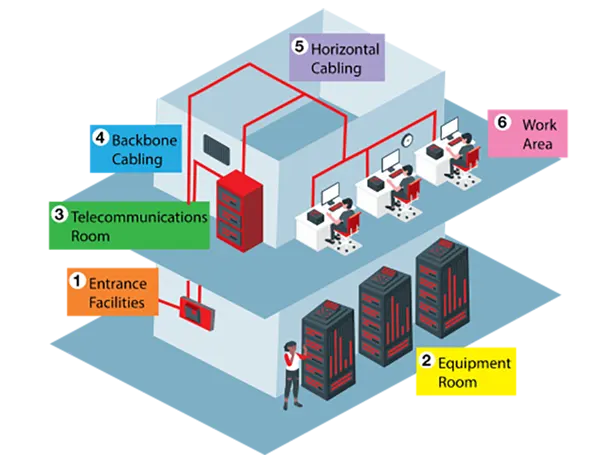
A structured cabling system is a standardized approach to building out communications infrastructure inside a facility. Instead of running random point-to-point cables whenever a new device shows up, the system is organized into defined components that work together.
That usually includes entrance facilities, equipment rooms, backbone cabling, horizontal cabling, telecommunications rooms, patch panels, racks, outlets, and the labeling that ties everything together.
In practical terms, this is what lets an office move a department without rewiring the whole floor. It’s what lets a warehouse add scanners, cameras, and access points without piling on temporary fixes.
It also gives the IT team a cleaner handoff between various active equipment, with the passive infrastructure supporting them. When every run is documented and terminated correctly, the network becomes much easier to manage.
The value here isn’t only neatness. It’s consistency. A structured layout gives you known cable paths, known termination points, and a better chance of isolating problems quickly.
That matters more than most teams realize, especially when the same environment supports users, guest Wi-Fi, voice, surveillance, and building systems.
Why Wireless, Cloud Apps, and Hybrid Work Still Depend on Cabling
One common assumption is that a stronger Wi-Fi equals less need for cabling, but in reality, better wireless systems often require even better cabling.
Every wireless access point still needs a wired connection back to the network, and many deployments also rely on Power over Ethernet.
Cisco notes that Power over Ethernet delivers DC power over copper Ethernet cabling, which is exactly why phones, cameras, sensors, and access points can be installed without separate local power supplies.
That becomes even more vital as workplaces spread across multiple floors, branches, and mixed-use spaces. Conference rooms need reliable video. Security systems need a stable backhaul.
Employees moving between desks still expect fast access to cloud tools. Even a company using mostly SaaS platforms still relies on local switches, wireless infrastructure, and physical connections to keep traffic moving cleanly inside the site.
This is also why businesses continue investing in professionally planned, structured cabling systems rather than treating cabling as a last-minute install. The cabling supports far more than desktop computers.
It supports the wireless layer, the security layer, the AV layer, and often the operating systems that people forget are riding on the same network until they stop working.
Fun Fact
Structured cabling doesn’t just transmit data; it also delivers electricity to devices like security cameras, Wi-Fi points, and more with PoE (Power over Ethernet), eliminating the need for a separate power outlet.
What Businesses Gain from Doing It Properly the First Time
The first benefit is simple troubleshooting. When a switch port, panel, cable run, and wall jack are all labeled clearly, your team doesn’t waste half the time tracing mystery lines above a ceiling tile.
The second benefit is flexibility. Adds, moves, and changes are routine in growing businesses, and structured layouts make those changes manageable instead of disruptive.
There’s a security and resilience angle too. Good infrastructure helps organizations maintain visibility into what is connected and where. CISA’s guidance on asset inventory stresses that visibility into assets and network structure supports risk management and operational resilience.
This principle applies beyond just industrial environments. If your physical networks are disorganized, your effectiveness and logical visibility suffer too.
Cost is another issue that gets misunderstood. Yes, a proper cabling project can look more expensive upfront than quick installs done as needed. But reactive work usually costs more over time because it creates repeat labor, inconsistent performance, and future rework.
A business that opens one new area this quarter and another next quarter can end up paying twice for the same mistakes: poor routing, underplanned rack space, or cable categories that no longer match performance requirements.
A good way to go about this is to think past the first install. Ask what the space will need in three years, not just next month.
That means checking whether there’s enough rack capacity, whether pathways allow for expansion, whether labeling standards are documented, and whether the design supports current and near-future device density.
Those details don’t feel glamorous, but they’re usually what separate a clean system from a constant maintenance headache.
Where Structured Cabling Makes the Biggest Difference
Offices are the obvious example, but warehouses, retail sites, schools, healthcare spaces, and multi-site businesses often see the biggest payoff.
Warehouses, for instance, may need cabling for scanners, cameras, access control, wireless coverage, and workstations spread across long distances. A patchwork setup might work for a while, but it becomes harder to maintain as operations scale.
In such settings, smart cabling methods reduce the chances of a rushed install, creating problems for multiple systems at once.
Multi-site teams have a different issue: consistency. If every site is built differently, IT support becomes slower and more expensive.
Standardized patching, labeling, and rack layouts make remote support easier because technicians and vendors aren’t starting from scratch at each location. That matters a lot for businesses trying to support branch growth without expanding the IT team at the same pace.
There are also day-two operational gains that don’t show up on a proposal sheet. Cleaner cable management improves airflow in equipment spaces.
Proper separation between data and electrical pathways reduces interference risk. Better documentation helps during audits, renovations, and vendor handoffs.
Even basic things like leaving extra things where it makes sens and keeping pathways open and accessible save many hours later.
If you’re planning a new fit-out, relocation, or network refresh, it helps to treat cabling as part of business continuity rather than a facilities afterthought. Review the number and type of connected devices you already have.
Then factor in conference rooms, cameras, access control, printers, wireless access points, and any equipment likely to be added during the lease term.
Too many businesses estimate based only on desks and laptops, then wonder why the infrastructure feels cramped six months after move-in.
The Takeaway
Businesses still need structured cabling because reliable operations still depend on reliable physical infrastructure. Cloud platforms, Wi-Fi, cameras, VoIP, and hybrid work tools all sit on top of it.
Get the cabling right, and everything above it gets easier to scale, support, and secure.
Frequently Asked Questions
What is structured cabling?
How does it help businesses?
Large businesses often contain many floors, systems, and devices, all of them having multiple cables connected to them. Smart cable management allows these wires to appear more organized, leading to efficient management of space.
Does cable management help the scalability of a company?
Yes, structured cabling ensures that when a firm decides to expand, it can easily do so without wondering which wire belongs to what device, and also save extra space by organizing them.
How do I know if my business requires proper cable management?
If the cables appear tangled, are not labeled correctly, and much of the time is wasted trying to figure out the right cable for a device, then it might be time to look into structured cabling solutions.
Related Posts

8 Best AI Presentation Makers for Business-Ready Slides
Making a presentation doesn’t just mean designing slides. It’s about defining a clear structure, using defined logic, useful visuals, and…

Queue Management Software Troubleshooting Guide: 8 Common Faults and Fixes
The long wait times and ineffective management of customer queues can have a significant impact on customer satisfaction and business…

How to Use Similarweb Website Traffic Data for Competitor Research
Competitor research without traffic data is guesswork. You can guess who your rivals are, guess how big they are, guess…

Choosing the Right Hosting Model for Scalable Digital Platforms
The performance of digital business is directly related to website speed, uptime, and scalability. Slow page performance has a negative…

How Data-Driven Performance Tools Are Transforming Employee Recognition in Tech Companies
“People work for money but go the extra mile for recognition, praise, and rewards.” — Dale Carnegie (Writer & Teacher)…

Why Businesses Struggle to Collect Reliable Data from the Web
Almost every company that depends on data runs into the same problem: although they can find the data they need,…

Why Financial Data Recovery Matters for Businesses
Financial data supports every part of a business, directly affecting cash flow, payroll, tax reports, audits, customer billing, and daily…

CMMC Compliance Is Coming for Manufacturers. Here Is What You Need to Do
“Cybersecurity is much more than a matter of IT.” — Stephane Nappo (Cybersecurity Professional) For manufacturers working within the defense…

How Data-Based Tools Influence Learning Performance
Learning has transformed in the modern age with the integration of new technologies to help students and professionals prosper in…