
Searching for a certain file type on one website or finding pages with a keyword in the title using Google dorks search operators.
Google Dorking Explained: Meaning, Uses, Examples, and Security Risks
 Saipansab Nadaf
Updated on: Mar 03, 2026
Table of Contents
- What is Google Dorking?
- How Does Google Dorking or Google Hacking Work?
- What are Some Common Uses of Google Dorking?
- Common Google Dorking Commands and Examples
- Is Google Hacking Legal?
- What are the Risks Associated with Google Dorking?
- How to Check If Your Website or Data is Exposed?
- How to Prevent Google Dorking Data Leaks?
- Final Thoughts
- Frequently Asked Questions
Most people think hackers need advanced tools to find security gaps. Sorry to break the news, but sometimes, Google is enough.
With the right search operators, anyone can uncover exposed files, login portals, sensitive documents, or misconfigured pages that are already indexed online. This is known as Google Dorking. Attackers use it to spot weakness. Smart security teams use it to audit their own systems.
In this guide, you will understand what Google Dorks really mean, how it works in practice, where the real risks lie, and how to proactively check and protect your business from accidental data exposure.
Key Takeaways
- Google Dorking is not hacking. It is an advanced search method for precision, and it only reveals what is already publicly indexed.
- Security teams use dorking to audit exposure. Attackers use it to find weak spots. Dorking in itself is neutral; the intent decides the outcome.
- Key search operators like site, filetype, intitle, and inurl turn basic search into targeted discovery and improve the research quality.
- The real risk is leaving sensitive files, backups, or admin panels publicly accessible.
What is Google Dorking?
Google Dorking (also known as Google Hacking) is the practice of using advanced search operators to make Google show very specific results. This could be a certain file type, a page title, a folder, or a section of a website.
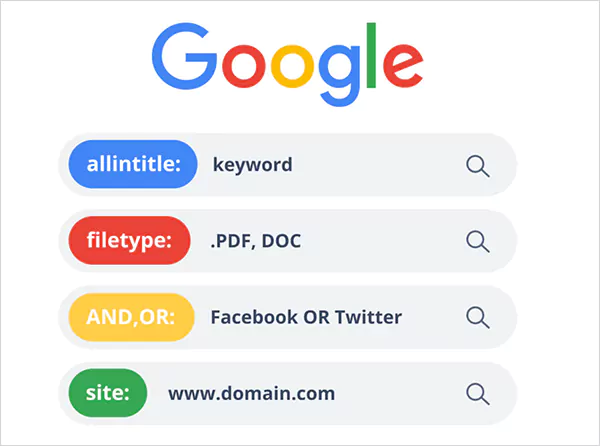
The idea is simple. Google indexes almost everything it can access. If something is publicly visible, it can be found with the right query. Dorking just helps you search with precision instead of guessing.
The term was popularized by security researcher Johnny Long in the early 2000s. He built a collection of search queries to help security testers find exposed files or weak configurations on websites. Over time, the same methods started being used for both ethical security testing and misuse.
How Does Google Dorking or Google Hacking Work?
How can we hack Google, and how does Dorking work? It works by combining keywords with special search operators (similar to what we do to retrieve archived emails on Gmail).
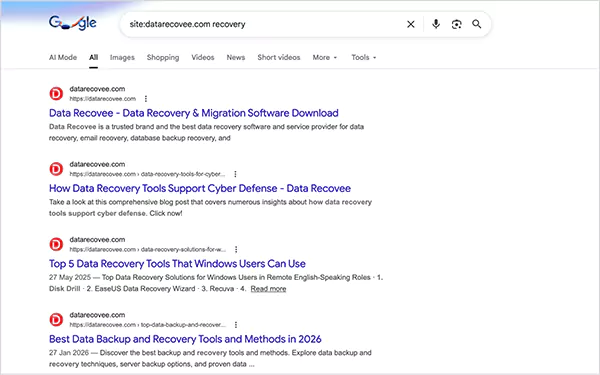
These operators narrow results so you only see what matches your exact intent. For example:
- “site:” limits results to one domain.
- “filetype:” shows a specific document format.
- “intitle:” searches page titles.
- “inurl:” searches with URLs.
You can stack these together. The more specific the query, the more filtered the result. This allows you to scan huge parts of the web and pull out very targeted information.
What are Some Common Uses of Google Dorking?
Google Dorking search is not just a hacker tool. It is widely used for research, audits, and competitive analysis when done ethically. Here’s why people dork Google:
- Security Testing
Security teams run targeted Google Dorks queries to find exposed login pages, open directories, or public files that should not be visible. This helps them fix issues before someone else finds them.
- Research and Data Discovery
You can locate public reports, datasets, or documents much faster. For example, searching for specific PDFs or spreadsheets on a topic. It has a great application in Data Aggregation.
- Competitive Insights
Brands or businesses use Google hacks to study competitor pricing pages, landing pages, or public documents. It is a quick way to map what competitors publish online.
- Website Audits
Companies use dorking to check if confidential files, backups, or internal documents are accidentally indexed by Google.
- OSINT and Investigations
Open-source intelligence teams use it to gather publicly available information across websites and document types.
However, there is a flip side. The same searches can reveal exposed credentials, open folders, or unsecured systems to attackers or unethical users.
Common Google Dorking Commands and Examples
Here are some of the most useful search operators people use when crafting Google dorks, along with simple examples. These can help you turn basic Google searches into powerful and targeted discovery tools.
| Operator | What It Does | Example Query | Why It’s Useful |
| site: | Limits results to a specific domain | site:example.com pricing | Helps audit what pages of a domain are indexed or analyze competitors’ content |
| filetype: | Filters results by document type | filetype:pdf annual report | Find reports, datasets, whitepapers, or exposed documents |
| inurl: | Searches for keywords inside URLs | inurl:admin | Identifies login panels, dashboards, or structured URL patterns |
| intitle: | Searches for words in the page title | intitle:”index of” | Useful for discovering directory listings or specific page categories |
| intext: | Finds keywords inside page content | intext:”survey results” | Helps locate content-heavy pages or specific mentions within articles |
| cache: | Shows Google’s cached version of a page | cache:example.com | Useful when a page is down or recently modified |
| link: | Finds pages linking to a specific URL | link:example.com | Helpful for backlink research and authority analysis |
These commands are the building blocks of precise web discovery and are important to learn how to hack Google ethically. Most people use Google at a surface level, but professionals use operators.
Pro Tip for Better Precision
Google Dorking search operators become powerful when combined.
Example: site:example.com filetype:pdf “financial statement”
This narrows the results to PDF files of financial statements only from that domain.
Is Google Hacking Legal?
Yes, Google Dorking is legal. It only pulls information that is already publicly indexed by Google. Anyone using the search engine could technically find the same data.
Security professionals use these techniques to test websites they own or are authorized to audit. Where it becomes illegal is when someone uses those results to:
- Access restricted systems.
- Download private data without permission.
- Bypass login protections.
- Exploit vulnerabilities.
Then it crosses the line and becomes a criminal activity under cybercrime and privacy laws. In short, searching public data is legal. However, accessing protected systems without permission is not.
What are the Risks Associated with Google Dorking?
Google Hacking in itself is passive in nature. It does not hack anything. The risk comes from what it can reveal. Many websites accidentally expose admin panels, login pages, backup files, spreadsheets, databases, test environments, and other pages. Attackers can use this information to:
- Map targets
- Launch phishing campaigns
- Identify weak software versions
- Collect exposed credentials
- Plan deeper attacks
Even if no breach happens during the search, exposed information can later lead to identity theft, financial damage, or compliance penalties. And something most businesses underestimate is reputation damage. It often costs more than the technical breach itself.
The real issue is not dorking, but the poor configuration and weak access control.
How to Check If Your Website or Data is Exposed?
Start with your own assets only. Never test what you do not own. So, here is a clean audit process you can follow to see what is exposed to Google Dorking:
Step 1: Use Google Search Console and add your domain. Check which pages are indexed, and use the URL inspection tool to see what Google sees.
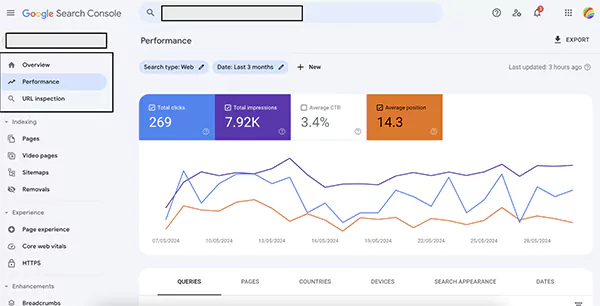
Step 2: Search “site:yourdomain.com”, and look for old subdomains, test folders, or any strange URLs. If you see something unexpected, investigate immediately.
Step 3: Check indexed file types and look for documents, backups, or test pages that were never meant to be public.
Step 4: Review your cloud storage and audit permissions carefully.
Step 5: Monitor logs and alerts, and watch for unusual crawling, traffic spikes to sensitive URLs, and repeated clicks on login pages.
Your end goal is simple: know exactly what search engines can see about your website infrastructure.
How to Prevent Google Dorking Data Leaks?
See, you cannot stop Google from crawling the web. But you can control what it finds. Here’s how professionals reduce the misuse of Google Dorking:
- Use Proper Access Controls: If something is private, protect it with authentication. Do not rely on the robots.txt file to instruct crawlers. That file is a suggestion, not protection.
- Use Noindex Tag Where Needed: Add noindex meta tags or headers that should not appear in search results.
- Set Correct File Permissions: Limit access to sensitive folders, backups, and configuration files.
- Audit Regularly: Run monthly exposure checks, review deployments, and rotate exposed credentials immediately.
- Remove Sensitive Files Fast: If something gets indexed, remove public access, request de-indexing, and change password or API keys immediately.
Most data leaks are not sophisticated hacks. They happen because someone lets something public by mistake. So, follow these habits to maximize your security efforts.
Final Thoughts
I want to reassure you that Google Dorking is not magic. It simply reveals what is already public. That is what makes it powerful and risky at the same time.
For security teams, it is a discovery tool. For attackers, it is a shortcut. For website owners, it is a reminder. If your data is public, search engines will find it eventually. I mean, that’s their main job.
So, the real takeaway is that visibility without control is risky. Treat search visibility as part of your security surface, not just SEO.
Frequently Asked Questions
What are some examples of Google Dorks?
What are some common Google Dorking search commands?
“site:”, “filetype:”, “inurl:”, “intitle:”, and “intext:” are some common commands. They help in narrowing large search results into targeted information.
What are the best Google Dorking tools?
Exploit-DB Google Hacking Database (GHDB), DorkGPT, and Mitaka extension are popular in dorking. Security teams pair Google with OSINT or monitoring tools to make their audit more effective and faster.
What is DorkGPT?
DorkGPT is an AI-based tool that turns simple prompts into advanced search queries of Google dorks.
Can Google detect misuse of dorking?
Yes, search engines can flag unusual patterns like automated scraping or heavy query activity. Normal manual searches are fine, but large-scale or abusive behavior can trigger restrictions.
Related Posts
Recovering Lost YouTube Videos from a Corrupted Drive
Losing your videos strikes fear into any YouTuber. One instant everything runs smoothly—crisp footage, clean sound, visuals locked in place—the…
How to Fix Windows Update Error? 10 Reliable Fixes
Windows Update keeps your Windows system secure, fast, and packed with the latest features. But let’s be honest, sometimes Windows…
How to Recover Data on Mac
People who work on a Mac almost every day often lose data, whether on purpose or by accident. And it…
Making Games Accessible Worldwide on Your Chromebook
Historically seen as a device for educational purposes, Chromebooks have become a global hub for gaming due to their use…
Best Ways To Convert Email Files (EML) To Images
An EML file is a saved email message. It contains the full content of the email, including the text, sender…
The Ultimate Guide to Becoming a Data Scientist
Whether you are someone choosing a career, switching it, or still deciding on what to pursue, a thorough knowledge of…

Practical Benefits Of Authentication Employee Time Clock Systems
Accurate attendance tracking plays a critical role in workforce management. Authentication-based employee time clock systems help organizations verify employee identity…

Top 7 Technology Consultant Services Every Data-Driven Business Needs (2026)
Data loss isn’t just an IT inconvenience. It is a threat to the survival of a business. Research shows that…

What is Hardware Accelerated GPU Scheduling and How to Enable It? (Windows 10 &…
Hardware accelerated GPU Scheduling allows the user’s graphics card to run its own memory management and task queue, rather than…