
These days, you can send a fax from your computer, smartphone, or tablet with the help of various online fax service apps and websites.
How Can You Fax From a Computer in 2026? [Quick & Easy]
 Mahima Dave
Updated on: May 20, 2025
Surprisingly, implementing faxing in your business is still beneficial, especially where security matters. The Fax Services Market is expected to reach 4.48 billion US Dollars by 2030 at a CAGR of 5.17%.
“How do I send a fax from my computer?” is one of the top queries on the internet. You don’t need an old-school fax machine to send a fax anymore. These days, online fax services make the process simple and quick.
Through this space, I will try to explain – How can you fax from a computer easily in 2026? Plus, we will also cover some of the popular and easy-to-use apps and websites that bring this old method into the digital age.
Can I Send a Fax From My Computer?
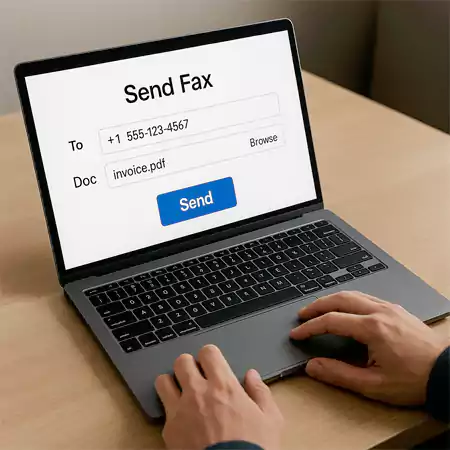
Yes, it is totally possible to fax documents right from your computer; no bulky machine or phone line is required. You can use various online fax services that allow you to fax without any hassle.
Online services work through your browser or email. You just need to upload your file, enter the recipient’s fax number, and hit send. Some solutions even let you fax directly from your email accounts.
If you use a Windows device, the Windows Fax and Scan app can also do the job, but it does need a fax modem and a phone line to work. Moving on, let’s see how to fax using computers (step-by-step).
How Can You Fax From a Computer?
To demonstrate and help you understand better, I will take the example of eFax, a popular online fax service. Let’s take a look at how to send a fax from a computer using eFax:
1. Start by signing up on the eFax website.
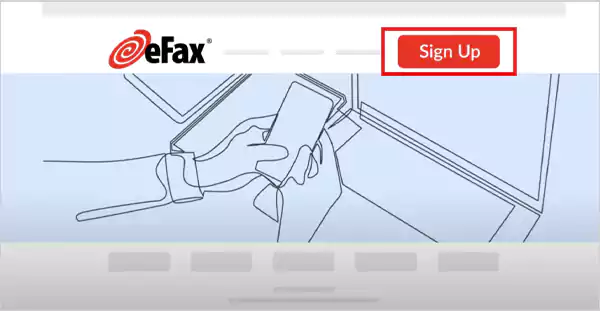
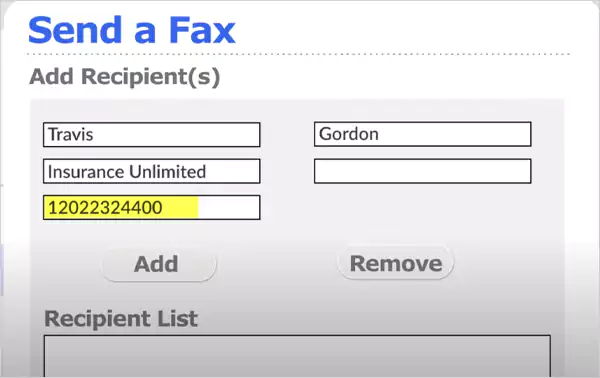
2. Once you are signed up, simply log in to your account, click on ‘Send faxes’, and enter the recipient’s details. You can also add a short message if you want.
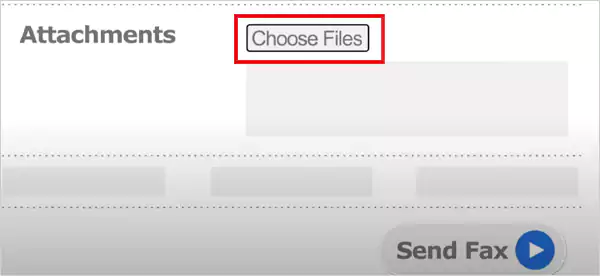
4. Now, you can upload up to 10 files by clicking on ‘Choose File. Depending on the service provider, you will get support for different file formats like PDFs, JPEGs, etc.
5. Finally, click on Send Fax, and your fax will be sent immediately.
That’s it! Isn’t it quick and easy? You don’t need to go outside to find a fax machine or deal with modems, drivers, and phone lines. It is convenient, safe, and saves a lot of time.
How Can I Fax From My Computer Using Email?
Many service providers also allow you to send a fax straight from your computer using email. Plus, it works on a phone and tablet, too. Supercool, right? Here’s how to fax from a computer using your email (eFax version) :
1. While composing a new email, type the fax number followed by @efaxsend.com in the ‘To’ field. For example: 11235551234@efaxsend.com
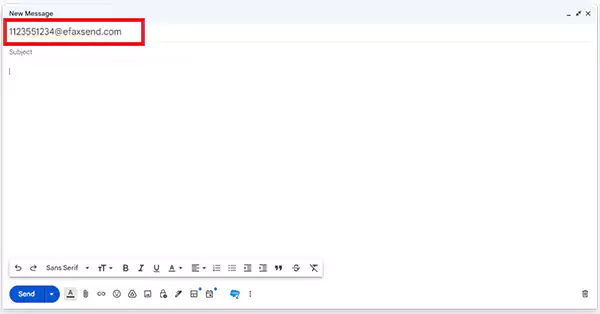
2. Now, this step is optional, but you can add a subject or message. This acts as a cover page when your fax is received.
3. Next, attach the files you want to fax, and click on Send.

Done! Your email will be delivered as a fax to the recipient. I hope these two methods have successfully addressed your question – how do I fax from my computer?
5 Best Software to Send a Fax From Your Computer in 2026
Now that you know how to fax using PCs, let’s take a look at some of the best online options available in the market:
1. Dropbox Fax: It is an easy-to-use service with a built-in e-signature. You can send 5 pages free for life; after that, it costs 99 cents up to 10 pages. Its paid plans start at $9.99 per month and include 300 pages.
2. Fax.Plus: It is an affordable and easy-to-use solution. You can send up to 10 pages for free. However, you need to have a paid plan to receive faxes. Plans start at $6.99 per month, which offers 200 pages.
3. eFax: We have already talked about eFax while explaining to you how to fax from your computer. It is a secure and reliable option trusted by many businesses. It works on all devices and is ideal for those who need advanced features.
4. FaxZero: It is a great free option for occasional users. You can send up to 5 faxes per day, with a limit of 3 pages each. The only downside is that it does not support receiving faxes.
5. RingCentral: It is best suited for high-volume faxing. For $22.99 per month, you get up to 3000 pages. It offers advanced tools, works on all major platforms, and supports HIPAA compliance.
Before coming down to one, consider how often you send or receive faxes, the level of security you need, and any additional requirements. Make sure the service and its plan fit your budget and workflow.
Final Thoughts
Faxing has come a long way; you no longer need big machines or deal with messy paper jams. I have tried to cover the best possible ways to learn how to fax via computer systems.
With tools like online services and email faxing, you can handle it all with ease. If this article helped you understand how can you fax from a computer, please share it with your friends and family who use fax frequently.
Frequently Asked Questions
How can I send a fax from my computer?
Can I send a fax through Gmail?
Yes, some fax service providers allow you to fax through Gmail or any other email account you have.
Can I fax with Microsoft 365?
You can integrate third-party fax services to send faxes directly from your Microsoft 365 applications, like Outlook, Word, etc.
Can I fax from my computer for free?
Yes, you can use the free online providers to fax someone. However, you might face some limitations on the number of pages you get to fax per month.
Related Posts

8 Best AI Presentation Makers for Business-Ready Slides
Making a presentation doesn’t just mean designing slides. It’s about defining a clear structure, using defined logic, useful visuals, and…

Queue Management Software Troubleshooting Guide: 8 Common Faults and Fixes
The long wait times and ineffective management of customer queues can have a significant impact on customer satisfaction and business…

How to Use Similarweb Website Traffic Data for Competitor Research
Competitor research without traffic data is guesswork. You can guess who your rivals are, guess how big they are, guess…

Choosing the Right Hosting Model for Scalable Digital Platforms
The performance of digital business is directly related to website speed, uptime, and scalability. Slow page performance has a negative…

How Data-Driven Performance Tools Are Transforming Employee Recognition in Tech Companies
“People work for money but go the extra mile for recognition, praise, and rewards.” — Dale Carnegie (Writer & Teacher)…

Why Businesses Struggle to Collect Reliable Data from the Web
Almost every company that depends on data runs into the same problem: although they can find the data they need,…

Why Financial Data Recovery Matters for Businesses
Financial data supports every part of a business, directly affecting cash flow, payroll, tax reports, audits, customer billing, and daily…

CMMC Compliance Is Coming for Manufacturers. Here Is What You Need to Do
“Cybersecurity is much more than a matter of IT.” — Stephane Nappo (Cybersecurity Professional) For manufacturers working within the defense…

How Data-Based Tools Influence Learning Performance
Learning has transformed in the modern age with the integration of new technologies to help students and professionals prosper in…