
Yes, if you have enabled the option of Phone & FaceTime in your iCloud backup settings, your voicemails will be stored in iCloud.
How to Retrieve Deleted Voicemail on iPhone: A Quick Recovery Guide
 Mahima Dave
Updated on: Dec 17, 2025
Table of Contents
- What Happens When You Delete a Voicemail on an iPhone?
- How to Retrieve Deleted Voicemail on iPhone from the Deleted Voicemails Folder?
- How to Recover Deleted Voicemail on iPhone through iCloud?
- How to Recover Voicemails on iPhone with iTunes/Finder Backup?
- How to Restore Deleted Voicemails on iPhone Using Third-Party Recovery Software?
- How to Retrieve a Voicemail on iPhone by Contacting Your Carrier?
- Best Practices to Protect Future Voicemail Messages
- Conclusion
- Frequently Asked Questions
A deleted voicemail on an iPhone can catch you off guard. One tap, one swipe, and suddenly a message you meant to save, a voice you wanted to replay, disappears. So, many people online ask me, “Can you recover deleted voicemails on iPhone?”
Yes, they are often recoverable, and I am writing this blog to help you get your voicemails back. You will learn how to retrieve deleted voicemail on iPhone, what you can try, when to check backups, and what to do if the usual tricks fail.
Let’s guide that message back to where it belongs.
Quick Glance (If You’re in a Hurry)
- Start the recovery process by looking at the Deleted Voicemails folder in the Phone app.
- Restore from iCloud or iTunes/Finder backup only if you backed up your device before deletion.
- Use third-party recovery tools when backups are not available. However, you need to act fast before the data is overwritten.
- As a last resort, check with your network carrier.
What Happens When You Delete a Voicemail on an iPhone?
Before you start to recover, you should know that deleting a voicemail does not always mean it is gone forever. Think of it like moving a file to a recycle bin. You still have a short window to get it back.
So, if you are on iOS 16 or newer, your deleted voicemails shift to the Deleted Voicemail folder. On older iOS versions, deletion is usually final, and you don’t get this safety net.
In simple terms, if you catch the deletion early, you can retrieve deleted old voice messages on iPhones in seconds. If not, you will have to explore backups or third-party data recovery software for iPhones.
How to Retrieve Deleted Voicemail on iPhone from the Deleted Voicemails Folder?
If you deleted a voicemail by accident, this is the quickest fix, and it works in seconds if you act on time. Here’s how to retrieve voice messages on iPhone:
- Open Phone and go to Voicemail.
- Here, look for the Deleted Voicemails or Deleted Messages option and click on it.

- Now, select the voicemail you want to recover.
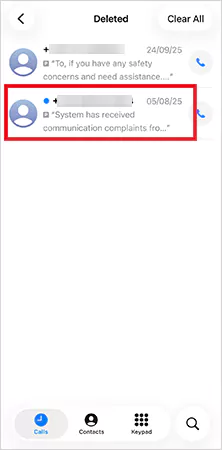
- Finally, just tap on the Recover or Undelete button.

The message jumps right back to your main voicemail inbox. If you don’t see the desired voicemail, it must be permanently deleted from the folder. Don’t worry, I will explain various reliable ways to recover from an emptied trash.
How to Recover Deleted Voicemail on iPhone through iCloud?
If you were using iCloud backup before the voicemail was deleted, you can restore your phone to an older version where the voice message still exists.
However, this works only when you back up before deleting the message and you are okay with resetting your entire device. Let’s see how to retrieve old voice messages on iPhone using iCloud:
- Open Settings on your iPhone.
- Go to General > Transfer or Reset iPhone.
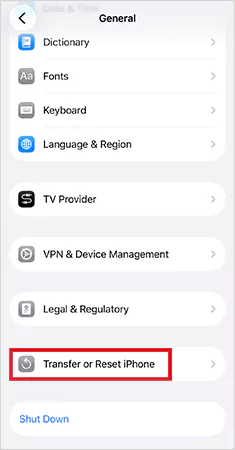
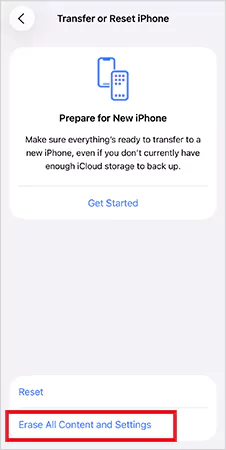
- Now, tap on Erase All Content and Settings.
- When your phone restarts, choose the Restore from iCloud Backup option.
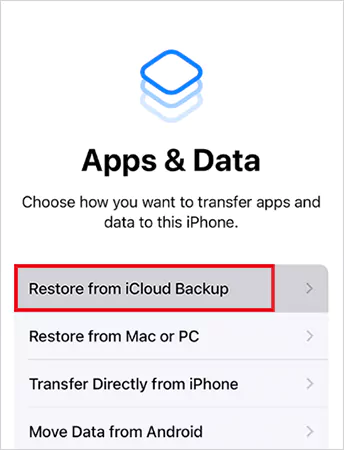
- Pick a backup created before the voicemail disappeared.
After setup, your deleted voicemail should reappear, along with everything else from that backup.
How to Recover Voicemails on iPhone with iTunes/Finder Backup?
You may already have a copy of the missing voicemail saved inside the local backup if you have ever backed up your iPhone to a computer. However, you need to have access to that computer.
Here’s how to retrieve voicemail messages on iPhone using iTunes or Finder backup:
- Connect your iPhone to your computer.
- Open iTunes (Windows/macOS Mojave and earlier) or Finder (macOS Catalina and later).
- Now, select your iPhone and click on Restore Backup.
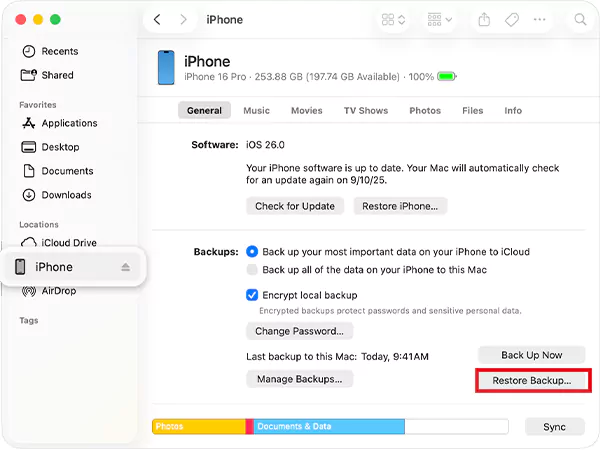
- Choose a version that was backed up before the voicemail deletion.
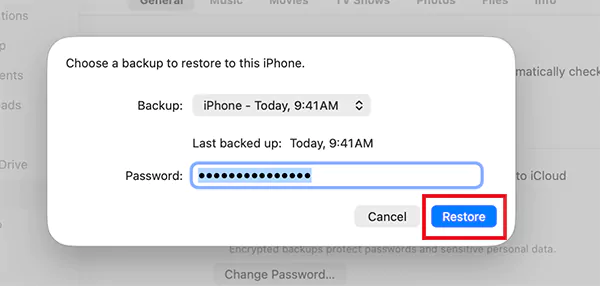
After the restoration is complete, you will get back all the data that existed at the time of that backup, including the voicemail. But keep in mind, it has the same limitation as iCloud because it rolls your entire device back to an older state.
How to Restore Deleted Voicemails on iPhone Using Third-Party Recovery Software?
How can you retrieve deleted voicemails on iPhones without backup? Even when a voicemail is deleted permanently, it is not wiped instantly from your iPhone. The file usually remains hidden in the phone’s storage until something new replaces it.
That is where data recovery tools come in. They can scan the storage for files that still exist in the background. If your iPhone has not overwritten the deleted voicemail yet, these apps can often bring it back.
Look for tools like Disk Drill, Stellar, and EaseUS. They support voicemail audio formats. Let’s quickly see how to retrieve voicemail on iPhone from Disk Drill:
- Install Disk Drill on your computer.
- Connect your unlocked phone and open the app.
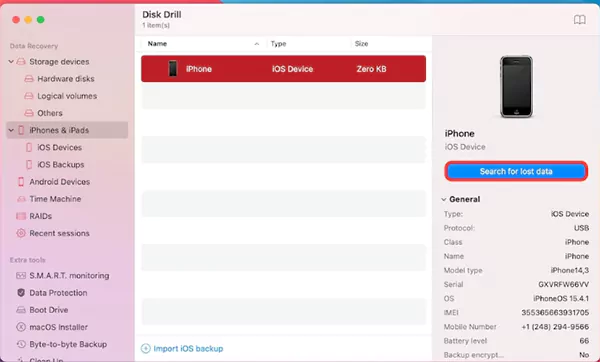
- From the sidebar, choose iPhones and iPads and select your device or internal storage.
- Now, click on Search for lost data.
- Review the audio files after the scan. You can also use the filters to preview the files you want.
- Next, select the voicemail file you want to restore.
- Click on Recover and choose a folder to save it.
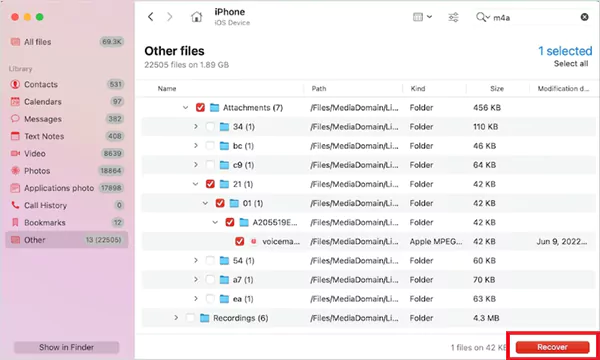
This approach is powerful when the voicemail is gone from the Deleted Messages folder, there is no useful backup available, and you want a chance to retrieve just the missing file without resetting your phone.
How to Retrieve a Voicemail on iPhone by Contacting Your Carrier?
How do I retrieve deleted voicemail on iPhone if recovery apps and backup don’t help? Well, it is not the most ideal scenario, but your network carrier becomes the next best option.
Voicemails also live on your carrier’s server. So if they have not permanently cleared the message, they might still be able to retrieve it from their system. Some carriers keep deleted voicemails for a short window, while others clear them immediately.
Call the customer support of your carrier and clearly mention what you are looking for. You may need to share details like, caller number, date, approximate time, and any other helpful details. In some cases, this method can help you get back voicemails and retrieve deleted messages on an iPhone.
Best Practices to Protect Future Voicemail Messages
Now that you know how to retrieve deleted voicemail on iPhone, you should also incorporate a few simple habits. These practices can save you from losing important voicemails again:
- Keep regular local backups and cloud services for automatic backups.
- Save important voicemails individually on the Files app. This stores the voicemail as a separate audio file you can access anytime.
- Keep enough storage on your device. Otherwise, new voicemails might fail to save.
- If you ever need to recover voicemails, act as soon as possible to increase your chances of success.
These small steps ensure that your voicemails stay safe even if you switch devices or update iOS.
Conclusion
YES! You can retrieve deleted voicemails on iPhones using the methods explained in this blog. The sooner you check your deleted voicemails, use backups, or try recovery tools, the better your chances.
Some voicemails can’t be saved once the system or carrier deletes them, but most accidental deletions can be reversed if you use the right method at the right time.
This guide covers everything you need to know. So if you found this helpful, please share it with someone who needs to recover important voicemails.
Frequently Asked Questions
Are iPhone voicemails stored in iCloud?
Can you retrieve deleted voice messages from iPhones?
Yes, you can restore them if you act fast, and the existing data is not replaced by overwriting.
How do I recover deleted voicemails on my iPhone?
Try checking the Deleted Voicemails folder of your Phone app. You can also recover using iCloud, iTunes/Finder, or third-party recovery tools.
Where are iPhone voicemails stored?
Voicemails are stored on your network carrier’s server and your iPhone’s Phone app.
How do I permanently delete voicemails on iPhone?
To delete them permanently, you need to first delete them from the main space and then clear them from the Deleted Voicemails folder.
Related Posts
Recovering Lost YouTube Videos from a Corrupted Drive
Losing your videos strikes fear into any YouTuber. One instant everything runs smoothly—crisp footage, clean sound, visuals locked in place—the…
How to Fix Windows Update Error? 10 Reliable Fixes
Windows Update keeps your Windows system secure, fast, and packed with the latest features. But let’s be honest, sometimes Windows…
How to Recover Data on Mac
People who work on a Mac almost every day often lose data, whether on purpose or by accident. And it…
Making Games Accessible Worldwide on Your Chromebook
Historically seen as a device for educational purposes, Chromebooks have become a global hub for gaming due to their use…
Best Ways To Convert Email Files (EML) To Images
An EML file is a saved email message. It contains the full content of the email, including the text, sender…
The Ultimate Guide to Becoming a Data Scientist
Whether you are someone choosing a career, switching it, or still deciding on what to pursue, a thorough knowledge of…

Practical Benefits Of Authentication Employee Time Clock Systems
Accurate attendance tracking plays a critical role in workforce management. Authentication-based employee time clock systems help organizations verify employee identity…

Top 7 Technology Consultant Services Every Data-Driven Business Needs (2026)
Data loss isn’t just an IT inconvenience. It is a threat to the survival of a business. Research shows that…

What is Hardware Accelerated GPU Scheduling and How to Enable It? (Windows 10 &…
Hardware accelerated GPU Scheduling allows the user’s graphics card to run its own memory management and task queue, rather than…