
Microsoft 365 data migration is the process of transferring business data from other platforms to the cloud.
Microsoft 365 Office Deployment and Data Migration: A Seamless and Secure Transition
 Mahima Dave
Updated on: Jul 22, 2025
Table of Contents
- Why Data Migration Is the Backbone of Office Deployment
- Preparing for Deployment: Assessing Data Readiness
- Choosing the Right Deployment Tool with Built-In Migration Features
- Secure Transfer Protocols for Enterprise-Level Data Protection
- Reducing Downtime Through Automated Migration and Rollback Options
- Cloud-Based Deployment: Streamlining Data Transfer and Collaboration
- Post-Deployment Data Validation and Recovery Readiness
- Frequently Asked Questions
Thinking about moving your company to Microsoft 365? You’re definitely not the only one. Every day, more businesses are making the leap to take advantage of its cloud features and productivity tools. But here’s the thing – if you skip the planning, what should be a simple upgrade can spiral out of control fast.
Data migration is the real backbone of any office deployment tool. You’ve got emails, files, calendars, contacts, critical stuff you can’t afford to lose. Shifting it all takes careful planning, a solid strategy, and focus on security. Mess up even a little, and you risk losing data, dealing with downtime, or running into compliance headaches.
The good news? With the right tools and a smart approach, your Microsoft 365 rollout can go off without a hitch. Want to make sure you nail it? Stick around. We’ll break down what you need to know.
Key Takeaways
- Data migration is the foundation of a successful Microsoft 365 deployment, ensuring business continuity and data integrity.
- Choosing deployment tools with built-in migration features simplifies the process and reduces risk.
- Automated migration and rollback options minimize downtime and safeguard against errors.
Why Data Migration Is the Backbone of Office Deployment
Let’s be real, rolling out Microsoft 265 isn’t just another software upgrade. It’s making sure every bit of your old data lands safely in the new setup, without causing chaos along the way. That’s why data migration isn’t just another step; it’s the backbone of the whole thing.
Picture it: your emails, shared folders, spreadsheets, years of files. This stuff is your company’s memory. Lose even a little, and suddenly productivity drops, customers get frustrated, and people can’t make decisions. But nail the migration, and everything keeps humming along, your data stays safe, and you’re off to a strong start.
Preparing for Deployment: Assessing Data Readiness
First, take a good look at your files, emails, and databases. Figure out what’s old or unnecessary; you don’t need to bring everything over. Watch out for files that won’t play nice with Microsoft 365, like strange formats that just won’t work there. It’s also smart to check how much data you actually have, so you know how long the migration will take and how much space you’ll need.
Yeah, this part isn’t exactly thrilling, but it saves you headaches later. If you want a smooth move, start with clean data.
PRO TIP
Before you begin migrating, run a “permission audit.” Even perfectly transferred data can break workflows if users lose access or gain access they shouldn’t have. A quick audit saves hours of post-deployment chaos.
Choosing the Right Deployment Tool with Built-In Migration Features
There are tons of deployment tools out there, so picking the right one can feel overwhelming. The trick is to find one with built-in migration features. Something that lets you keep everything in one place instead of bouncing between platforms.
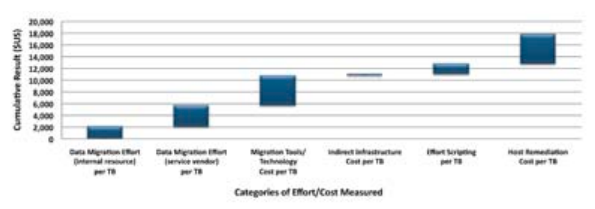
The overall cost of enterprise storage migration exceeds $15,000/TB.
Microsoft has its own tools for this, like the Microsoft 365 Admin Center and the SharePoint Migration tool. Both make things a whole lot easier. If you need something more advanced, third-party tools like BitTitan MigrationWiz and AvePoint have you covered for those tougher migrations.
Secure Transfer Protocols for Enterprise-Level Data Protection
Don’t treat security like an afterthought during data migration. You’re moving some pretty sensitive stuff from one place to another. If you don’t protect it, you’re basically inviting trouble.
That is why secure transfer protocols matter so much; big companies depend on encryption standards like TLS and SSL to keep data safe while it’s on the move. On top of that, they use things like multi-factor authentication and strict access controls, so only the right people get near the data during migration.
Reducing Downtime Through Automated Migration and Rollback Options
Every minute your systems are down, you’re losing money and momentum. So, when you roll out Microsoft 265, you really need to keep things running smoothly.
Automated migration tools help a lot here. They move your data in the background, usually when things are quiet, so your team can keep working without getting interrupted. You barely notice it’s happening.
Of course, not everything always goes as planned. That’s why rollback features matter. If something breaks, a good tool lets you jump right back to where you started. With both automation and rollback in your corner, you can switch over the Microsoft 365 without missing a beat, even if you hit a snag along the way.
Cloud-Based Deployment: Streamlining Data Transfer and Collaboration
Microsoft 365 moves your data straight to secure cloud servers, so you can reach everything from anywhere, on any device. Many teams also complement their workflows with lightweight cloud-ready office suites such as WPS.com, especially during transition phases. No more waiting around, your team jumps right into SharePoint, OneDrive, and Teams without dealing with local installs.
IT teams get a break too, since there’s no need for pricey hardware or constant upkeep. Honestly, it’s a smooth switch: your data’s ready, the tools are ready, and everyone can get to work right away.
Post-Deployment Data Validation and Recovery Readiness
The migration is done, but there’s still work to do. Don’t skip post-deployment validation; it’s a step people tend to forget, even though it really matters. This is where you double-check that all your data made the trip safety and works the way it should in its new home.
Frequently Asked Questions
What is Microsoft 365data migration?
How long does a Microsoft 365 deployment take?
The timeline varies depending on the size of the enterprise or volume of the data. It may take a few weeks or days.
What tools are recommended for Microsoft 365 migration?
It offers native tools like the admin center, SharePoint migration tool, etc.
Related Posts

8 Best AI Presentation Makers for Business-Ready Slides
Making a presentation doesn’t just mean designing slides. It’s about defining a clear structure, using defined logic, useful visuals, and…

Queue Management Software Troubleshooting Guide: 8 Common Faults and Fixes
The long wait times and ineffective management of customer queues can have a significant impact on customer satisfaction and business…

How to Use Similarweb Website Traffic Data for Competitor Research
Competitor research without traffic data is guesswork. You can guess who your rivals are, guess how big they are, guess…

Choosing the Right Hosting Model for Scalable Digital Platforms
The performance of digital business is directly related to website speed, uptime, and scalability. Slow page performance has a negative…

How Data-Driven Performance Tools Are Transforming Employee Recognition in Tech Companies
“People work for money but go the extra mile for recognition, praise, and rewards.” — Dale Carnegie (Writer & Teacher)…

Why Businesses Struggle to Collect Reliable Data from the Web
Almost every company that depends on data runs into the same problem: although they can find the data they need,…

Why Financial Data Recovery Matters for Businesses
Financial data supports every part of a business, directly affecting cash flow, payroll, tax reports, audits, customer billing, and daily…

CMMC Compliance Is Coming for Manufacturers. Here Is What You Need to Do
“Cybersecurity is much more than a matter of IT.” — Stephane Nappo (Cybersecurity Professional) For manufacturers working within the defense…

How Data-Based Tools Influence Learning Performance
Learning has transformed in the modern age with the integration of new technologies to help students and professionals prosper in…