One of the major shifts the COVID-19 pandemic brought was online education. Though it wasn’t a new trend back then, that was the time when everyone accepted this mode of learning with open arms. The pandemic is over, but the changes it brought are still very useful for some.
Today, about 49% of students globally trust this method of learning. And why wouldn’t they? It brought convenience and flexibility. Students can now learn from anywhere, assignments can be submitted instantly, and resources are available 24/7.
But here comes the scary part: education is also one of the most targeted industries by cyberattackers. This is why having a structured framework to prevent data loss during online learning becomes a necessity.
Key Takeaways
Data loss can happen to anyone, even careful students.
Regular backups are one of the simplest ways to protect your work.
Strong passwords and software updates prevent many security risks.
Cloud storage makes accessing files from anywhere easier.
A few smart habits today can save hours of frustration later.
Understanding the Risks of Data Loss
The first step to building defense is understanding what you are dealing with and the risks associated with it. Data loss not only means losing files, assignments, research notes, etc. For students, it can also look like:
Accidental deletion of files
Laptop or device failure
Malware or ransomware attacks
Lost or stolen devices
Corrupted files during saving or transfer
Apart from this, students might also lose their data when browsing for academic help and share their data with not-so-trusted third-party apps that may use it to fulfil malicious intent. So make sure to only visit trustworthy apps when searching for help or summarize paragraphs online.
Why Data Backup is Essential in E‑Learning
Backing up data is one of the simplest yet most effective data loss prevention tips for students. It simply means keeping copies of important work in more than one place. So even if one copy is compromised, you’ll have the other one. And, in this era, when everything is online, losing even a single PDF can ruin your academic record and disrupt everything.
Having a good backup system in place will ensure that your assignments are recoverable even if a device fails. Research notes and drafts remain accessible. Work can continue without having to start from scratch.
In the simplest terms, backup systems act as a safety net for your academic work.
Backup Solutions Every Student Should Know
As mentioned before, the easiest way to prevent data loss is to maintain multiple backups of important files. For that, you can:
Cloud Storage Services
Platforms like Google Drive, OneDrive, and Dropbox remain students’ favorites as they allow them to store files online and access them on any device. They also offer automatic synchronization, which means changes to the doc will be saved continuously.
Local Backups on External Drives
External drives are a reliable physical backup option. By periodically copying important files to these devices, students can build a safe online backup that can come in handy when there is no internet access.
However, they must be handled with care and prevented from falling into the wrong hands.
Automated Backup Tools
Automated backup tools regularly copy files without requiring manual effort, and keep updated versions of all the files. This reduces the risk of forgetting to back up. An extremely useful tool for busy students who can’t keep track of backups on their own.
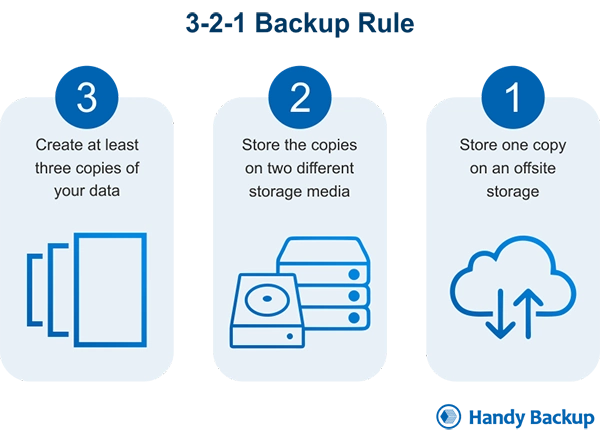
INTRIGUING INSIGHTS The 3-2-1 Backup Rule states that you should keep at least three copies of your important data, store them on two different media types, and keep one copy off-site.
Staying Safe Beyond Backups
Yes, backups are essential, but not the only solution you need to tackle the advanced cyber criminals today.
Use Robust Passwords and Authentication
Keeping strong passwords is another simple and effective way of securing your digital infrastructure. It protects your accounts from unauthorized access. Always create a password that is a combination of letters, numbers, and symbols; this makes it harder to crack.
Also, wherever possible, enable two-factor authentication (2FA) to add an additional layer f security. This can save you even if your password is compromised.
PRO TIP: Never use common information like your date of birth or mobile number as your passcode, and do not use the same password for multiple accounts, as this makes it easier for attackers to hack into your systems.
Keep Software Up to Date
Software updates often come with better security fixes and performance improvements. Relying on outdated systems can turn out to be an expensive mistake, as they can leave devices vulnerable to malware or compatibility issues, and may lead to data corruption.
Avoid Unsecured Networks
Free Wi-Fi networks can look inviting, but they are equally risky. So, if you really need to use any public network, be it in cafes, airports, or libraries, do not forget to take precautionary measures and avoid accessing sensitive accounts or uploading critical assignments.
Recognize and Avoid Phishing Attempts
Students often become easy targets for attackers. Beware of phishing emails that might use to trick you into revealing login credentials or downloading malicious files. Be cautious of messages that request account verification, contain suspicious attachments, and ask for passwords or personal details. Always verify the sender before opening the files sent by them.
Secure Your Devices
Your device plays a huge part in all this, and forgetting to secure it would be nothing but a foolish mistake. So, enable device passwords or biometric locks, install antivirus protection, and use secure browsers and trusted applications.
Be Cautious With Third-Party Apps
Some educational tools require students to connect their accounts with third-party apps. Be very careful in such cases. Before installing or authorizing third-party apps, verify the developer’s credibility and review permissions cautiously.
Limit unnecessary app access to protect both your personal data and coursework.
Educate and Advocate for Better Systems
Students play a major role in encouraging better digital practices with educational institutions. So, to make sure their data is protected, schools and universities should:
Offer cybersecurity awareness training
Provide secure learning platforms
Promote regular backup practices
When institutions and students work together as a team, online learning environments become more trustworthy for all the parties involved.
Conclusion
Online learning has brought a major shift in the education industry, making it more flexible, convenient, and accessible than ever. However, there is a flip side as well; it has also opened the door to several online risks.
And in the current times when students quite literally have everything on their devices, it becomes more important than ever to have secure data systems in place. Because in the end, the goal is simple: focus on learning, not recovering lost work.
Frequently Asked Questions
How often should students back up their files?
Ideally, after every major update or assignment session. In case that feels like ‘too much work’, you set automatic backups.
Is cloud storage enough to protect my files?
Cloud storage can be helpful, but not enough. Having additional local backup is even safer.
What is the most common cause of student data loss?
The most common causes of student data loss include accidental deletion and device failure.
Can viruses or malware delete assignments?
Yes, malware can corrupt or lock files, which is why antivirus protection and safe browsing matter.

 Mahima Dave