Trust me, your Mac rarely fails for no reason. When the fan suddenly goes wild, sound disappears, or the screen changes on its own, the issue is sometimes deeper than macOS. And for this, you should know how to reset PRAM Mac, and also the SMC.
I learned this the hard way while working on an important project, when my MacBook suddenly began misbehaving. That’s when I discovered that most users never touch PRAM, NVRAM, or the SMC.
As we proceed, I will explain what they do, when SMC resets or PRAM resets actually help, and how to reset them safely.
Key Takeaways: Reset NVRAM/PRAM and SMC
NVRAM and PRAM store small but critical system preferences like sound, display, startup disk, and time zone.
SMC controls hardware behaviour such as battery charging, fans, heat, the power button, and sleep functions.
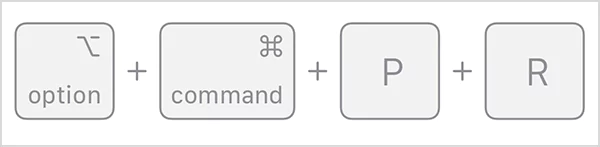
Press and hold Option + Command + P + R on Intel Macs for 20 seconds to reset PRAM or NVRAM.
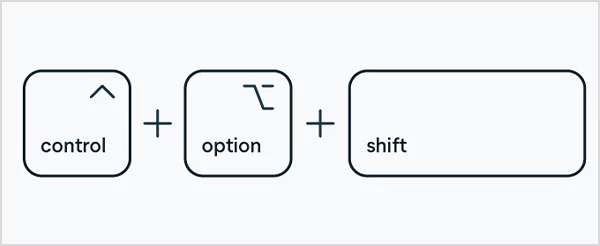
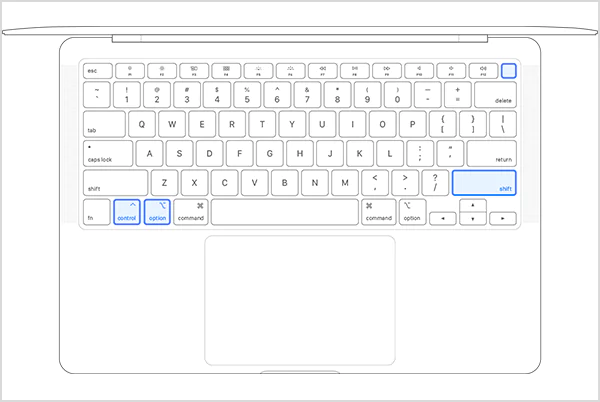
Press and hold Shift (right) + Control (left) + Option (left) for 7 seconds. While holding the other, press and hold the Power button for 7 more seconds, and then turn the Mac on to reset the SMC on Intel Macs with the T2 Chip.
Apple Silicon Macs do not need manual SMC or PRAM resets. A proper shutdown and restart handles it automatically.
What is PRAM or NVRAM on a Mac?
Your Mac has a few tiny system controllers working quietly in the background. You never see them and rarely think about them. I had no idea about them until I faced some issues a year back.
They sit much deeper than Mac recovery mode and control how your Mac remembers preferences and how its hardware behaves. Understanding what each one does helps you fix problems faster instead of randomly restarting or reinstalling macOS.
PRAM (Parameter RAM) and NVRAM (Non-Volatile Random-Access Memory) are small memory areas your Mac uses to remember important system settings even when it is turned off. These include things like:
Speaker volume
Screen resolution
Startup disk selection
Time zone
Basic hardware preferences
Older Macs used PRAM, and newer Macs use NVRAM. Both do the same job with different names. The key idea is that these settings are supposed to stay saved. If they become corrupted, your Mac may forget them or behave strangely.
What is SMC on a Mac?
SMC stands for System Management Controller. Think of it like your Mac’s hardware manager. It controls how physical components behave, including:
Power button response
Battery charging
Fan speed
Heat management
Sleep and wake behaviour
Keyboard backlight
Sensor-based actions like ambient light
When SMC works fine, you will never notice it. When it glitches, your Mac starts acting physically weird. Also, they feel like hardware problems, even though the hardware is usually fine.
Notes
SMC and NVRAM exist only on Intel-based Macs. On Apple silicon Macs like M1 or M2, these functions are built directly into the chip. That’s why MacBook SMC resets are not always the same way on newer Macs.
Do You Need to Reset SMC and NVRAM/PRAM?
You don’t need to reset NVRAM or SMC all the time. These are troubleshooting tools, not maintenance steps. You reset them only when you see the symptoms.
If your Mac works normally, do not reset anything. Random resets do not improve performance. They only help when something is misconfigured.
Notes
SMC or PRAM/NVRAM Reset on Mac clears only these saved preferences and restores safe defaults. Your files, apps, and data stay untouched.
How to Reset NVRAM on Mac?
Is Your Mac Apple Silicon or Intel?
To check which Mac you’re using, click the Apple menu and open About This Mac. If you see Chip, your Mac runs on Apple Silicon. If it shows Processor (Intel), you’re on an Intel-based Mac.
This works only on Intel-based Macs. If you are using Apple Silicon, this method will not apply. Here are the steps for NVRAM/PRAM reset Mac:
Shut down your Mac completely.
Press the power button and immediately hold these four keys together: Option (⌥) + Command (⌘) + P + R.
Keep holding the keys for about 20 seconds. You might see the Apple logo appear and disappear twice.
Release the keys and let your Mac start normally.
This clears the stored system preferences and reloads clean defaults. On Apple Silicon Macs, a normal restart is usually enough because NVRAM is handled by the chip.
Mac reset SMC process varies by Mac model only on Intel machines. You don’t need to separately reset SMC controllers on Apple silicon Macs (M1, M2, and later). A simple restart or shutdown followed by a cold start essentially resets those low-level controls.
Here’s how to reset the SMC on MacBook Pro and other models running on Intel:
Intel Mac with the Apple T2 Security Chip
Sometimes, just a forced restart can fix the issue. First, try to press and hold the power button or Touch ID for 10 seconds and release the button. If the problem continues, move to the full SMC reset onMac with the Apple T2 Security Chip:
Shut down your Mac.
On the built-in keyboard, press and hold Shift (right) + Control (left) + Option (left) for 7 seconds.
Without releasing them, press and hold the power button as well.
Keep holding all these keys for another 7 seconds and release everything.
Then, wait for a few seconds and turn your Mac on normally.
You may notice your Mac turn on or off during the process, which is normal.
Intel Desktop Macs (iMac, Mac mini, Mac Pro)
If you are using an iMac, Mac mini, or Mac Pro with a T2 chip:
Shut down the Mac.
Unplug the power cable.
Wait for 15 seconds.
Then, plug the cable back in.
Wait another 5 seconds.
Finally, press the power button.
This power cycle resets the SMC controllers on desktop versions.
Intel Mac Without T2 Chip
If you have an Intel Mac without a T2 chip, here’s how to reset SMC on MacBook Pro and other models:
First, shut down your Mac.
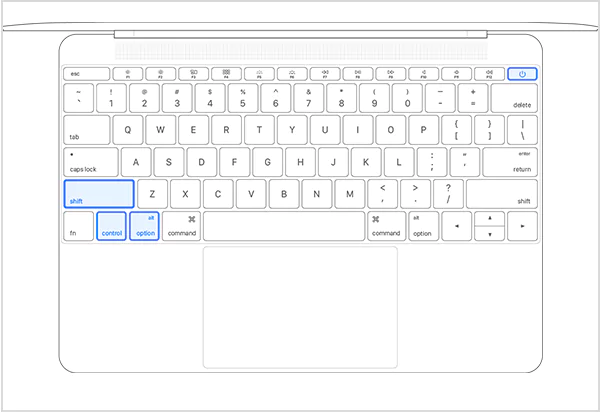
Then, press and hold the Shift, Control, and Option buttons on the left side of the built-in keyboard.
While holding them, press and hold the power button for 10 seconds.
Finally, release everything and turn your Mac on normally.
This will reset how your Mac handles power, heat, battery, sensors, and other things.
Conclusion
PRAM, NVRAM, and SMC resets are not everyday fixes. However, they can fix specific system issues and some common macOS issues without affecting your personal data or the installed macOS.
On Intel Mac, these resets still matter. On Apple Silicon Macs, the architecture itself handles these processes, which is why simple restarts are enough.
Frequently Asked Questions
What does resetting PRAM do on a Mac?
Resetting PRAM clears small stored system settings like volume level, display resolution, startup disk selection, time zone, and some hardware preferences.
Is it safe to reset PRAM or NVRAM?
Yes, it is completely safe. It restores some system preferences to default, which can fix misbehaving settings without touching your files and data.
What is an SMC reset on a Mac?
An SMC reset refreshes the hardware controller that manages power, battery, fans, and thermal behaviour on Intel Macs.
How do I reset my Mac NVRAM?
On Intel Macs, reset NVRAM by holding Option + Command + P + R at startup. On Apple silicon Macs, NVRAM resets happen automatically with a restart.
Can a PRAM reset fix startup problems?
If your Mac won’t boot correctly, shows the wrong startup disk, or displays a question mark folder before loading macOS, resetting PRAM can help by clearing corrupted settings.

 Upasna Deewan