One of the major shifts the COVID-19 pandemic brought was the change in corporate workflows. Businesses that were quick to shift to hybrid and remote work survived, and the others, well… could not.
And this major shift shaped the way things work forever. Roughly 11-15% of employees globally work fully remotely, while approximately 24-52% operate under a hybrid model, combining home and office work. Some even trust public networks from airports, cafes, hotels, and coworking spaces. Yes, these are the new normal today, but here is the catch: public networks and Wi-Fi are one of the main targets for cyber attacks.
So how do companies allow their employees to work from anywhere without exposing their internal systems? Well, the answer is secure remote access, powered by VPNs.
Key Takeaways
Public Wi-Fi is one of the easiest entry points for cyber attackers.
VPNs protect data by encrypting it during transmission.
Authentication and access controls matter just as much as encryption.
Controlled remote access reduces insider and external risks.
Security is not about limiting flexibility; it is about enabling safe flexibility.
What is Secure Remote Access?
Secure remote access allows employees, contractors, partners, and all the parties involved to connect to company systems from anywhere around the world without exposing sensitive data to the public.
You can access files, use internal applications, connect to enterprise databases, and work inside corporate systems. All this, while keeping the connection secure.
CASE STUDY A mid-sized digital marketing company shifted to hybrid work and allowed employees to access systems from home, hotels, and public Wi-Fi. Initially, remote access was enabled with basic login credentials but without encrypted connections or strong authentication controls. Within months, they experienced the repercussions: suspicious login attempts and minor credential leaks. This serves as a wake-up call for the management, and they implemented secure remote access using a business-grade VPN, multi-factor authentication (MFA), and role-based access controls. And the results? Encrypted connections on all public networks, reduced unauthorized login attempts, improved client confidence, stronger audit compliance, and a completely protected remote work environment.
How Uncontrolled Remote Access Creates Data Security Risks
Uncontrolled remote access is directly like showing cybercriminals a green flag to flood into your systems. The possibilities are massive, and a lot can happen:
Hackers intercept login credentials on Wi-Fi
Sensitive data travels unencrypted across networks
Unauthorized users gain entry to internal systems
Malware spreads from personal devices into the company infrastructure
Confidential files are exposed or copied
Fortunately, all this can be taken care of with the right cautionary steps. Because the problem isn’t remote work itself; it is the unprotected remote connections.
Understanding How VPNs Secure Remote Data Connections
A Virtual Private Network, or VPN, creates a secure, encrypted pathway between a user’s device and the company network. Instead of sending data openly across the internet, it acts like a safe tunnel patched up from everywhere to prevent data leakage.
Encryption Tunnels
Imagine you place your data inside a locked, armoured truck before sending it across a busy road. Even if someone sees the truck, they won’t know what is inside it. And this is how VPNs work, making an encryption tunnel.
It scrambles the data into unreadable code while in transit. Even if it is intercepted, it looks like random characters that are of no use without the description key.
Authentication Methods
VPNs do not respond to all demands and require identity verification to grant access. Some of the common ways for it are username and password, multi-factor authentication, biometric verification, and digital certificates. These ensure that only the authorized contact has access to the information on hold.
Secure Protocols
They heavily rely on secure communication protocols like OpenVPN, IPsec, SSL/TLS, which define how data is encrypted and transmitted between two endpoints. Strong protocols prevent attackers from injecting malicious traffic or tampering with communications.
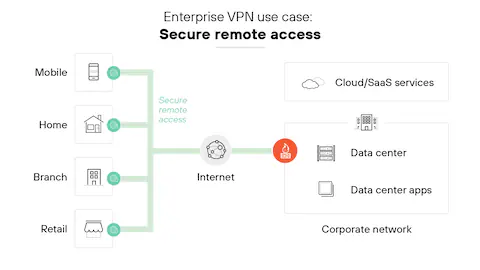
To further explain, the infographic below shows the enterprise VPN use cases:
How VPNs Enable Controlled Access to Enterprise Data
VPNs not only secure the connection but also determine who can access it. Therefore, after a secure VPN download and installation, administrators can configure access levels that align with business roles and security policies.
User Permissions
Every employee in a company does not require all the data of the company. VPN systems allow administration to restrict access by department, grant role-based permissions, limit file access, and monitor login behavior to make sure that employees only see the data that is necessary for their particular work.
Network Segmentation
Network segmentation means dividing a company’s infrastructure into separate zones. For example, finance systems, HR systems, product development servers, etc. Segmenting like this will prevent attackers from moving freely across the entire network, even if any one area is compromised. This minimizes the damage from a data breach.
Access Policies
To add an additional layer of protection, VPNs enable organizations to define strict policies like device compliance checks, geographic login restrictions, session time limits, and automatic disconnect after inactivity.
VPNs vs. Other Remote Access Security Solutions
VPNs are quite popular, but not the only option available in digital environments. There are many other solutions, such as:
Zero Trust Network Access (ZTNA)
Secure Access Service Edge (SASE)
Remote Desktop Gateways
Cloud-based identity patterns
So, what’s the difference between these?
Zero-trust models verify each access request individually and treat everyone as a threat. SASE, on the other hand, combines networking and security in a cloud-native architecture.
And, VPNs create a secure tunnel into the network, leaving no room for any slip-ups. That is why it remains a practical, cost-effective foundation for secure remote access for many organizations.
DO YOU KNOW? Many cyberattacks on public Wi-Fi don’t require advanced hacking skills. Some attackers simply set up fake hotspots with names like “Free Airport Wi-Fi” and wait for people to connect.
DataRecovee – Safest Choice for Data Backups
Data protection does not end at secure remote access and connection security. Backups are also an integral part.
For that, solutions like DataRecovee remain a popular choice among organizations. It helps them focus on safeguarding enterprise data through secure backup systems and recovery frameworks.
Remember that a strong VPN protects data in transit
Reliable backup systems protect data at rest.
And together, they create resilience.
Wrap Up
Remote work has become the new normal these days, and so has the increasing number of data breach cases. In this situation, VPNs emerge as a helpful solution that provides secure remote access, helping employees work from anywhere without exposing sensitive company information.
Enterprises must know that in today’s connected world, security is not about restricting access; it is about controlling it intelligently. Because when remote access is secure, productivity does not come at the cost of protection.
Frequently Asked Questions
Does VPN make me completely anonymous online?
Not completely, but a VPN encrypts your connection and hides your IP address from public networks. However, it does not make you invisible. It is a security layer, not a magic layer.
Will using a VPN slow down my internet?
Sometimes slightly, because your data is being encrypted and routed securely. But with modern VPNs, the slowdown is usually minimal and worth the protection.
Is a free VPN good enough for business use?
For enterprise data? No. Free VPNs often have weaker security controls and limited monitoring. Business environments require stronger encryption, access control, and compliance support.
If we used cloud apps, do we still need a VPN?
Often, yes. Even cloud systems require secure authentication and controlled access. A VPN adds protection, especially when employees are working across public networks.

 Saipansab Nadaf