
Not really, they can not completely replace the traditional photoshoot, especially for highly reflective items (jewelry, automotive chrome) or regulatory-critical shots (medical devices). However, it may dominate some categories like consumer goods, beauty, apparel-on-avatars, and home decor.
AI Product Photography Software Showdown: Upscaling, Editing & Realism Tested
 Upasna Deewan
Updated on: Dec 09, 2025
Table of Contents
- How We Tested and Scored the Contenders
- 1. Leonardo AI: Best Overall Photorealism And Control
- 2. PhotoRoom: Fastest Path to Marketplace-Ready Shots
- 3. Pebblely: Template Consistency Without Prompt Anxiety
- 4. Claid.ai: Custom Models and API Power for Scale-Driven Teams
- 5. Flair AI: Drag-And-Drop Scene Design for Quick Marketing Shots
- 6. Magic Studio Product Photos: All-In-One Editor for Small Teams
- 7. Adobe Firefly: Creative Wildcard Inside the Adobe Stack
- 8. WeShop AI: Virtual Try-Ons Without a Photoshoot
- Conclusion
- Frequently Asked Questions
For businesses, one of the major factors that decides the fate of their products is how they present them in front of their audience. Either it can grab all the attention at a glance, convincing the customers to give it a chance, or vice versa. However, investing in high-production product photography is not the most convenient option for some businesses, especially the smaller ones.
And this is why businesses are now turning to AI product photography. Stats show that 50% of businesses are already using AI images for their products. If you also plan on doing the same, this guide is the one for you. We have listed down the top 8 AI photography software that will help you upsale, edit, and test realism for your product images.
Key Takeaways
- AI product photography is fast enough to replace many traditional shoots.
- Photorealism depends more on lighting and shadows than raw image quality.
- The best tool changes based on whether you need speed, realism, or scale.
- Templates help beginners, while controls matter more for advanced teams.
- AI works best as a production system, not a one-click magic tool.
How We Tested and Scored the Contenders
To combine a reliable list for you, we ran every platform through the same 12-image mini catalog (fabric, chrome, bottles, and clear glass) on a stock M3-chip MacBook connected to a 1Gbps line. The main object for this was to isolate software performance from hardware bias.
Here are the factors we used for grading the software:
| Performance Criteria | Description | Points |
| Photorealism | The degree to which an image looks indistinguishable from a real photograph. | 30 Points |
| Editing Depth | How many essential fixes did the app completed withing itself, such as background swap, object erase, color tune, and upscale. | 20 Points |
| Upscaling Quality | Each image was upscaled 4x and printed at 300ppi to check for any haloing or texture loss, which reduced the score. | 15 Points |
| Speed & Workflow | From the moment the prompt was uploaded to the final click, we timed everything. We found out that PhotoRoom’s one-tap flow averaged about 13 seconds in our test, the same as its published latency range of 2–9 seconds per AI feature. | 15 Points |
| Integrations | Checking for direct Shopify hooks, API access, and clear listing terms to note how AI product photography platforms handle these touchpoints. | 10 Points |
| Pricing | The subscription prices of different packages: monthly cost, credit rollover, and free-tier limits. | 10 Points |
These criteria helped us filter out the worthy options in the market, eliminating the not-so up to the mark at the first step.
Tip: If you’re standardizing QA for a growing catalog, keep a small internal benchmark set or reference photo editing datasets for AI training to re-check realism, edges, and logo fidelity whenever you switch tools or update prompts.
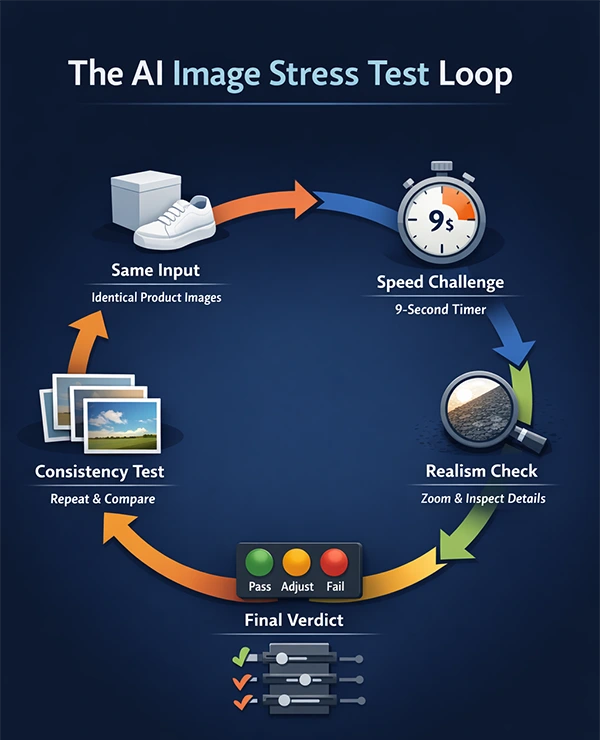
The infographic below further explains the AI image stress test look:
1. Leonardo AI: Best Overall Photorealism And Control

To describe it in the simplest form, Leonardo ai feels like a cloud station in your browser. It requires you to just drop a product photo onto the canvas, and you can easily remove visible lint, extend backdrops, or upscale for print without having to install any external software. Allows paid subscribers to own every exported image, an essential element for Amazon listings and retail syndication.
Salient Features:
- Ranked highest for realism.
- Logos stayed razor sharp, chrome reflections matched reality, and none of the glass bottles warped when the resolution was pushed to 4x.
- Upscaler exports a 4K frame that prints cleanly at 300 ppi.
- Full generate-edit-upscaler took roughly 25 seconds.
2. PhotoRoom: Fastest Path to Marketplace-Ready Shots

PhotoRoom, the fastest one on the list. It takes only 13 seconds to provide the final draft, including background removal, relighting, and export. Speed is of no use if the quality is compromised. In our tests, the quality also remained top-notch: edges stayed sharp on frayed denim and curly hair, and an instant background request for a “sun-lit patio” produces a soft shadow that matched true boon light without manual masting.
Salient Features:
- Excellent speed
- Templated offers every common ratio for different platform needs
- Focuses on realism rather than inventing new camera angles or props.
3. Pebblely: Template Consistency Without Prompt Anxiety

Do you freeze at the empty prompt box? Pebblely is the best choice for you. There are more than 40 predefined background themes, each ready to surround a product in just one click. A single click lets every SKU share the same visual language, which proves to be a great help when dealing with dozens of listings across the marketplace.
Salient Features:
- 40 predefined background themes.
- Zero compromise on quality
- Bulk mode processes 25 images in one run.
- Does not have any limits, allowing users to try every present style.
4. Claid.ai: Custom Models and API Power for Scale-Driven Teams

Claid.ai allows you to teach AI what your product looks like. All you need to do is to upload 10–20 reference pictures, and the platform trains a private model that can recreate that exact sneaker tread or perfume-bottle bevel in new scenes.
Salient Features:
- Keeps the embossed logo crisp, even after refining it
- Adjusts light vectors according to the pictures, automatically.
- Can process thousands of images overnight.
PRO TIP
Do not judge an AI tool by its first output because the biggest quality improvements come from minor lighting tweaks, one additional refinement pass, or switching from free-form prompts to structured inputs.
5. Flair AI: Drag-And-Drop Scene Design for Quick Marketing Shots

An excellent tool for teams working in collaboration, Plair AI allows you to cut-out product onto the canvas, add props such as plants, spaces, or a hand model, matching background and balancing lighting so each element looks shot together.
Salient Features:
- Built in collaboration
- Provides drag-and-drop control without heavy prompting
- Allows users to tweak compositions easily.
6. Magic Studio Product Photos: All-In-One Editor for Small Teams

True to its name, Magic Studio acts like a magical tool that combines background removal, scene generation, and quick touch-ups in a single sidebar. You can simply start by clipping the product with remove.bg technology, then click product photos to drop it into a present scene or type a custom prompt.
Salient Features
- Dual Path delivers speed
- Provides on-brand results that align with the theme in seconds
- Cleanup happens in the same tab
7. Adobe Firefly: Creative Wildcard Inside the Adobe Stack
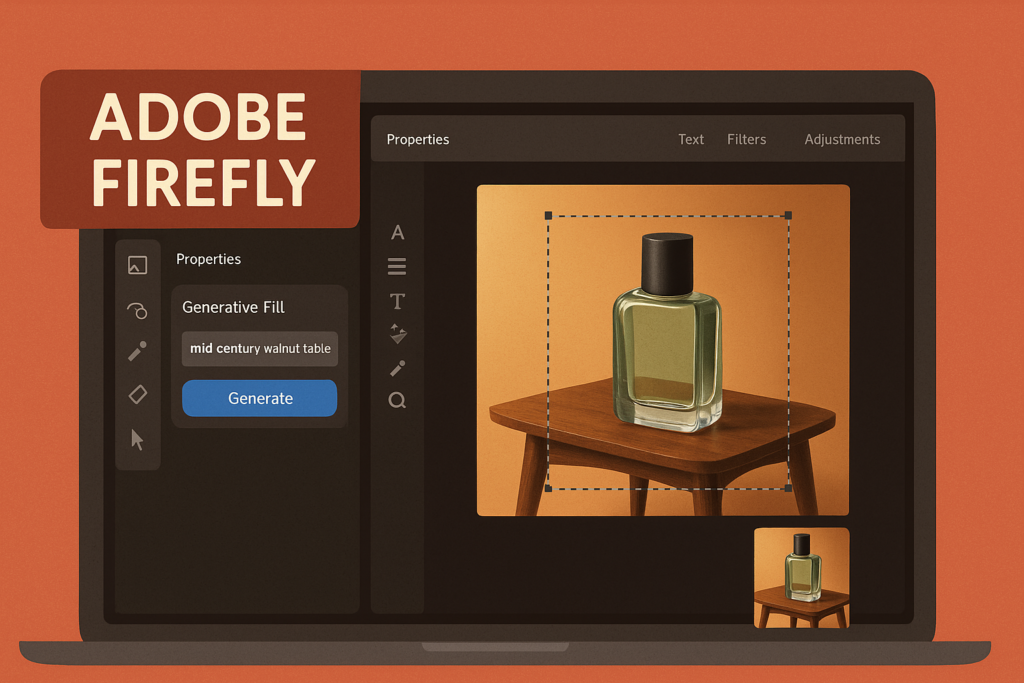
Adobe Firefly is a big name that plugs into apps many designers already pay for, making it easy to integrate into your systems. It bridges the classic layer work and medium AI effects.
Salient Features:
- Great range, allows users to add surreal smoke, metallic particles, or a mountain vista.
- Friendly pricing for existing subscribers
- Offers creative features for more unique outcomes.
8. WeShop AI: Virtual Try-Ons Without a Photoshoot
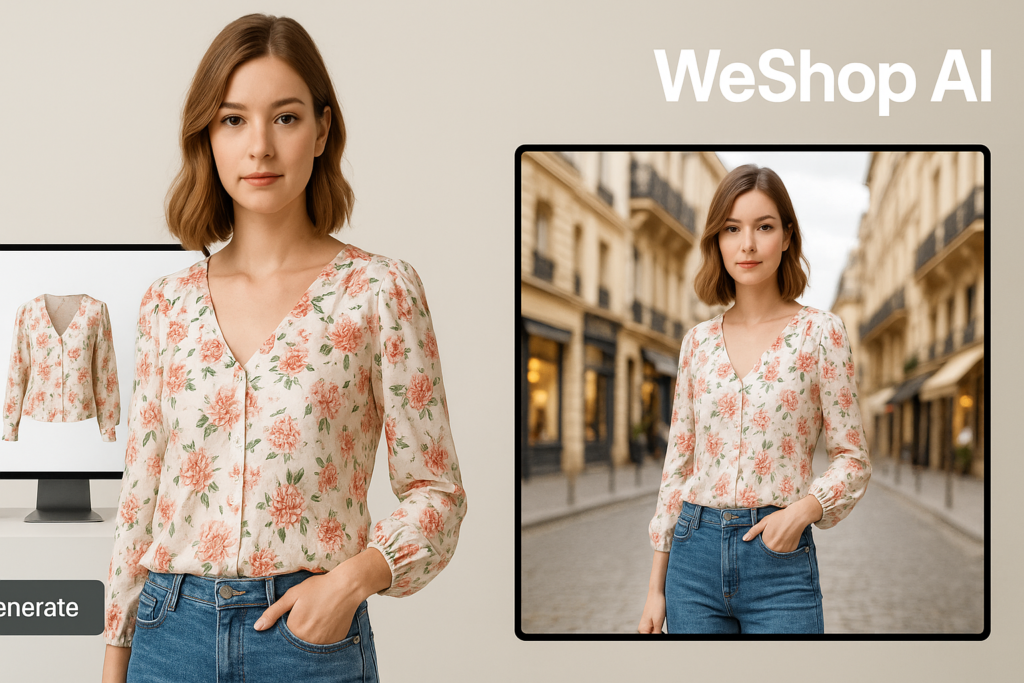
WeShop is a reliable choice for e-commerce websites. It generates believable human models; you just need to upload head shot or select an avatar, and the AI dresses that figure in your garment and poses it in fresh scenes.
Salient Features
- Includes background generation, upscaling, and quick touch-ups.
- The pricing model is flexible
- Delivers runway-level visuals from your device.
Conclusion
AI product photography software has bridged the gap between large-scale businesses with whole production teams and solo entrepreneurs trying to make it big in the market. These tools give everyone an equal chance to showcase their products in the best way possible to their potential customers.
With so many tools available in the market, a brand must know what its major requirement is in order to choose one that suits it the best. Tools like Leonardo AI, PhotoRoom, Pebblely, Claid.ai, Flair, Magic Studio, Firefly, and WeShop AI are some reliable ones that offer quality services at reasonable prices. An AI Image Generator now runs through Higgsfield too, adding video generation alongside the same kind of product visual work.
So, if you are a business owner who doesn’t wish to invest in a professional set-up and full-production shoots, do check these out!
Frequently Asked Questions
Can AI product photos completely replace the traditional ways?
Are AI-generated images allowed on e-commerce platforms?
Yes, some famous ecommerce platforms like Amazon, Etsy, and eBay allow AI-generated images, provided the output meets each marketplace’s technical spec and accuracy guidelines.
Who owns the claims to AI-generated images?
Usually, most paid platforms, including Leonardo, Claid, PhotoRoom, and Magic Studei, grant full commercial rights to exported images. However, this might not be the case for free tiers.
Which tool makes the most realistic images?
According to our blind panel scoring, Leonardo AI is ranked the highest in terms of photorealism.
Which tool is best for batch or API workflows?
PhotoRoom API gives the fastest throughput, and Claid.ai adds custom-trained models and autoprompt for high-volume operations.
Related Posts

8 Best AI Presentation Makers for Business-Ready Slides
Making a presentation doesn’t just mean designing slides. It’s about defining a clear structure, using defined logic, useful visuals, and…

Queue Management Software Troubleshooting Guide: 8 Common Faults and Fixes
The long wait times and ineffective management of customer queues can have a significant impact on customer satisfaction and business…

How to Use Similarweb Website Traffic Data for Competitor Research
Competitor research without traffic data is guesswork. You can guess who your rivals are, guess how big they are, guess…

Choosing the Right Hosting Model for Scalable Digital Platforms
The performance of digital business is directly related to website speed, uptime, and scalability. Slow page performance has a negative…

How Data-Driven Performance Tools Are Transforming Employee Recognition in Tech Companies
“People work for money but go the extra mile for recognition, praise, and rewards.” — Dale Carnegie (Writer & Teacher)…

Why Businesses Struggle to Collect Reliable Data from the Web
Almost every company that depends on data runs into the same problem: although they can find the data they need,…

Why Financial Data Recovery Matters for Businesses
Financial data supports every part of a business, directly affecting cash flow, payroll, tax reports, audits, customer billing, and daily…

CMMC Compliance Is Coming for Manufacturers. Here Is What You Need to Do
“Cybersecurity is much more than a matter of IT.” — Stephane Nappo (Cybersecurity Professional) For manufacturers working within the defense…

How Data-Based Tools Influence Learning Performance
Learning has transformed in the modern age with the integration of new technologies to help students and professionals prosper in…