You are full at 10:00 AM. Every booking made, customer queued, your crew like clockwork. At 10:05 AM, it’s all vanished.
No appointments. No client history. No idea who is walking in next.
It is a drastic thing to say, but not unusual. Research indicates that more than 60 percent of small firms that lose vital information close shops in less than six months, and almost a third of companies suffer data loss through human error alone. Not cyberattacks. Not disasters. Just everyday mistakes.
That risk is more of an impact on businesses that operate on an online appointment scheduling system. Your information is not passively hanging in the background; it is actively running your day. All bookings, cancellations, and customer information drive directly to your bottom line and customer service.
And this is the bad news: the majority of businesses start to consider backups when something is wrong. That is why data backup and recovery software is not only a technical protective measure, but it is something that stands between a short-lived interruption and an utterly ruined business day.
Key takeaways
Over 60% of small businesses that lose critical data close within six months.
Nearly 1/3rd of data loss comes from human error.
Modern backup software creates automatic copies without manual effort.
Cloud-based solutions provide remote access, scalability, encryption, and faster disaster recovery.
Lost appointments mean lost income and frustrated clients. Backup software prevents costly downtime and maintains customer confidence.
Why Data Protection is Critical for Appointment Scheduling Software
In the present-day service-oriented world, the appointment scheduling software is much more than a calendar. Whether it is a salon, clinic, or consulting business, each booking will mean time, money, and confidence in the routine.
For example Salon management and scheduling software do not just handle appointments but also store client profiles, service history, staff schedules, and payment details.
In case this information is lost or ruined, its effects are short-term and apparent. One day of lost bookings could translate to confused staff, frustrated customers, or lost income.
Along with operations, there is a trust factor. Customers want businesses to manage their data in a responsible manner. Personal information and appointment history are things that are ot easily regained once they are lost and thus can ruin your reputation. This is why data protection has now become a business survival strategy.
Common Risks of Data Loss in Scheduling Platforms
Scheduling platforms also work in dynamic conditions, and because of this, there are various forms of risks that affect them. Human error is one of the most widespread causes. Even the simplest error, such as the removal of the wrong set of data or improper settings of a system, may wipe out vital information in a few seconds.
Next, there are technical failures. Servers go dead, there are software glitches, and updates are not always successful. In the absence of a backup system, it is almost impossible to recover the lost data.
Another increasing threat is cybersecurity threats. Scheduling systems tend to hold sensitive data of clients, and this makes them a target for hackers. Ransomware attacks can especially lock businesses out of their systems.
Even such a simple issue as a power outage can disrupt processes and corrupt files, particularly when the system is not built to deal with unexpected crashes.
Lastly, contemporary systems are based on integrations. Data inconsistencies due to failure os connected tools or failure to synchronize data may result in partial or total loss of data.
The ultimate learning? Data loss does not necessarily occur due to dramatic situations; it can be due to common vulnerabilities.
How Data Backup and Recovery Software Works in Scheduling Systems
The backup and recovery software operates quietly in the background, but it plays a very important role.
In its essence, it makes copies of your information periodically. Such backups are able to done automatically so that you are always guaranteed that your system is under protection without having to go out of your way.
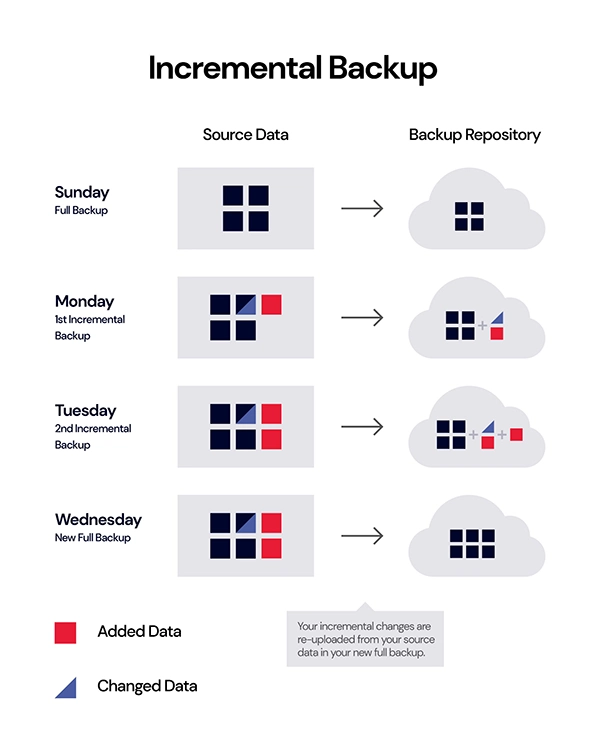
Modern systems do not copy all data each time, but they make incremental backups. This implies that only new or modified information is stored, and thus the process is quicker and more effective.
The data stored is then secured in either the local or cloud servers or both. This will provide redundancy, hence in case one system fails, there is still another copy available.
The real value can be seen in recovery. In case something goes wrong, you can:
Most systems also provide point-in-time recovery, whereby a business can revert to a certain point prior to the occurrence of a problem. It involves, in simple terms, just in case of anything, your scheduling system will be able to recover because of the backup and recovery software.
PRO TIP Set your backups to run just before your business’s booking hours, not during them. This ensures your system is fully updated without slowing down peak-time performance.
Key Benefits of Backup and Recovery for Appointment Platforms
The use of backup and recovery software is not merely a matter of disaster protection, but it also implies continuous benefits.
First, it guarantees business continuity. Operations can be quickly restored with minimal disruption, even in the case of a system failure.
Second, it secures the trust of customers. The clients will be more assured that they will not risk losing their data or missing out on their appointments.
Third, it minimizes financial losses. Failure to book, lost time can be costly, downtime, and recovery can be expensive; backups can prevent these costs.
Operational efficiency is another significant advantage. Teams will no longer need to consider data protection activities as manual ways of protecting their data with automated backups.
It also facilitates compliance and data regulations, which is becoming crucial to businesses dealing with personal information.
Lastly, it brings a sense of relief. When you are certain that your information is secure, you can concentrate on expanding your business, rather than thinking about the worst possibilities.
Role of Cloud-Based Backup Solutions in Scheduling Applications
Online backup systems have revolutionized the way companies secure their reservation systems.
In comparison to the old methods, cloud backups store data on remote servers, and hence, it is accessible everywhere. It comes in handy, particularly in companies that have numerous branches or distant workers.
Scalability is one of the largest advantages. Your backup capacity can be increased as your business increases without the need to purchase new hardware. Cloud solutions also provide a better level of security, such as encryption and multi-layered protection, which is important to keep sensitive data secure.
Automatic updates and maintenance are another major advantage. Cloud providers also upgrade systems, unlike on-premise systems, thus lessening the internal team workload.
Moreover, cloud backups enable faster disaster recovery, which allows companies to resume their operations in a short period, even following significant disruptions. Concisely, cloud solutions ensure that backup systems are more dynamic, dependable, and future-proof.
INTRIGUING INSIGHTS Incremental storage saves changes, reduces storage use, and improves efficiency, instead of copying everything each time.
Conclusion
In the rush of online booking of appointments, information is all. Every part of your business requires precise and easy-to-reach information, whether it is booking or customer relationship management.
The backup and recovery software will make sure that such crucial information is never actually lost. It insures against daily risks, facilitates the smooth running of operations, and creates long-term confidence with the customers.
Frequently Asked Questions
Why does an appointment scheduling system need data backup?
They store critical booking data, client information, and payment details.
How often should the scheduling system and data be backed up?
Automated daily or real-time backups are ideal for everlasting businesses.
Can backup software prevent ransomware attacks?
Backups don’t prevent attacks but enable quick data recovery without paying ransom to restore your scheduling system.
Are backup systems expensive to implement?
Not necessarily. Many cloud-based solutions are affordable and scalable, making them accessible for businesses of all sizes.

 Reviewed By Brijesh Kumar Singh
  Kartik Wadhwa







