
Preferably, it is advisable to take backups on a daily basis, particularly websites that are regularly updated.
Why Regular Website Backups Are Essential to Prevent Content Data Loss
 Reviewed By Brijesh Kumar Singh
  Upasna Deewan
Updated on: Feb 18, 2026
On the face of it, your site may appear serene, pages loading well, content in its place, and so on, but backstage, it is not as robust as one might assume.
One update to the plugin is unsuccessful. A programmer destroys the faulty file. One of the servers collapses at an inappropriate time. And before you know it, you have lost your content.
It is not that unusual either. It is reported that 30% of the websites incur some type of data loss every year, and a substantial portion of the cases is attributed to human error.
Your content is your online property, regardless of whether you are running a blog or a business website, or even using an easy website builder. Lose it, and you are not only losing files, but also time, traffic, and trust.
This is why performing regular backups of the website is not a mere precaution. They are backup in case something goes wrong.
Key Takeaways
- The loss of data on websites is not an exception.
- One of the major causes of loss in content is human error.
- Frequent backup means that recovery can be done within a short time without significant loss.
- There are various types of backup that are flexible according to your needs.
- Not only data, but also your business continuity is safeguarded by backups.
Common Causes of Website Data Loss
The loss of data on websites is seldom caused by a single dramatic incident, but rather an outcome of daily risks, which pass unnoticed. Human error is one of the largest contributors. One wrong click, deletion, or update can destroy whole portions of a site within seconds.
Then there is the conflict of software and plugins. Sites nowadays are based on various interoperations, and when one update fails to match another, it may cause things to go wrong, in some cases permanently.
Another critical menace is cyberattacks. Websites are the most common target of hackers who can inject malicious code, steal information, or take your site entirely, leaving your content compromised or deleted. This highlights the need for a reliable tool for commercial websites.
On top of that, there are server failures and hosting problems, which can lead to unforeseen downtimes, or corruption of data, and even poor maintenance habits, where old systems get weakened over time.
These all have a direct influence on business data safety, and it is evident that data loss is not a question of if, but a question of when.
How Regular Website Backups Protect Your Content
Backups on a regular basis are a kind of rewind button for your website. Should there be an issue, then you don’t need to start all over again; you just restore your site to a prior stable state.
This comes in particularly handy when it comes to human errors. You do not need to panic about deleted material when you can restore it easily without long-term impact on your live site. Backups are also used to safeguard failed updates. In case a plugin or theme crashes your site, you can revert to a previous version when the problem did not arise.
In order to make the backups as effective as possible, the following are some of the tips for reducing errors:
- Automation of the backup schedule will help prevent human errors.
- Store backups locally and in the cloud (in several places).
- Test your backups to make sure that they are functioning.
- Record version history to be able to revert to certain points.
It is not merely to have backups, but to have working backups when you really need them.
Types of Website Backup Solutions You Should Know
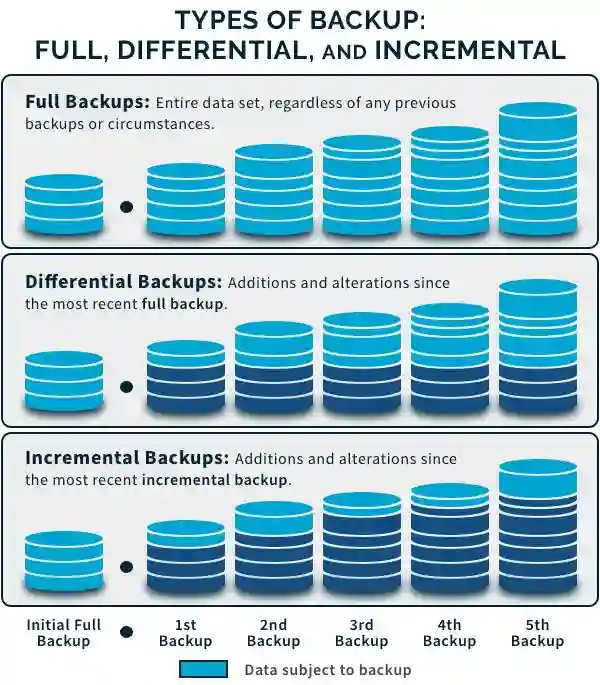
The backup solutions are not all identical, and the correct choice of the backup solution can significantly affect the effectiveness of the protection of your website.
Full Backups:
These make an entire replica of your site. Although they are dependable, they can become time-consuming and need to be stored more.
Incremental backups:
These are simply some changes that occurred during the last backup. They are more efficient and quicker, and therefore fit well in sites that are constantly updated.
Differential Backups:
Such changes in the store since the last complete backup are a compromise between speed and completeness.
These save your information on remote servers so that it is available and safe even in the event of a breakdown in your main system.
Automated vs Manual Backups:
Manual backups are more controllable, whereas automated backups are more consistent and do not depend on human intervention.
In the case of online stores, which businesses operate, backups are also involved in keeping an effective e-commerce marketing strategy. The loss of product pages, customer data, or campaign content can have a direct effect on conversions and revenue.
PRO TIP
Setting backups and forgetting about them is not the right approach; make sure to test your restore procedure at least once a month. A backup should only be helpful when it is really working when required.
Key Benefits of Maintaining Regular Backup Systems
Backups are not only a way to recover lost data but also to reinforce your whole digital presence. To begin with, they provide business continuity. Your site will be up and running in a short time, and should something go wrong, with minimal downtime.
Second, they secure your SEO and content work. The loss of blog posts, landing pages, or metadata can reverse months of work. They also enhance customer confidence. A professional site is one that is stable and reliable.
Less stress is another major advantage. When you know that you have safe data, you can concentrate on growth and not on the possibility of failures.
Lastly, backups mean long-term safety, which means you will always be ready in the face of small problems and significant inconveniences.
Wrapping Up!
Loss of data in the website is not necessarily dramatic, but its consequences are. There are infinite possibilities of how your content can be lost, whether due to minor mistakes or monumental failures. And when it happens, it is not only a technical cost but also emotional, financial, and reputational.
Frequent backups provide you with control within a highly unpredictable setting. They transform what could have been disastrous situations into solving problems and make sure that you have not really wasted your efforts.
Since it is not about avoiding all the mistakes, it is about ensuring that no mistake lasts at the end of the day.
Frequently Asked Questions
What is the frequency of my backup of the website?
Are automated backups better than manual ones?
Yes, automated backups reduce the risk of human error and ensure consistency.
Where should I store my Backups?
Use multiple places, cloud storage, and external devices; this provides maximum safety.
Do small websites really need backups?
Absolutely. Even small sites can suffer data loss, and recovery without backups can be difficult.
Related Posts

8 Best AI Presentation Makers for Business-Ready Slides
Making a presentation doesn’t just mean designing slides. It’s about defining a clear structure, using defined logic, useful visuals, and…

Queue Management Software Troubleshooting Guide: 8 Common Faults and Fixes
The long wait times and ineffective management of customer queues can have a significant impact on customer satisfaction and business…

How to Use Similarweb Website Traffic Data for Competitor Research
Competitor research without traffic data is guesswork. You can guess who your rivals are, guess how big they are, guess…

Choosing the Right Hosting Model for Scalable Digital Platforms
The performance of digital business is directly related to website speed, uptime, and scalability. Slow page performance has a negative…

How Data-Driven Performance Tools Are Transforming Employee Recognition in Tech Companies
“People work for money but go the extra mile for recognition, praise, and rewards.” — Dale Carnegie (Writer & Teacher)…

Why Businesses Struggle to Collect Reliable Data from the Web
Almost every company that depends on data runs into the same problem: although they can find the data they need,…

Why Financial Data Recovery Matters for Businesses
Financial data supports every part of a business, directly affecting cash flow, payroll, tax reports, audits, customer billing, and daily…

CMMC Compliance Is Coming for Manufacturers. Here Is What You Need to Do
“Cybersecurity is much more than a matter of IT.” — Stephane Nappo (Cybersecurity Professional) For manufacturers working within the defense…

How Data-Based Tools Influence Learning Performance
Learning has transformed in the modern age with the integration of new technologies to help students and professionals prosper in…