
SSD has a clear advantage in data recovery over HDD.
SSD Data Recovery vs HDD: What to Expect From Each
 Mahima Dave
Updated on: Feb 03, 2026
It usually begins in the same manner. Your laptop either emits a strange sound you’ve never heard or remains silent. You click on a folder, only to find it empty. You blink, refresh, and a sinking feeling takes hold.
At this point, the distinction between SSD and HDD becomes more than just a technical detail; it becomes a pressing concern: is there a way to recover your files? Panic starts to crawl under your skin when you lose your mental inventory and want to recall some important things.
You might even catch yourself typing do my assignment for me because losing a drive has a special talent for landing on the week everything is due. Through this blog post, we are going to look at what to expect from SSD and HDD recovery and provide valuable insights to the readers
Let’s begin!
How SSDs and HDDs Store Data
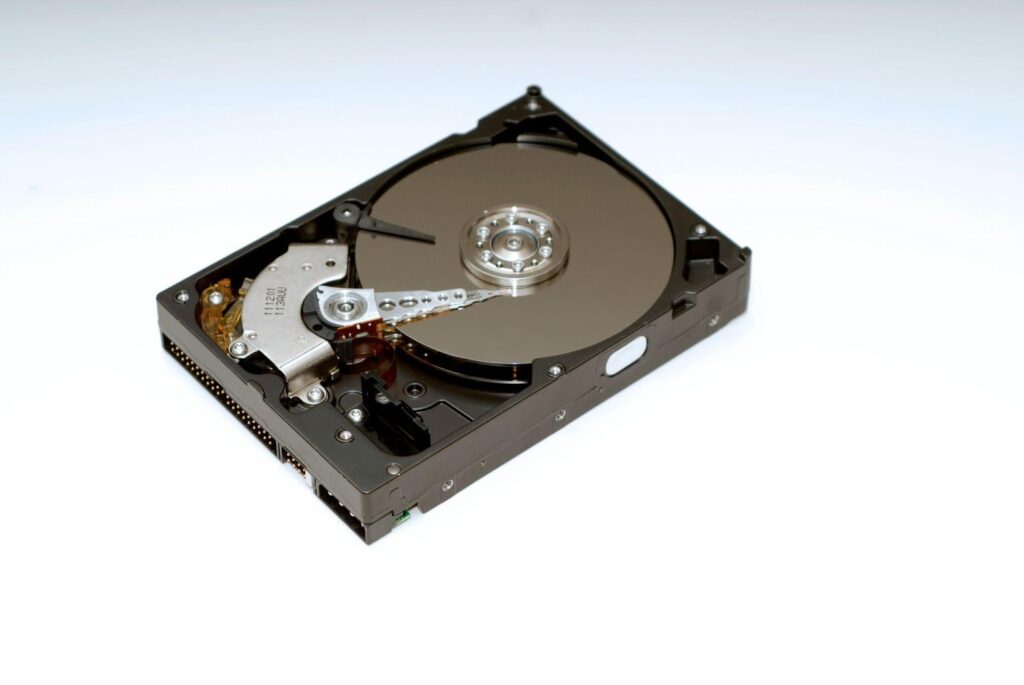
An HDD stores data on spinning platters, read by a moving head. An SSD stores data in flash memory chips.
That physical difference shapes recovery. HDD issues often involve mechanics you can diagnose. SSD issues often involve controller logic, firmware, and how flash cells get managed behind the scenes.
Why SSD Recovery Plays by Different Rules
With SSD file recovery, the hardest cases often involve deleted data or drives that kept running after the loss. Many modern SSDs use TRIM and garbage collection to clear blocks that the operating system marks as no longer needed. Once that cleanup cycle runs, the old data can disappear quickly, which is why many recovery labs warn that deleted-file recovery on TRIM-enabled SSDs is frequently futile.
There is also encryption and controller complexity. Two SSDs can fail in the same “it died” way, yet require completely different lab methods depending on the controller, firmware, and whether the drive is still detectable.

Why HDD Recovery Often Starts With Mechanics
HDD failures can be dramatic. Clicking sounds, slow reads, a drive that vanishes from the system, then reappears like it is teasing you.
The upside is that HDD problems are often easier to classify: logical issues (accidental formatting, corruption) versus physical issues (head crash, motor, platter damage). Physical recovery can require clean-room work and donor parts, but the recovery path is at least familiar to the industry.
When the drive is physically damaged, the safest move is usually to stop powering it on. A struggling head can turn a recoverable problem into a scraped platter.
Reliability: What Fails and How
People love the question of SSD vs HDD reliability, and the honest answer is: it depends on the environment and workload. In large-scale data, Backblaze has reported SSDs failing at a slightly lower annualized rate than HDDs in their fleet, with figures around 0.98% for SSDs versus 1.64% for HDDs in one comparison.
That does not mean SSDs are “safe” in the way people imagine. SSDs tend to fail with less warning, and when they fail, recovery can be trickier because of TRIM, encryption, and controller behavior. HDDs can give you warning signs, yet mechanical damage can make recovery expensive.
Interesting Facts
HDD recovery is often possible at a 90%+ success rate for many failures, while SSD recovery success rates can be significantly lower (some estimates suggest 30% at best in complex cases) due to data fragmentation and automatic TRIM commands.
HDD Data Recovery Cost: What Drives the Price
Pricing varies widely, mostly based on what failed and how urgent the job is. Some providers describe a few hundred dollars for simpler logical cases, then four figures for mechanical work that needs clean-room tools and donor parts.
SSD recovery can climb higher in advanced cases, especially when it involves controller-level work or chip-off techniques.
SSD vs HDD Data Recovery Comparison
The phrase SSD vs HDD advantages looks simple, but in recovery, there is a twist. SSDs resist shock damage better in daily life, yet deleted data can vanish faster because of how SSDs manage free space. The fact is HDDs are physically vulnerable, but their deleted data can sometimes linger longer on disk if the drive is healthy enough to read.
| Area | SSD Recovery | HDD Recovery |
| How failure often looks | Sudden, sometimes silent | Warning signs, noises, slow reads |
| Deleted data recovery | Often time-sensitive due to TRIM | Sometimes easier if drive stays stable |
| Physical damage | Less common from drops | More common, mechanical parts vulnerable |
| Common lab challenges | Controller, firmware, encryption | Heads, platters, donor parts |
| Typical cost pattern | Can rise sharply in advanced cases | Wide range, higher for mechanical clean-room work |
Conclusion
HDD recovery is often a story of mechanics. SSD recovery is often a story of timing and controller behavior. If the data is valuable, pause, protect the drive’s current state, and choose actions that keep options open rather than shrinking them.
Frequently Asked Questions
Which is better for data recovery, SSD or HDD?
Are SSDs harder to recover data from?
Yes, itmakes recovery of deleted files nearly impossible due to the feature of TRIM.
What happens to SSD after 10 years?
It gets torn down due to cell degradation.
Related Posts

8 Best AI Presentation Makers for Business-Ready Slides
Making a presentation doesn’t just mean designing slides. It’s about defining a clear structure, using defined logic, useful visuals, and…

Queue Management Software Troubleshooting Guide: 8 Common Faults and Fixes
The long wait times and ineffective management of customer queues can have a significant impact on customer satisfaction and business…

How to Use Similarweb Website Traffic Data for Competitor Research
Competitor research without traffic data is guesswork. You can guess who your rivals are, guess how big they are, guess…

Choosing the Right Hosting Model for Scalable Digital Platforms
The performance of digital business is directly related to website speed, uptime, and scalability. Slow page performance has a negative…

How Data-Driven Performance Tools Are Transforming Employee Recognition in Tech Companies
“People work for money but go the extra mile for recognition, praise, and rewards.” — Dale Carnegie (Writer & Teacher)…

Why Businesses Struggle to Collect Reliable Data from the Web
Almost every company that depends on data runs into the same problem: although they can find the data they need,…

Why Financial Data Recovery Matters for Businesses
Financial data supports every part of a business, directly affecting cash flow, payroll, tax reports, audits, customer billing, and daily…

CMMC Compliance Is Coming for Manufacturers. Here Is What You Need to Do
“Cybersecurity is much more than a matter of IT.” — Stephane Nappo (Cybersecurity Professional) For manufacturers working within the defense…

How Data-Based Tools Influence Learning Performance
Learning has transformed in the modern age with the integration of new technologies to help students and professionals prosper in…