
Telehealth systems store sensitive patient information that must be protected from cyber threats and unauthorized access.
Data Security and Recovery Strategies for Scalable Virtual Healthcare
 Reviewed By Brijesh Kumar Singh
  Mahima Dave
Updated on: Apr 22, 2026
Table of Contents
- Why Data Security Is Critical in Virtual Healthcare Systems
- Common Data Risks in Scalable Telehealth Environments
- The Importance of Backup and Recovery for Patient Information
- Best Practices for Protecting Sensitive Healthcare Data
- How Cloud Storage and Encryption Support Secure Virtual Care
- Building a Reliable Data Recovery Strategy for Healthcare Providers
- Final Thoughts
- Frequently Asked Questions
Virtual healthcare has undergone a dramatic change in the way that patients receive medical care, and healthcare platforms have become an integral component of the modern healthcare system. Digital solutions are becoming increasingly prevalent in hospitals, clinics, and private practices around the world, with online consultations, for example, and remote patient monitoring.
The global telehealth market hit $156.84 billion in 2025 and is expected to see large growth in the next few years. With the expansion of virtual care services, safeguarding patient information is more critical than ever for healthcare organizations. Medical records, diagnostic reports, payment information, and communication records are all highly susceptible to cybercriminals.
To ensure patient trust and regulatory compliance challenges management, healthcare providers need to adopt robust data security, backup, and recovery measures that facilitate trusted and scalable VHC operations.
Key Takeaways
- Virtual healthcare systems manage patient data, and some are very sensitive.
- Cybersecurity threats are increasing in the telehealth setting.
- Healthcare continuity is essential, and backup and recovery systems are paramount in maintaining it.
- Virtual healthcare security is enhanced by encryption and cloud storage solutions.
- Recovery planning supports providers to keep patients in continuity of care.
Why Data Security Is Critical in Virtual Healthcare Systems
In healthcare systems, data security is crucial in virtual healthcare systems. Large volumes of sensitive patient data are handled on virtual healthcare platforms on a daily basis. This encompasses medical records, medications, insurance information, and live patient/professional interactions.
If not properly protected, this information can be exposed to cyberattacks, unauthorized access, and accidental exposure. It is essential that, before organizations are able to put into place scalable digital healthcare systems, they need to grasp the importance of security in a virtual care context. The importance of robust data protection in the healthcare industry.
The need for robust data protection in the healthcare sector is non-negotiable because the information in medical records is extremely personal, healthcare organizations are popular targets of cyberattacks, in the event of a data breach, patient care may be affected, and regulatory compliance requirements are very stringent. There are a lot of security features that have been developed in today’s telehealth software programs that help providers to take care of their patient data with greater safety and to assist with their remote healthcare delivery.
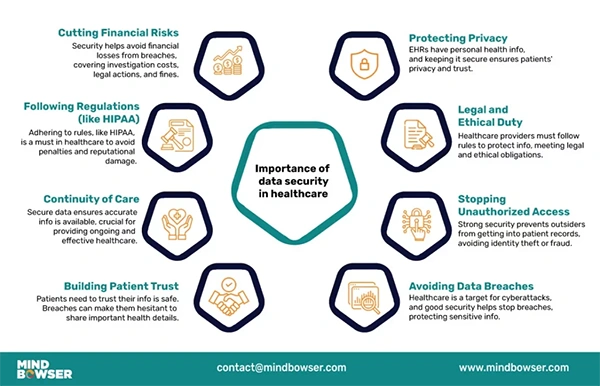
Healthcare data privacy is not just a regulatory requirement; it’s a cornerstone of dependable healthcare services. The infographic below further explains the importance of data security in healthcare.
Common Data Risks in Scalable Telehealth Environments
The more telehealth systems grow, the more devices are connected, cloud-based services are expanded, and remote users are added. This adds extra security and operational difficulties.
Hepatocellular damage requires healthcare providers to determine if there is a vulnerability so they can prevent it from having negative effects on patient safety or system reliability. Common risks associated with telehealth data are:
- Ransomware attacks
- Training about phishing scams for employees
- Weak password management
- Unauthorized remote access
- Cloud storage misconfigurations
- Data interception during video consultations
However, if organizations are not keeping up with the growth of their systems and fail to properly monitor traffic on their networks, there may also be security gaps. For a scalable virtual healthcare environment, ongoing monitoring and proactive cybersecurity management are vital.
The Importance of Backup and Recovery for Patient Information
Healthcare data loss can have significant consequences on patient care, operations, and regulatory compliance. Backup and recovery solutions provide healthcare organizations with the ability to recover valuable data in the event of a cyber attack, hardware malfunction, or accidental deletion. Organizations need to be aware of the necessity of backup planning before putting recovery systems in place. Companies must first be well-informed about the need for backup planning to ensure the continuity of operations in the healthcare sector.
Backup systems help avoid loss of patient information, reduce operational downtime, help provide emergency health care services, enhance preparedness for disaster recovery, and ensure compliance with healthcare policies and procedures.
Patient data should be regularly backed up in secure locations and copies kept outside the operating system. Automated backup processes not only ensure faster recovery times but also mitigate manual data handling risks.
Best Practices for Protecting Sensitive Healthcare Data
To keep virtual healthcare systems safe and ensure that patients trust them, it is crucial to maintain good cybersecurity practices. Technical safeguards should be used in conjunction with employee training and other measures to implement across controls in healthcare settings.
To ensure security, the recommended practices are:
- Enable multi-factor authentication
- Ensure patient communication data is encrypted
- Ensure that access by other users is limited
- Keep software and systems up to date
- Monitor networks continuously
- Train employees in cybersecurity
- Use role-based access permissions
- Clear up inactive accounts in a timely manner
These measures aid in minimizing the threat posed by insiders and the possibility of unauthorized data leaks. A proactive security approach can allow organizations to improve operational stability and regulatory compliance.
How Cloud Storage and Encryption Support Secure Virtual Care
Cloud technology is an important component of today’s telehealth infrastructure, offering scalable storage, remote access, and secure collaboration. But to effectively safeguard sensitive healthcare data, cloud systems need to be set up accordingly. The advantages of cloud-based healthcare storage are numerous. Cloud-based healthcare storage offers a list of benefits.
- Scalable storage capacity
- Improved remote data access
- Continue to enhance interagency coordination with providers
- Automated backup integration
- Reduced infrastructure costs
Additionally, encryption can help safeguard healthcare information by turning it into secure formats that are hard to access by unauthorized users. In the following, encryption is used for:
- Patient records
- Video consultations
- File transfers
- Cloud storage systems
With robust cloud technology, encryption can help make health care operations much safer.
INTERESTING FACT
Telemedicine technology has been used since the 1960s when NASA was investigating the use of remote health care monitoring for astronauts on space missions
Building a Reliable Data Recovery Strategy for Healthcare Providers
If you have a robust recovery strategy, healthcare businesses can keep tuning in the event of a cyberattack, server down, or unexpected disruption. Providers should create plans ahead of time to recover from incidents rather than responding to them after they happen. The elements of a recovery strategy are outlined below:
- Automated scheduling
- Offsite backup storage
- Disaster recovery testing
- Incident response planning
- Recovery time objectives (RTOs)
- Secure recovery documentation
Final Thoughts
The increasing adoption of telehealth will require healthcare organizations to focus on data security and recovery strategies to ensure safe and scalable virtual care delivery. Cybersecurity is a vital part of healthcare providers’ tasks, as sensitive patient information is one of the most frequently targeted types of digital data.
Secure telehealth platforms, encrypted cloud storage, automated backups, and structured recovery strategies can minimize risks and ensure reliable healthcare services for organizations. By fostering compliance, operational efficiency, and patient trust, robust security measures are essential for safeguarding patient information and maintaining the integrity of healthcare systems.
By investing in proactive data protection and recovery solutions now, healthcare providers will be better equipped to handle future digital healthcare challenges and evolving cybersecurity threats.
Frequently Asked Questions
Why is data security important in telehealth?
What are common telehealth cybersecurity risks?
Common risks include ransomware attacks, phishing scams, weak passwords, and cloud misconfigurations.
How do backups help healthcare providers?
Backups help restore patient information quickly after data loss or cyber incidents.
Why is encryption important in virtual healthcare?
Encryption protects sensitive healthcare data storage and transmission.
Related Posts

8 Best AI Presentation Makers for Business-Ready Slides
Making a presentation doesn’t just mean designing slides. It’s about defining a clear structure, using defined logic, useful visuals, and…

Queue Management Software Troubleshooting Guide: 8 Common Faults and Fixes
The long wait times and ineffective management of customer queues can have a significant impact on customer satisfaction and business…

How to Use Similarweb Website Traffic Data for Competitor Research
Competitor research without traffic data is guesswork. You can guess who your rivals are, guess how big they are, guess…

Choosing the Right Hosting Model for Scalable Digital Platforms
The performance of digital business is directly related to website speed, uptime, and scalability. Slow page performance has a negative…

How Data-Driven Performance Tools Are Transforming Employee Recognition in Tech Companies
“People work for money but go the extra mile for recognition, praise, and rewards.” — Dale Carnegie (Writer & Teacher)…

Why Businesses Struggle to Collect Reliable Data from the Web
Almost every company that depends on data runs into the same problem: although they can find the data they need,…

Why Financial Data Recovery Matters for Businesses
Financial data supports every part of a business, directly affecting cash flow, payroll, tax reports, audits, customer billing, and daily…

CMMC Compliance Is Coming for Manufacturers. Here Is What You Need to Do
“Cybersecurity is much more than a matter of IT.” — Stephane Nappo (Cybersecurity Professional) For manufacturers working within the defense…

How Data-Based Tools Influence Learning Performance
Learning has transformed in the modern age with the integration of new technologies to help students and professionals prosper in…