
It is a physical server that is specifically used to run AI workloads, with complete control, performance, and customization.
What Is a Dedicated Server? 5 Tips to Back Up AI Dedicated Server Data in 2026
 Reviewed By Brijesh Kumar Singh
  Saipansab Nadaf
Updated on: Jan 28, 2026
Table of Contents
- Understanding Dedicated Servers
- Why Data Backup Is Critical for AI Dedicated Servers
- Tip 1: Implement Automated and Scheduled Backups
- Tip 2: Use Hybrid Backup Solutions (Cloud + Local Storage)
- Tip 3: Enable Data Versioning and Snapshot Backups
- Tip 4: Encrypt Backup Data to Prevent Security Risks
- Tip 5: Regularly Test Backup and Recovery Processes
- Final Considerations
- Frequently Asked Questions
Data is the backbone of all AI models. With gigantic training sets and continuously changing models, each file, parameter, and output contributed to its performance.
Now, imagine losing that data.
Broken server or a distorted dataset, or even a minor configuration issue can put the teams months behind their schedules, and in worst cases, even years. And the stakes continue to increase. A Forbes report estimates that the totaldataspheres of the world will surpass 175 zettabytes, but AI workloads will be a major contributor to that figure.
That is why companies that operate AI Dedicated Servers are not only investing in the performance, but they are also investing in backup plans that are reliable enough to know whatever they make.
Key Takeaways
- Dedicated servers have complete control and performance of AI workloads.
- AI data should be considered precious, and it should be saved regularly.
- Hybrid backups will be fast and reliable.
- Versioning will assist in error recovery that will not require starting over.
- Backup testing gives assurance that systems will actually be operational in an emergency situation.
Understanding Dedicated Servers
A dedicated server refers to a physical server that is used by a single organization as opposed to shared hosting setups. This gives full control over resources, fast and efficient workflow performance with high workload, and personalized AI models and data processing.
In the case of AI applications, it is common to use dedicated servers to provide model training, data processing pipelines, GPU-intensive computations, and large-scale storage. Organizations evaluating these capabilities may also consider where to buy an AI server that provides the hardware and performance needed for their specific workloads.
Why Data Backup Is Critical for AI Dedicated Servers
The issue of data protection is even more significant in the AI setting, which is much more complex than traditional systems.
Protecting Large Training Datasets
AI models are based on huge datasets, which may take weeks or months to gather, clean up, and prepare. Deleting this information does not imply the loss of files, but losing time, computational resources, and model accuracy progress.
Backups are important to ensure that, without starting all over again, datasets can be restored as soon as possible.
Preventing Downtime and Data Loss
AI systems are regularly used on a continuous basis, particularly in manufacturing sites. In case of inaccessibility of data because of hardware failure or cyber attacks, it may result in:
- Interrupted workflows
- Delayed deployments
- Risk of loss of essential insights in the business
A good backup plan will reduce downtime and ensure the running of operations.
Tip 1: Implement Automated and Scheduled Backups
Manual backups cannot scale to meet AI demands. On the other hand, automated backups ensure that data is saved consistently, that new updates are captured regularly, and that human error is eliminated.
In the case of AI workloads, the timing of backups can often be set according to data updates, frequency, training cycles, and model deployment stages. Automation is used to make sure that nothing of significance is wasted in the cracks.
Backing up AI server data is not just about saving files; it is a structured workflow. Here’s what a reliable backup system actually looks like behind the scenes.
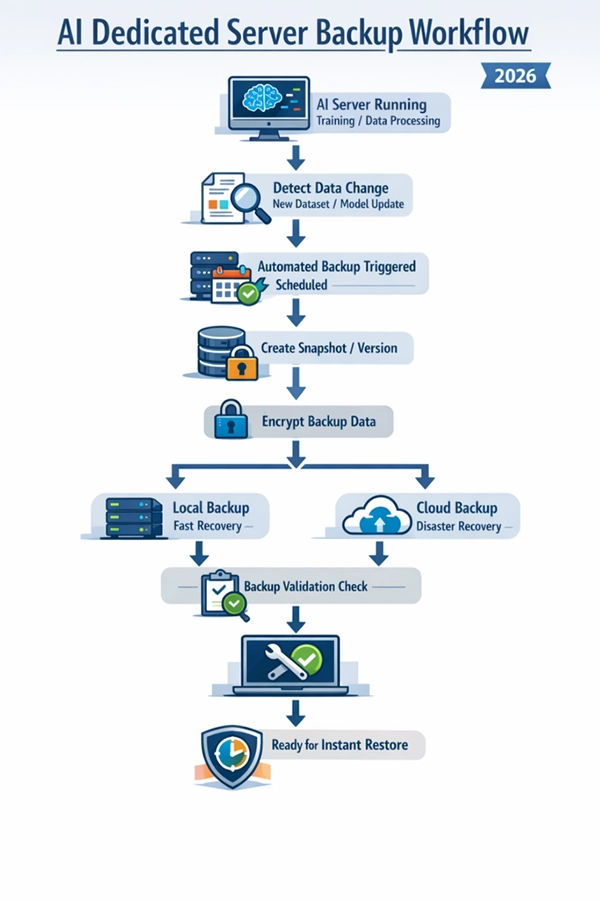
Tip 2: Use Hybrid Backup Solutions (Cloud + Local Storage)
It is not very safe to have one backup area. Hybrid backup solutions are a combination of fast recovery local storage and off-site storage with cloud computing. This approach ensures that local backups can be used to solve minor problems within a short time, and also cloud backups include major incidents such as server failure.
For AI settings, such a trade-off is important as datasets are voluminous and important.
Tip 3: Enable Data Versioning and Snapshot Backups
The development of AI is a cyclic process; the models are continuously trained, introduced into new cycles, and optimized. This allows teams to revoke old versions of data sets or models and get back to stable conditions in case something goes wrong.
This particularly comes in handy when:
- A model change brings about inaccuracies
- The effects of data processing alter results
- Experimentation has to be revisited.
Snapshots serve as save points in a game you can never go wrong with.
Tip 4: Encrypt Backup Data to Prevent Security Risks
Backups are equally effective as well as susceptible to attacks as live data. Unless they are secured, they may fall victim to cyberattacks. Encryption turns data into a form of a backup that is not decipherable by an unauthorized user, securing sensitive databases and addressing compliance requirements.
For AI systems that deal with proprietary or sensitive information, encryption is no longer a choice but a necessity.
Tip 5: Regularly Test Backup and Recovery Processes
It is one thing to have backups, but it is another thing to know that they are working. Periodic testing is useful in ensuring that data can be stored quickly, backup systems are operational, and there is good knowledge of recovery processes.
Testing may include:
- Scenarios of simulated recovery
- Partial data restoration
- Full system recovery drills
This minimizes risk and instills confidence in your contingency plan.
BONUS TIP
Treat your trained AI models like assets, not files; back them up separately and version them carefully, just like source code.
Final Considerations
Artificial intelligence is as powerful as the information used. And the larger and more complicated the datasets become, the higher the cost of losing such data is. Protection is not only about reliable backup strategies, but also about continuity, stability, and long-term progress.
Automation coupled with hybrid storage, visioning, encryption, and frequent testing will help companies to keep their AI dedicated servers steady, even in the event of unforeseen problems.
In the world of AI, it is not just that losing data can just make you slow down, but it can also destroy all the progress you have made.
Frequently Asked Questions
What is a committed server in AI?
What is the importance of backups to AI systems?
Since AI makes use of mass data and models, which are time-consuming and costly to establish.
What does a hybrid backup strategy mean?
It integrates local storage so that it can be recovered quickly and cloud storage so that it can be stored off-site.
What is the frequency of the AI data backup?
It is determined by the frequency of data change, but automated backup on a daily or real-time basis is the standard.
Related Posts

8 Best AI Presentation Makers for Business-Ready Slides
Making a presentation doesn’t just mean designing slides. It’s about defining a clear structure, using defined logic, useful visuals, and…

Queue Management Software Troubleshooting Guide: 8 Common Faults and Fixes
The long wait times and ineffective management of customer queues can have a significant impact on customer satisfaction and business…

How to Use Similarweb Website Traffic Data for Competitor Research
Competitor research without traffic data is guesswork. You can guess who your rivals are, guess how big they are, guess…

Choosing the Right Hosting Model for Scalable Digital Platforms
The performance of digital business is directly related to website speed, uptime, and scalability. Slow page performance has a negative…

How Data-Driven Performance Tools Are Transforming Employee Recognition in Tech Companies
“People work for money but go the extra mile for recognition, praise, and rewards.” — Dale Carnegie (Writer & Teacher)…

Why Businesses Struggle to Collect Reliable Data from the Web
Almost every company that depends on data runs into the same problem: although they can find the data they need,…

Why Financial Data Recovery Matters for Businesses
Financial data supports every part of a business, directly affecting cash flow, payroll, tax reports, audits, customer billing, and daily…

CMMC Compliance Is Coming for Manufacturers. Here Is What You Need to Do
“Cybersecurity is much more than a matter of IT.” — Stephane Nappo (Cybersecurity Professional) For manufacturers working within the defense…

How Data-Based Tools Influence Learning Performance
Learning has transformed in the modern age with the integration of new technologies to help students and professionals prosper in…