


Validate the order and customer fields before submission, then confirm the processor response against the same transaction ID before updating the order status.
How to Catch Data Problems Before They Derail Business Transactions
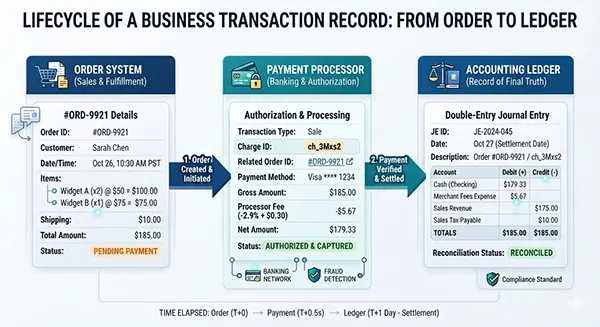
At 10:14 a.m., an online order shows “paid” in checkout, “pending” in the order system, and no matching entry in the accounts. Someone will have to untangle it. Until then, the customer may try again.
Most transaction failures do not begin with a dramatic outage. A bad product code, stale customer record, delayed update, or duplicate retry can send two systems in different directions. The fix gets more expensive after the order, inventory, and accounting records stop agreeing.
Catch the mismatch at the handoff. This guide explains where to validate data, how to keep payment status honest, which checks to automate, and how to investigate a pattern without losing the evidence.
Start With One Record You Trust
Most often, when a business is using multiple different tools for different business aspects, a lot of people, including the staff, are confused about what data they receive from which tool.
This can be harmful for your business because not knowing which data comes from which tool makes you pick the one that looks the most efficient and productive. This can end up with you collecting the wrong data and making a business decision based on it like it is the right one.
This is why the best approach to solve this matter is to know which records someone should trust when it comes to one particular tool, where it is stored in that tool, and what data is not a part of that tool. So consider tools for orders, stock, billing, and customer support. Each tool will only work for the betterment of your business if you know how to understand the data that they consolidate.
An even better option to make sure that multiple tools in your business work together is to choose a stable transaction ID that you use almost everywhere across your business. This helps maintain consistency in a business and makes sure that each tool in your business has a standard setting to look back at, so that nothing ever goes unchecked.
You can achieve it by using this ID in each of your systems, like item codes, currency, amount, creation time, and more. Once you start using it regularly enough and for a long time, this one ID becomes the source of truth for your business against which each aspect of your business checks itself. Moreover, this part is the least glamorous when it comes to checking the safety of the data you have collected, but it is also the most stable. This is because once you create it and start attaching it to every system, these systems work on autopilot without you having to put in the extra effort every single time.
The cost often starts as a tiny mismatch and becomes a significant revenue problem when teams refund, restock, or invoice from conflicting copies.
Validate the Data Before It Moves
Most people often overlook this step, thinking that this one is already getting solved through automated browser checks. While that is true, one should always make sure that system checks are also happening manually before they can ever be put on autopilot.
According to OWASP, validating values on your own server is extremely important to notice the malfunctions firsthand. Even though browser forms have their own set of checks, they will never observe the security systems as well as someone from within the business will. So browser checks can help, but server checks are the ones that actually matter in the long run.
You should also check each record before it moves to the next system in the transaction phase. This does not mean that you should only check the meaning of a record. Instead, you should check the exact syntax and meaning your record is using to demonstrate its value. For example, you must be sure that the date column is using the specified format instead of using the one it finds convenient, and similarly, a return date should not come out before the original purchase.
All of these things might seem small when you’re handling multiple systems in a business, but even the slightest mistake in these can create a bigger problem for your business.
Moreover, do not limit yourself to checking only the validity of a record. A contact field can be syntactically valid and still belong to the wrong customer. A mistyped email address can send a receipt or an account alert to the wrong place, so compare it with the customer record and verify ownership when the risk warrants it.
A Payment Status Can Lie by Omission
Usually, after a payment, when a green badge is displayed, we think that the payment has transferred successfully and everything has gone accordingly. But in reality, that’s actually not the case because a green success badge proves very little about the data.
What I mean by this is that payouts happen later than checkouts. This happens in the case of settlement because, in this particular case, the funds are grouped together for a payout, which usually happens later. Additionally, sometimes a processor can accept a payment and show a green badge as an acknowledgement given to the customer that payment has arrived, all while a request is marked as a timeout on the same server.
So a good piece of advice to avoid the situation altogether is that before marking the payment complete, refer to the same order ID and match it to the processor’s final status. Most people get this part wrong because they tend to combine different terms under the same general umbrella. “Authorized,” “captured,” “failed,” and “refunded” describe different stages, so treat them.
I would rather hold one uncertain order for a human check than quietly create a second charge. Do not guess.
According to the PaymentIntent documentation, released by Stripe, even one payment intent can actually track an order. This is a useful example because tracking a payment attempt through customer sessions is extremely important. This makes sure that the object is checked by the server and has to go through several states before it ever shows the green badge. This reduces the capacity for things to go wrong in your business and helps safeguard your payments and your business’s data. The exact labels differ by provider, so map them deliberately into your own order states.
Reconcile the Handoffs
There are different things that you should compare in a business to understand where your data is getting stored and who all have access to it. Given below is the list of things to compare, along with the mismatches that are most common with these signals and what they could mean for your business. Moreover, the first checks that you should conduct after you catch a mismatch are also listed below.
| Where to Compare | Mismatch to Catch | First Check |
| Order system to inventory | Paid order with no stock movement, or stock reduced twice. | Match order ID, product code, quantity, and event time. |
| Checkout to processor | Local order says paid while processor is pending, declined, or refunded. | Read the processor status for the original request. |
| Processor to accounts | Settlement total, currency, or refund amount does not match. | Compare transaction ID, amount, currency, and settlement batch. |
| Customer record to invoice | A receipt, invoice, or notification is attached to the wrong account. | Confirm the stable customer ID and validated contact fields. |
You should always start with the transaction ID because that is usually the easiest part to build safety checks and standards from. This means that you compare the records that you have stored in your data through both sides mentioned above whenever any handoff happens.
The only thing you have to ensure while doing this is that you use the same identifier throughout the entire process. If you switch to different identifiers, the data still gets collected, but it stops making sense. This is why a transaction ID is suggested as the primary basis. And in the case of a mismatch like the total payment, which differs by a cent, a currency code that changes, or an event that has no matching order, it is worth reviewing before you close the business every single day until the numbers start aligning.
One more common mistake that most people make while checking their servers’ security system is that they forget to consider the time zone differences. This means that even clocks can disagree, and if you do not know which one is just a result of a time zone difference and which one is actually a misalignment, your business will forever be at risk.
For instance, a processor can record an event in the UTC timestamp (Coordinated Universal Time), while the dashboard records the same data in the local time. In this case, a five-minute difference is not a result of data loss; rather, it is just a geographical factor that you didn’t account for. So before investigating where your business is going wrong, always make sure that you normalise the time zones.
One more part of the business that belongs in this review is provider selection. According to Limitless Payment Solutions, round-the-clock support and a fraud-protection program are good features to include so that your business stays safe. But for the data to remain safe, you need to understand what both of the services cover, how misparity like deadlines and refunds are reported back to you, and whether event data can be matched to your own order record or not.
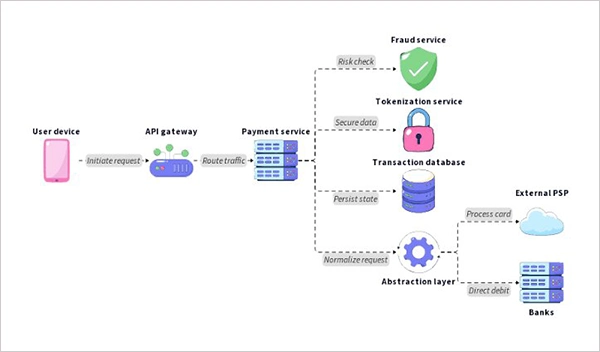
Treat Complaints as System Signals
Customers are usually the best source of failure recognition for your business, because they recognise a failure long before it ever appears on your dashboard or on the tools you have purchased for your business.
This is why when a frustrated customer reports a failure like a receipt that never arrived, an order that is still pending, or a card that has been charged twice, it is usually telling you more about a problem. All you have to do is log all of these reports and check the transaction history.
According to HubSpot’s complaint-response guidance, keeping track of all of the failures that have happened and how they were fixed gives you a designated set of solutions when the same problem occurs the next time in your business. It also helps you figure out which part of your business is lagging and what needs to be changed before it turns into a bigger problem.
This means that capturing the order ID, estimating the approximate time in which the issue will be resolved, writing down the error shown, and what channel will help you use the existing data in a better way. So all you have to do is listen to the issue, outline the action being taken, and follow up after the fix. Keep the support case linked to the technical incident, so the same pattern is easier to spot next time.
Make Failures Safe to Repeat
Retries in a business to make sure that your data is safe and to avoid problems are normal. Especially when you are starting out. However, if these retries keep continuing for a long time and without a defined cap on them, then these can become an expensive problem.
According to Stripe’s API documentation, you should use an idempotency key for any operations that require the regular use of creating a charge, order, refund, or shipment. This helps set up a unique identifier for the business that recognises a set of actions that have been repeated consistently over time, so that, if needed, you can take the necessary actions against it.
This actually helps in ensuring that the retries are treated with the same amount of caution as the first try was treated with and it also makes sure that the requests are safe and only made after a connection shows an error. However, even with all of this, you have to make sure that a new key was not generated simply because the old key was taking too long to reply. Only create a new key when you are 100% sure that the first key wasn’t working. Even in that case you should generate the key from the original operation and reuse it on a retry.
In fact, you should also set up a queue where you can see why a retry was initiated by keeping a list of the failed work. Keep attempts, error codes, and the next retry time. Set a limit, move repeated failures to a review queue, and make sure staff can resume the original transaction rather than creating a new one from scratch.
KEY TAKEAWAYS: If the order, processor, and accounting records disagree, pause any action that cannot be reversed until one status is confirmed.
The Last Test Is Recovery
Most business owners feel that just because they bought expensive tools to protect and safeguard their business, the data will remain safe. However even with a good quality of validation and payment software, certain issues can leave a transaction midway in the sense that no dashboard will be able to explain its misalignment.
For instance a software release, a brief network interruption, or a downstream outage can all be the factors because of which a safety check could not be explained to the staff or the owner.
Test the unhappy route before launch. Simulate a timeout after a request is sent, a duplicate event, a missing inventory update, and a refund that reaches the processor but not the accounting system. Confirm that alerts identify the affected transaction and that an operator can safely retry, reconcile, or pause it.
There is almost nothing that a silent detection can improve because rarely does anyone notice it. This is why for every default in your software you should keep a record of it. This means that every recovery action should be logged with the timestamp, an owner, and the reason for which the failure occurred in the first place.
One mistake that people also make while logging these failures is that they do not clearly state who has access to view these records and who does not. These failures are not just records, but they are sensitive customer and payment data that should not be made accessible to just anyone on staff. This is why storing these records in a system using backups is extremely important so that there is no room for failure. A backup that has never been restored is a promise, not a recovery plan.
A useful alert should leave the on-call person knowing whether to hold an order, retry it safely, or reconcile it by hand. An alert that cannot guide the next action just reports trouble.
Frequently Asked Questions
How can a business catch transaction errors before payment?
What causes duplicate transactions?
A retry may repeat an operation that the server already accepted, especially after a timeout. Use idempotency keys and check the original request before submitting a new one.
Why do two systems show different transaction statuses?
They may update at different times, use different status labels, or miss an event. Compare IDs, event timestamps, and the processor’s current status before changing the record.
How often should transactions be reconciled?
Check high-risk or time-sensitive operations as they happen, then run scheduled reconciliations for the wider ledger. The right cadence depends on volume, settlement timing, and the cost of an undetected mismatch.
Related Posts
Search Console Forgets Everything After 16 Months: How to Back Up Your SEO Data
After completing the period of 16 months, all the data and access are deleted from Google Search Console’s database. After…
Why Digital Transformation Projects Stall: A Resourcing Playbook for Project Managers
Digital transformation projects are on the rise at this time. From government-backed initiatives to enterprise cloud adoption and AI integration.…
How Email Hosting Providers Store and Protect Business Data
Where does your business email go when you click the send button? The impression is that the email just goes…

Best CI/CD Platforms for Coding Agents and AI-Native Development
CI/CD has changed its job because coding agents now write a growing share of the changes that reach a repository.…

Mavlers Agency on Why Global Agencies Are Turning to Offshore SEO Teams
An offshore SEO team in India is becoming more and more an option for great profit for global agencies; it’s…
How to Change Signature in Outlook: A Complete Guide
How do you change signature in Outlook? It sounds simple until you realize that the steps vary across Windows, Mac,…

Best 7 AI Development Companies for Data AI Solutions for Your Project: Guide for…
Buying model work before the data work is the most expensive order to do it in. The pilot shows well,…

Top Software Development Companies Backed by GoodFirms Reviews
In September 2026, GoodFirms listed 853 software development companies in California. The group had a median hourly rate of $37,…

What Is a Blockchain Explorer? How to Track Crypto Transactions
A blockchain explorer is a searchable interface for viewing data recorded on a public blockchain. You can look up a…