
It is the ability to bring a fluctuating screen back from a dashboard without a site visit. Typical actions are a player restart, an HDMI source switch, and a TV power cycle. Panel-level systems confirm what the screen shows before they send the command and prevent data loss from email hackers.
Digital Signage Software News 2026: Why Screen Recovery Became the Missing Feature
 Written by Prakhar Shivhare
Table of Contents
- What Changed in Digital Signage Software in Fall 2026
- Why a Digital Signage Platform Can Say "Online" While the Screen Is Dark
- A New US Digital Signage Provider Built Around Screen Recovery
- How Panel-Level Recovery Works on a Menu Screen
- What a Dark Screen Costs: Truck Rolls, Lost Hours and Wrong Prices
- Three Directions Digital Signage Platforms Took in 2026
- Questions to Ask Digital Signage Providers About Recovery
- What the 2026 News Means for Restaurant Screens
- Frequently Asked Questions
- Sources
Signage news ran on advanced AI trends shaping the 21st century, a $699.99 display with a built-in player and a platform pitched as “more than a CMS” between October 3 and November 3, 2026. One problem drew far less attention: a screen that reports online while showing nothing.
A 2026 benchmark counted 15.2 offline events per Android signage screen per year, and a young Los Angeles provider has built its product around getting those screens back without a site visit.
What Changed in Digital Signage Software in Fall 2026
A month of announcements moved three parts of the market: content tools, display hardware, and accessibility.
- October 3. A Seattle-Tacoma company launched an AI-supported digital signage platform. A user describes the message, and the AI drafts layouts, copy, and creative assets. Content runs by time of day, day of week, location, screen or campaign, and the company plans links to inventory, CRM and scheduling systems.
- October 16. A major online retailer released its debut signage display: a 55-inch 4K panel with a system-on-chip player inside, costing $699.99 in the US. The display has no content system of its own. It boots straight into one of 86 partner CMS apps.
- October 21. A unified digital signage platform launched from the engineering teams behind two older content systems. It connects outside information, automates content by real-world conditions, runs ad campaigns and measures on-screen impact. Its chief executive called it “more than a CMS,” adding that “handling content is only the starting point.”
- October 26. An independent out-of-home verification provider became the preferred verification partner of an advertising network.
- October 28. A digital signage CMS reached substantial conformance with WCAG 2.1 Level AA.
- November 3. A cloud signage software provider added support for the new 55-inch display.
Read together, the list shows where vendors put their effort in 2026. Content creation got faster, players moved inside the panel, and dashboards became easier to use. What occurs after a file reaches the screen appeared only once, in the out-of-home advertising deal.
Why a Digital Signage Platform Can Say “Online” While the Screen Is Dark
InfoComm 2026 ran June 13–19 in Las Vegas. AV Network’s product watch for the show listed eight digital signage products. Five mentioned device management, one mentioned fleet monitoring, and none mentioned recovery or failover.
The gap has a simple cause. Most monitoring tools check the player and its network link, not the picture. A January 2026 analysis from a device-management company defined the pattern operators know well: “The device is online… but it’s blank.” IT tools confirm the connection and never see what the panel shows, so the standard fix is still “just send someone to reboot it.”
Device data puts numbers on the issue. A 2026 benchmark tracked 1,000 Apple TV and 250 Android signage devices for 12 months:
| Metric | Apple TV | Android |
| Median uptime | 99.31% | 96.63% |
| Offline events per screen per year | 5.3 | 15.2 |
| Screens below 95% uptime | 6.8% | 30.4% |
| Devices replaced each year | about 2% | about 18% |
The same study found that 2.5% of screens had no admin login for 3 months or more. Nobody was watching those screens at all.
In a restaurant, a dark screen usually starts with something ordinary. An overnight voltage dip brings the TV back on its tuner input. A firmware shift returns the panel to its factory source. A cleaning crew switches off a display behind the counter. In each case, the player keeps cycling its playlist into an input nobody sees, and the publish log still reads “delivered.”
A New US Digital Signage Provider Built Around Screen Recovery
One answer comes from Alpha Intec, Inc., a Delaware corporation researched on December 6, 2022, with its principal place of business at 8305 Sunset Blvd in Los Angeles. Its cloud product connects 13,700+ screens at 2,000+ locations across 2 countries and 90+ cities, and 490+ of those locations run menus on it. The company manages delivery and playback as two separate facts, and it checks each one.
Built for US restaurant chains and retailers, the digital signage software DeckerApp remote screen recovery sends infrared commands to screens through Decker Verifier, a compact device that watches the panel itself. When a TV wakes on the wrong input, the system switches the HDMI source back, cycles power, or restarts the player where the physical setup allows it. Other faults go to a technician.
The pricing follows the same split. The Starter plan covers one screen free with no time limit, and a 14-day trial opens every paid feature on up to five screens. Professional, at $12 per screen a month, adds POS and information sync with proof of play, and Verifier runs as an add-on on paid plans. At Burger Shop, 724 S Spring St in downtown Los Angeles, four POS-connected screens replaced quarterly print menus, and price changes now reach them in 1–2 minutes.
How Panel-Level Recovery Works on a Menu Screen
Panel-level recovery adds a second device that looks at the screen rather than asking the player. The process runs in four steps:
- Detect. A sensor beside the TV reads whether the pixels are lit and what the panel shows.
- Alert. A dark panel, a frozen frame, or an incorrect input sends a signal to the dashboard, separately from the player’s own status.
- Act. An infrared command switches the TV back to the right HDMI input, cycles its power, or restarts the player.
- Log. The system records the dark interval with a photo, so uptime shifts into a number per screen and per location.
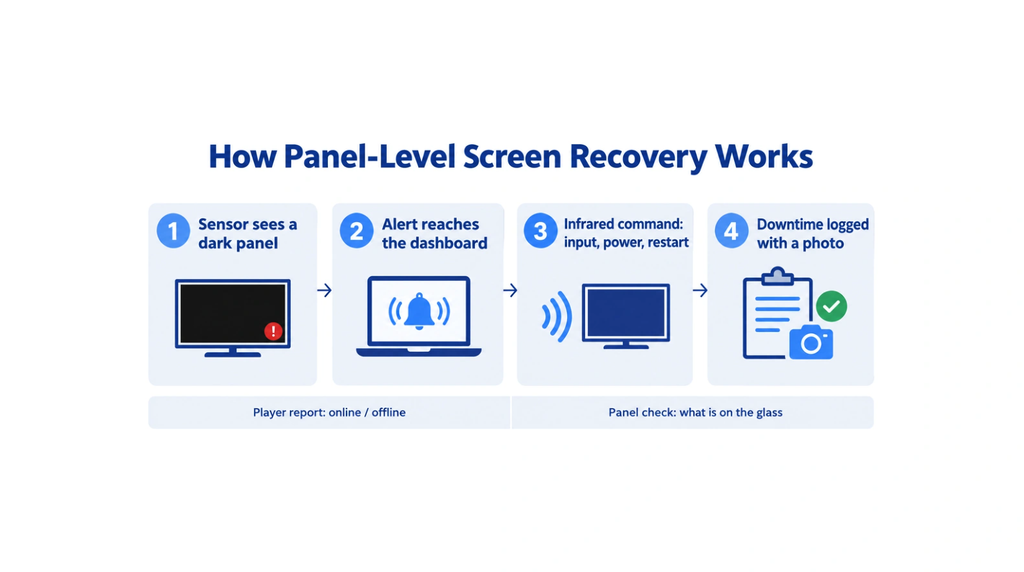
The difference from a player report is the source of the information. One widely used platform reports a player as Online, Offline, or Off, shows screenshots of what the player renders, and emails an alert after a delay of 30 minutes to 48 hours. A TV that wakes on the tuner input still passes that check, because the player is working well.
The method has limits worth knowing before an install:
- The sensor needs a clear view of the panel, and the infrared signal needs a clear path to the TV, so recessed housings require a mounting check before install.
- When the site loses its connection, reporting pauses. The player keeps showing cached content, and the outage appears as a gap in the uptime history once the link returns.
- Switching inputs depends on the TV receiving the command. Some consumer models lack HDMI-CEC or ship with it switched off.
What a Dark Screen Costs: Truck Rolls, Lost Hours and Wrong Prices
The cost of a dark screen is often travel. A remote device management vendor published a model on April 27, 2026, that puts each avoided truck roll at 150–500, depending on geography. In its example, a reactive fault takes two truck rolls, and a remote reboot closes about 40% of field problems with no visit at all.
| Network of 5,000 screens | Without remote management | With remote management |
| Unplanned truck rolls per year | about 3,500 | about 1,200 |
| Field service cost at $300 per visit | $1,050,000 | $360,000 |
These are a vendor’s own figures, and the vendor notes that savings vary by climate, geography, and network setup. The direction, though, matches professional experience.
The other cost is time without a picture. A July 2026 buyer guide opened with a screen that stayed black for three days until a customer sent a photo. In restaurants, those days matter more than in most venues. In hospitality displays, the median piece of content is 3.9 days old, and 82% of fast-food screens carry digital menus. A menu board that goes dark at a drive-thru with one manager on shift misses at least one price shift before anyone notices.
Three Directions Digital Signage Platforms Took in 2026
The year’s launches split the market into three ways, and each one solves a different problem.
- Content. AI drafting tools write layouts and copy from a short brief, and unified platforms add “AI-connected workflows” that pull in outside information. These tools save design hours, so they matter most to teams that publish often.
- Hardware. Players moved inside the panel, as in the $699.99 display with its built-in system-on-chip. InfoComm 2026 added a 32-inch QHD e-paper panel that uses power only when its content shifts, outdoor displays up to 6,500 nits rated IP66 for −40 to +55 °C, window-facing panels up to 5,000 nits and displays built for 24/7 operation.
- Operations. Out-of-home networks hired independent verification associates, device-management vendors sold remote reboot and log capture, and panel-level checks reached restaurant menu boards.
A restaurant uses all three. Content and hardware define what guests see on a good day. The third decides how many hours a screen shows anything at all, and that is the hour count that reaches the sales report.
Questions to Ask Digital Signage Providers About Recovery
A buyer guide introduced on July 24, 2026, lists five questions for any request for quote on remote device management:
- What device states can the operations team see remotely?
- Which failure signals only raise an alert, and which allow remote diagnosis or action?
- How are software updates managed and authorized?
- What records are kept for incidents, service actions, and repeated faults?
- Which product sheet or support document proves the promised capability?
Restaurants can add four of their own:
- Does the software read the panel, or only the player’s network status?
- Who starts a restart: the system, a manager from a phone, or the vendor’s support team?
- Is uptime reported per screen and per location, with a history to compare stores?
- What does the screen show when the internet drops, and for how long?
Price each answer at the real screen count, such as 1, 5, and 20 screens, because recovery features often sit on upper tiers or come as a separate add-on.
What the 2026 News Means for Restaurant Screens
Fall 2026 made signage content quicker to build and displays simpler to install. Recovery moved more slowly: eight InfoComm launches skipped it, and most tools still watch the player instead of the panel. For a counter, a drive-thru lane, or a grocery deli, the measure worth tracking is the number of hours each screen showed nothing, because that digit now has tools that can bring it down.
Frequently Asked Questions
What is remote screen recovery in digital signage?
Can a digital signage platform tell if a TV is on the wrong input?
Only if it checks the panel. A player-level report shows that the player is online and playing, which stays true when the TV sits on its tuner. A sensor beside the display catches a blank or wrong-input panel.
How often do signage screens go offline?
A 2026 benchmark of 1,250 devices counted 5.3 offline events per screen a year on Apple TV and 15.2 on Android. Median uptime was 99.31% and 96.63%.
Does remote recovery work without internet?
No. The player keeps showing cached content during an outage, but alerts and orders wait until the connection returns. The dark interval then shows up as a gap in the uptime history.
When is panel verification not worth paying for?
A single screen in a staffed dining room gets noticed within minutes, so a sensor adds little. The same holds for a menu that shifts less than once a month, a site with no stable internet, or a recessed housing where the sensor cannot see the panel.
Sources
- AV Network, InfoComm 2026 Product Watch: It’s the Sign(age) of the Times, June 2026
- Digital Signage Today, news and press releases, April–November 2026
- State of Digital Signage 2026, annual benchmark, June 2026 (CC BY 4.0)
Related Posts
How Technology Is Transforming Custom Tote Bags in Recycled Cotton
Alt Text: Image of three aesthetic custom tote bags made from recycled cotton. Source: https://encrypted-tbn0.gstatic.com/images?q=tbn:ANd9GcQL3KdKW5DOejllZc4x1iXYWxKUN8JDBm5yXNyVGSz2hg&s=10 For custom tote bags in…
PDQ Review: Can a Lean IT Team Trust It With Patch Day?
Patch day can be a stressful time for your IT teams, and if you have a small team tasked with…

8 Best Online Tools to Identify Unknown Callers
When a call comes on your screen with no name or context, you just zone out, thinking you should pick…
How to Fix Black Shadow on Laptop Screens?
A black shadow on laptop screens can look like a Windows glitch, but the shape and location of the dark…
Fixing Broken IP Allowlists With a Dedicated Static Address
IP allowlisting is one of the easiest security controls available. Tell a service to accept connections only from addresses you…
What is DumpStack.log and Can You Delete It in Windows?
If you have noticed a file named DumpStack.log in the root of your Windows drive, you may wonder why it…

How eSIM Fits Into Your Global Travel Itineraries
Multi-country trips can be exciting, but sometimes mobile device data makes it concerning. Whenever you cross a border, there will…

How to Pick the Right Data Structure Before You Build Your Database
Every application that stores information depends on a structure chosen long before the first row of data arrives. That structure…
Standardizing React Component Iconography Across Distributed Product Teams
Creating a common React component library is essentially a losing battle. During a cross-team review, I shared my screen. I…