


It simply means that Operational Technology (OT) combines the instruments, controllers, software, and all types of networks accessed by industries to control manufacturing operations.
Why Cybersecurity Has Become Essential for Modern Manufacturing
Table of Contents
- Why Manufacturing Cybersecurity Is Different
- Map the Machines, Data, and Connections
- Separate Network Zones Before Adding More Tools
- Lock Down Remote Access and Update Paths
- Keep Backups That Can Bring Production Back
- A Readiness Check for the Next Shift
- The First Restore Should Happen During a Drill
- Frequently Asked Questions
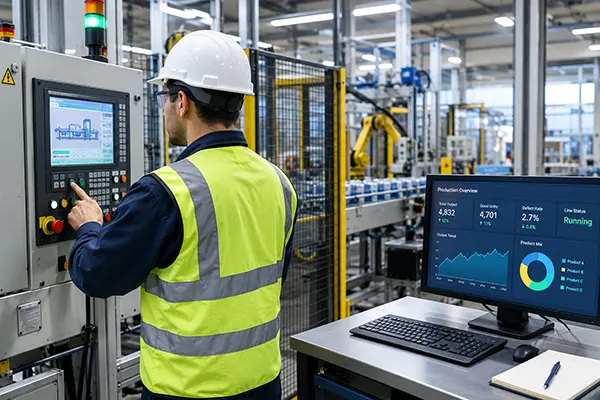
Generally, at midnight, the production line does not respond. When an operator sees the warning signal, the engineering team finds the system not responding and access revoked.
This can cause your controller to pause, or infected servers, or an attack can influence the vendor accounts. This also causes the production unit, quality, schedules, or customer retention to suffer across the whole environment.
If you manufacture, cybersecurity is an important credential to help the system run. It usually contains all networks, your industrial control system, automated machinery framework, different cloud applications, and the system data circulating.
This practical plan ensures that what is connected, access controls, security issues, data privacy, and employee security are restored safely.
Takeaway:
If you lose the device, misplace data, disclose remote credentials, or leave a backup system open. All can turn small problems into production issues. Secure the access gaps before it acquires other access tools.
Why Manufacturing Cybersecurity Is Different
A manufacturer’s security response is very different than an office security plan. If you stop the process in between, it can cause a new issue with the controller for a production cycle, damage the equipment, affect quality, or create security theft.
You have to understand when different professionals operate on different types of tasks depending on the workload they handle.
For the IT team, they usually cover the applications used in businesses, records maintained, and admin accounts.
Similarly, OT includes the systems that are useful for operations for business activities such as PLCs, HMIs, and SCADA systems. Industrial operations use advances in control management, while manufacturers ignore them.
All the changes that you are supposed to manage lead to caution alerts about the changes made, difficulties in creating networks, and controller operation issues. This is an initial technical issue that your team can quickly address before it produces large consequences.
NIST simply defines the hurdles posed during processing online and offline threats. The matrices are designed to conserve the rules and protocols within security parameters for operational technology to provide smooth procedures.
Map the Machines, Data, and Connections
You can usually start by collecting all listed connected machines, with their servers, all controllers, and related cloud services. Also maintain records with inventory updates, network framework, and remove all the network connections when the attacks occurred.
| Asset to manage | Maintain records for security |
| PLC | Equipments or firmware across system |
| Engineering workstation | User permissions and device operation |
| Production system | Storage and retrieval details |
| Vendor security | Procedural, permission, or termination |
Count Data That Is Easy to Miss
A factory has the protection layer for several customer records, product details, machine operation settings, recorded results, quality access reviews, frameworks, and all logs of daily activities.
If you lose the data, then the engineer has to work on restoring the equipment or verifying the quality parameters. You should remember the location of inventory data, storage, and access controls, which change during the process.
Document your recovered datasets, which usually combine all portal information from digital systems, or cloud dashboards that contain production information that controls the machine directly. This also adds hands to your team to minimize further errors.
Separate Network Zones Before Adding More Tools
This only happens when you connect your office system with industrial controllers, which usually share unauthorized networks; an attacker can access the production system from a system.
All your network segments reduce risk and shrink their firewall connections by controlling separate business applications, workstations, security systems, and Wi-Fi parameters.
The manufacturer usually requires the DMZ to operate the incidents coming to connection servers between IT or OT frameworks. Sometimes your separate zone parameters cannot be sufficient.
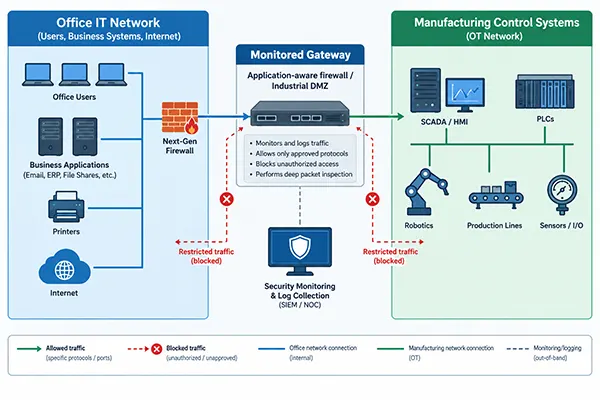
You should also regularly check the required tasks, delete the unauthorized connections, and verify the firewall that can add a layer of security. Keep in mind the production safety teams with machinery drawbacks, monitoring through all emergency operations.
Lock Down Remote Access and Update Paths
When you control the system remotely, it opens your security parameters while accessing the account or password share to team members. You should require a code to generate, with possible multi-factor authentication.
You should also use a good VPN system or remotely controlled gateways that eventually give access when the system demands it. Use access controls for temporary jobs, and keep an eye on such activity for suspicious behaviour.
Treat your vendor permissions strictly; monitor their connections for where they used the flaws, and revoke system access; if not, then this will compromise the account, and this covers the risks involved in monitoring vendors’ systems to reduce the overall further threats.
You also operate the test procedures before installing an upgrade because an affected update can influence the production system. You should test the patches, operational permissions, and then install with proper maintenance.
Keep a plan updated when the update installed creates an issue. Older equipment cannot be patched safely without restricting the connection, activity, and safety procedures; you should ignore the drawbacks, which can cause difficulties in the process.
Keep Backups That Can Bring Production Back
The procedure to back up the data is to protect the critical information with the PLC logic, machine settings, engineers’ data, production source databases, quality records, and receipts onwards. It also doesn’t mean that your system is secure; backup only recovers lost data, not protection.
This also confirms that following defined rules for creating 3 copies with several storage locations makes the layer more secure. Your backups and data retention policies are designed for the extreme condition of the main server being at risk. The cloud backup provider has options to cope with the challenges faced in the event of exposure or compromise.
Three-layered backup protection creates the protection parameters that lower any threat with the copies created.
| Tier 1: Working data ( Configuration or production files ) | → | Tier 2: Secondary backup ( Secure protection with limited controls ) | → | Tier 3: Recovery copy( Stored in a remote environment ) |
Instructions to be followed:
- You should rectify the system and process the records.
- Data security and confirm its backup procedures.
- Use several servers to minimize the risk of compromise
- Test the system from a secure environment with the recovery process under control
- You finally remove the threats and review all records that were maintained over a long time.
You also assign the authority or repeat tasks for the changes that occurred. Restarting equipment verifies the recovery configuration and gets permissions for operations.
A Readiness Check for the Next Shift
When you see that security protocols are needed when the system is running, or the business is online. If the permission is revoked, then access is halted.
You need to check the points that help your system move forward:
- The critical system is monitored, ensuring the system, machines, servers, and network are in the right direction
- Make the network framework and note the exchanges and route followed
- Vendor setup is most important. Expiry, permissions, control activity.
- Essential MFA to integrate in remote situations.
- Problems to be noticed fast; create a position to monitor failures.
- Duplicates are maintained to protect from dangers.
- Instructions for your team when a difficult situation is out of control.
- Your team has specific rules to follow in failure or permission obtained in security whether to call off or to attempt.
- Your staff knows which protocols or procedures to follow.
If this list does not follow all rules, then take the situation seriously, and report the situation to the concerned authority and limit the time controls. Smaller mistakes are easy to overlook, but real situations force the team to work under pressure.
The First Restore Should Happen During a Drill
You should practice the recovery option with real challenges, which usually include IT teams, engineering, production units, and all safety protocols.
Review all the data again after recovery. Check for missed information and details leaked, related login credentials, permissions revoked, or information exchanged.
First, fix the issue and repeat afterwards if you find any flaws. These rules should be followed by your team in such situations.
Frequently Asked Questions
What Is OT Cybersecurity in Manufacturing?
Why Does a Manufacturing Network Need Segmentation?
It generally controls the connection between servers, which helps minimize the risk of an office system being exposed to the outside environment.
Can Cloud Backups Protect Production Data?
Absolutely, it provides security by generating copies and securing the system; examine recovery rules, with safe procedural requirements.
Should Industrial Equipment Install Updates Automatically?
No, not always. Test updates before installation, use approved maintenance windows, and protect unpatchable equipment with additional network controls.
Related Posts
Using HeyGen AI for Sales and Customer Onboarding
It’s best to use HeyGen AI to create videos for you that answer a particular question or pain point. You…

Search Console Forgets Everything After 16 Months: How to Back Up Your SEO Data
After completing the period of 16 months, all the data and access are deleted from Google Search Console’s database. After…
Why Digital Transformation Projects Stall: A Resourcing Playbook for Project Managers
Digital transformation projects are on the rise at this time. From government-backed initiatives to enterprise cloud adoption and AI integration.…
How Email Hosting Providers Store and Protect Business Data
Where does your business email go when you click the send button? The impression is that the email just goes…

Best CI/CD Platforms for Coding Agents and AI-Native Development
CI/CD has changed its job because coding agents now write a growing share of the changes that reach a repository.…

Mavlers Agency on Why Global Agencies Are Turning to Offshore SEO Teams
An offshore SEO team in India is becoming more and more an option for great profit for global agencies; it’s…

How to Change Signature in Outlook: A Complete Guide
How do you change signature in Outlook? It sounds simple until you realize that the steps vary across Windows, Mac,…

Best 7 AI Development Companies for Data AI Solutions for Your Project: Guide for…
Buying model work before the data work is the most expensive order to do it in. The pilot shows well,…

Top Software Development Companies Backed by GoodFirms Reviews
In September 2026, GoodFirms listed 853 software development companies in California. The group had a median hourly rate of $37,…