


Ans. An updated signature keeps your contact details, job title, company information, and links accurate across your emails.
How to Change Signature in Outlook: A Complete Guide
How do you change signature in Outlook? It sounds simple until you realize that the steps vary across Windows, Mac, web, and mobile. A new job title, updated phone number, or changed company logo can leave your old details attached to every email.
Fortunately, updating your signature only takes a few steps once you know where to look. This guide explains how to change signature in Outlook, control when it appears, and keep it professional and easy to read.
Quick Answer: How to Change Your Signature in Outlook?
- New Outlook or Outlook on the Web:
Go to Settings > Accounts > Signatures, select your signature, edit it, and choose Save.- Classic Outlook for Windows:
Go to File > Options > Mail > Signatures, select the signature, make your changes, and save them.- Outlook for Mac:
Go to Outlook > Settings > Signatures, select the signature, choose Edit, and update it.- Outlook Mobile App:
Open Settings > Signatures, then edit your signature.
How to Change Signature in Outlook?
Outlook signature change steps depend on which version you are using. Before you start, check whether you have New Outlook, classic Outlook for Windows, Outlook on the web, Outlook for Mac, or the mobile app.
1. How to Change Your Email Signature in New Outlook
Microsoft has moved signature settings into the account settings in New Outlook.
- Open Outlook.
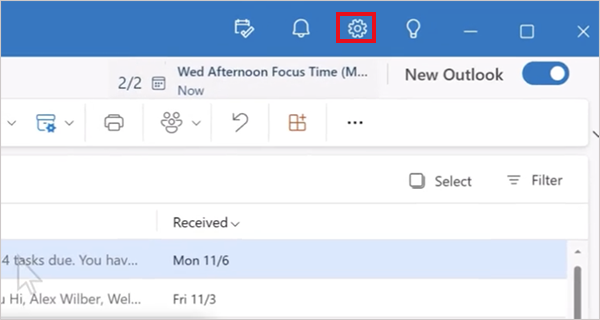
- Select Settings in the upper-right corner.
- Go to Accounts > Signatures.
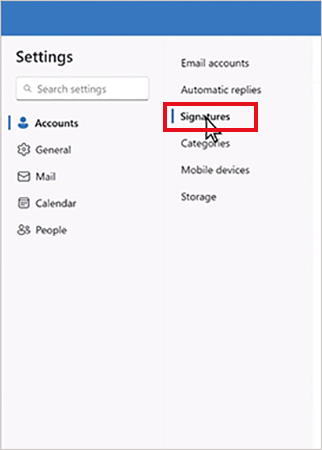
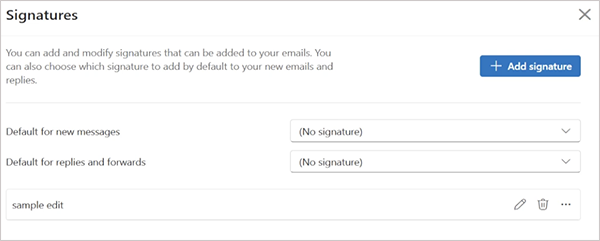
- Locate the signature you want to change.
- Select the Edit signature icon.
- Update the text, formatting, links, or images, and select Save.
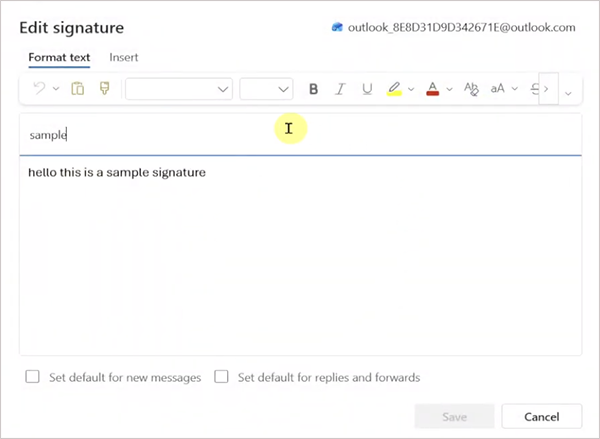
If you have multiple email accounts, make sure you select the correct account before editing its signature. You can also create multiple signatures for different situations, such as business, personal, or internet emails.
2. How to Update Signature in Outlook on the Web
Outlook on the web uses a similar process. Here’s how to change Outlook email signature on the web version:
- Open Settings.
- Then, go to Accounts > Signatures.
- Select Edit signature next to the signature you want to change.
- Make your changes and select Save.
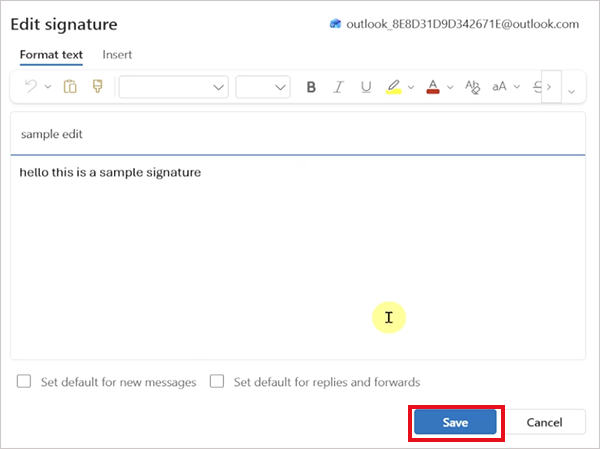
The exact interface may vary slightly depending on your Outlook version and account.
3. How to Update Your Signature in Outlook Classic for Windows
Classic Outlook has a different settings path:
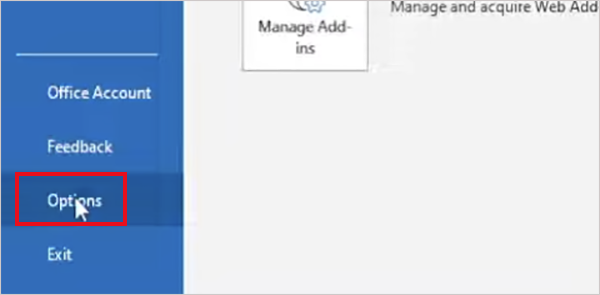
- Open Outlook and go to File > Options.
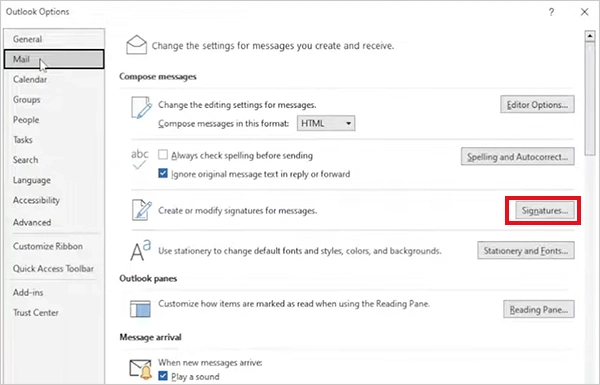
- Select Mail and click Signatures.
- Select the signature you want to edit.
- Then, make your changes in the Edit signature box.
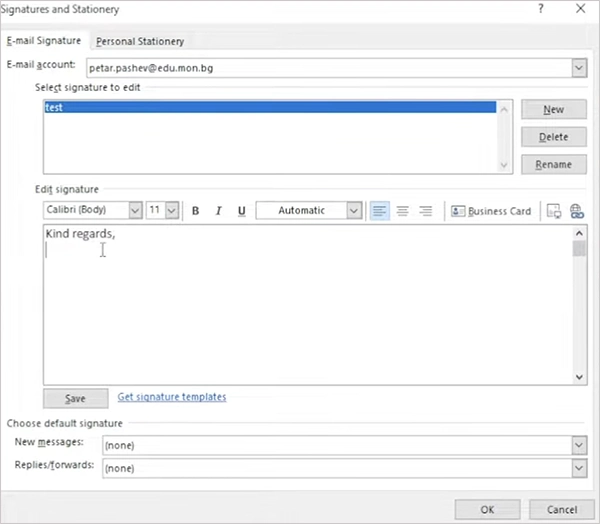
- Select Save, then OK.
You can update the text, formatting, hyperlinks, images, and other signature elements from this window.
4. How to Adjust Signature in Outlook for Mac
Now let’s see how to update Outlook signature on a Mac:
- Open Outlook.
- Select Outlook > Settings from the top menu.
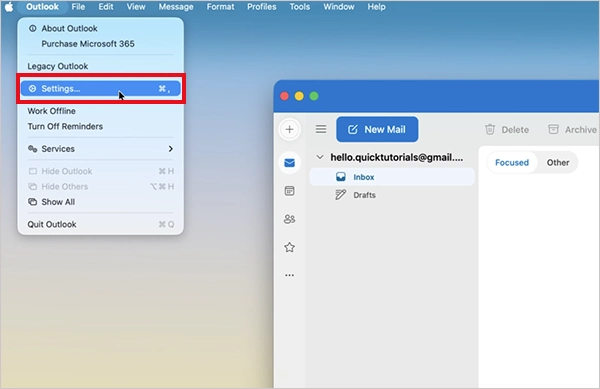
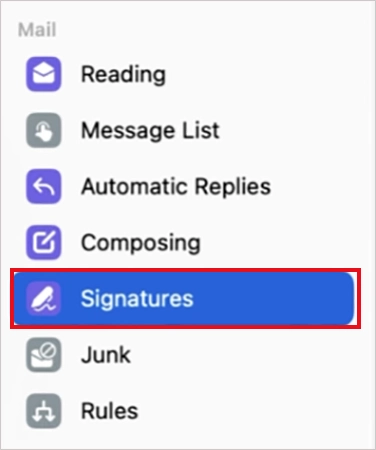
- Under Mail, select Signatures.
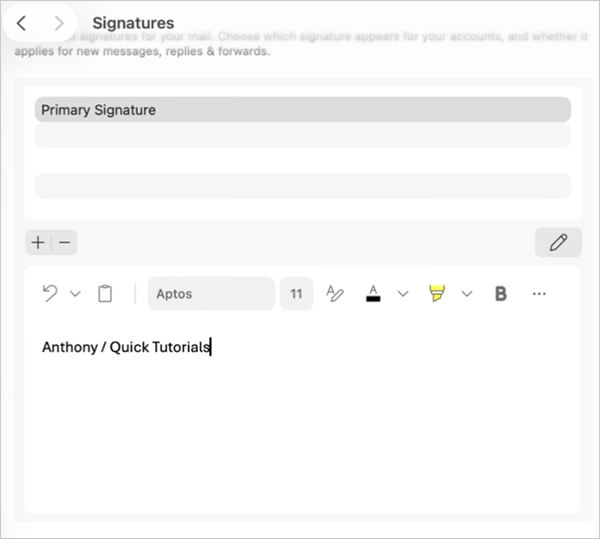
- Select the signature you want to change.
- Select Edit, update the signature, and close the window.
If you have multiple accounts, check that you are editing the signature associated with the correct account.
5. How to Change Outlook Signature in Mobile
The Outlook mobile app uses a simpler setting. Here’s what you need to do:
- Open the Outlook app.
- Open Settings.
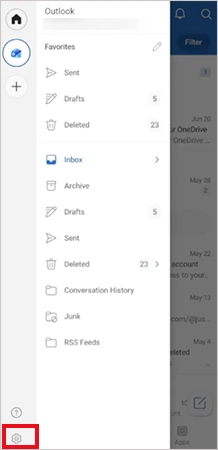
- Next, select Signatures.
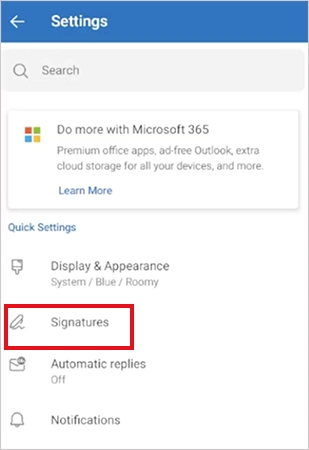
- Now, just enter or edit your signature.
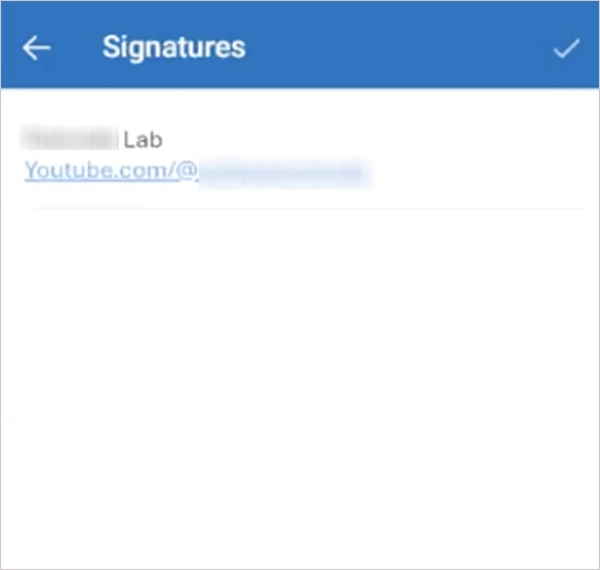
If you use multiple accounts, turn on Per Account Signature to create separate signatures for each account.
How to Set Your Signature for New Emails, Replies, and Forwards?
Changing a saved signature does not necessarily determine when Outlook inserts it automatically. You can choose separate signatures for new emails and replies or forwards.
In new Outlook and Outlook on the web:
- Go to Settings > Accounts > Signatures.
- Choose the signature you want to use for new messages and for replies and forwards.
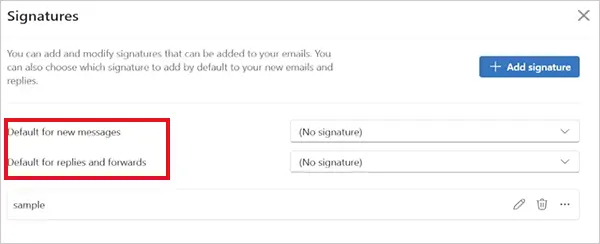
You can leave either option blank if you prefer to insert a signature manually.
In classic Outlook for Windows:
- Go to File > Options > Mail > Signatures.
- Under Choose default signature, select a signature for:
- New messages
- Replies/forwards

- You can also select (none) if you don’t want Outlook to add a signature automatically.
On Mac:
- Go to Outlook > Settings > Mail > Signatures.
- Configure the signature settings for new messages and replies or forwards.
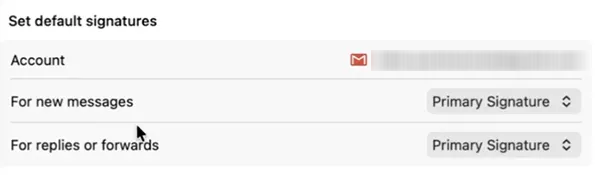
This is useful when you want a detailed signature for new emails but a shorter sign-off when replying to an existing conversation.
How to Change Email Signature in Outlook Manually?
You can also insert a saved signature only when you need it instead of adding one automatically to every message.
In new Outlook or the web version, compose an email and select Signature from the message toolbar. Then choose the signature you want to insert.
In the classic version, open a new message, select Signature from the message menu, and choose the saved signature.
On Mac, click inside the message, select Signature, and just choose the signature you want to use.
Manual insertion is useful when you have different signatures for different situations, such as a detailed signature for clients and a shorter one for internal emails.
Best Practices to Create a Signature in Outlook
A good email signature should make your contact information easy to find without taking over the message. For a professional signature, consider including:
- Full name
- Job title
- Company name
- Phone number, if relevant
- Website or professional profile
- Company logo, if appropriate
Also, keep the following points in mind when creating your signature:
- Keep it short and only include the information recipients actually need.
- Stick to a readable font, sensible spacing, and use consistent formatting.
- Test website and social profile links to make sure they work properly.
- Resize logos properly; for example, a large logo can make an otherwise clean email look cluttered.
And remember, it is better to use separate signatures when needed. Multiple signatures can be useful for different accounts, roles, or types of communication.
Conclusion
Changing an Outlook signature is straightforward once you know where Microsoft has placed the setting in your particular version. Once you have updated the signature, check when Outlook inserts it automatically. Using separate signatures for new emails and replies can help keep your messages appropriate without having to edit the signature every time.
Frequently Asked Questions
Why does changing your signature in Outlook matter?
How do I change my signature in Outlook?
Ans. In new Outlook, go to Settings > Accounts > Signatures, select your signature, edit it, and select Save. Classic Outlook uses the File > Options > Mail > Signatures path.
How do you change an email signature in Outlook on Mac?
Ans. Open Outlook > Settings > Mail > Signatures, select the signature you want to change, and edit it.
How to update my email signature in the Outlook mobile app?
Ans. Open the Outlook app, go to Settings > Signatures, and edit the signature. You can also enable Per Account Signature to use different signatures for different accounts.
Why am I not able to edit my signature in Outlook?
Ans. This can happen if you are using a different Outlook version than expected, editing the wrong email account, or if your organization manages signature settings.
Related Posts
Why Small Businesses Are Moving Payroll Processes Online
Do you know that 82% of small business owners work more than 40 hours a week and most of the…

Ecommerce Competitor Backlink Gap Analysis: A Data-Led Workflow
Ecommerce competitor backlink gap analysis helps a store identify websites that link to competing shops but not to its own.…

Using HeyGen AI for Sales and Customer Onboarding
It’s best to use HeyGen AI to create videos for you that answer a particular question or pain point. You…

Search Console Forgets Everything After 16 Months: How to Back Up Your SEO Data
After completing the period of 16 months, all the data and access are deleted from Google Search Console’s database. After…

Why Digital Transformation Projects Stall: A Resourcing Playbook for Project Managers
Digital transformation projects are on the rise at this time. From government-backed initiatives to enterprise cloud adoption and AI integration.…
How Email Hosting Providers Store and Protect Business Data
Where does your business email go when you click the send button? The impression is that the email just goes…

Best CI/CD Platforms for Coding Agents and AI-Native Development
CI/CD has changed its job because coding agents now write a growing share of the changes that reach a repository.…

Mavlers Agency on Why Global Agencies Are Turning to Offshore SEO Teams
An offshore SEO team in India is becoming more and more an option for great profit for global agencies; it’s…

Best 7 AI Development Companies for Data AI Solutions for Your Project: Guide for…
Buying model work before the data work is the most expensive order to do it in. The pilot shows well,…