


No. Because AWS resources depend on backup plans, configuration, or permissions granted, it is ensured by testing that the backup job completes successfully.
AWS-Based Data Recovery: How Cloud Systems Restore Lost Data
Table of Contents
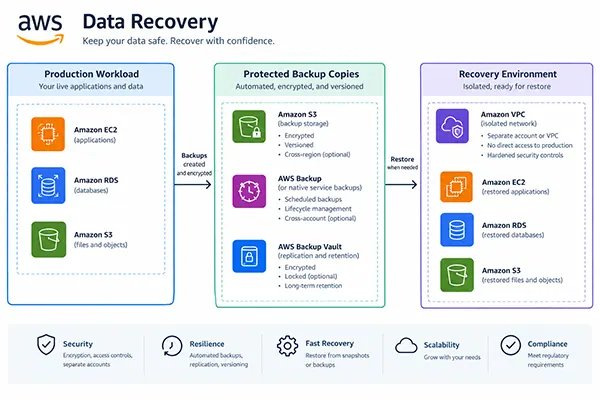
All your problems arise when you lose your data, which leads to delayed operations and reduced customer accessibility. But AWS data recovery can eventually help your business to provide restoring lost data, retrieve damaged versions, and bring failed systems online.
AWS has different tools, including backups, S3 Versioning, disaster recovery, and snapshots. All have different usage purposes for securing your business system completely.
Single cloud storage is not a robust recovery option. Outdated backups, failed settings, and account security increase the risk every time.
Your business needs a system where the problems related to all security instructions are followed strictly, and your important data is protected, with minimal interaction with the outside environment for further failures.
Quick Answer: A practical AWS recovery plan contains a backup, a secure copy, recorded restore actions, and routine testing features. Establish recovery point objectives (RPO) and recovery time objectives (RTO), then go to the services that meet your preference.
Recovery Starts With Two Business Targets
First, you select the AWS services, then you should decide how much data your business can afford to lose and how long the system can operate without any protection.
The Recovery Point Objective (RPO) is the permitted data loss with respect to time. The Recovery Time Objective (RTO) defines the permitted time to recover within the timeframe.
Let’s understand with an example: an online store requires to check out restored data in one hour while limiting lost transactions to five minutes. A reporting system can accept more hurdles during processing time.
This ultimately focuses on ensuring the required business operations go smoothly and cannot be made to follow predefined rules. Your security level defines what can be restored or at what level.
These are also shown in DataRecovee’s data loss recovery tactics, which can teach you how the plan actually works.
Build the Backup Path in Layers
The best AWS backup strategy deals with securing the credentials in different formats while managing the risks involved. It automates the backup plan for resources you control, but Amazon V3 Versioning allows you to retrieve previous data, and EBS and RDS provide restore features for the intensity and size of databases.
The direction of your backups depends upon how you manage them. The duplicates are stored in an outer environment separate from the main servers, with protected backup vaults. If access is lost or changed on the main servers, then critical data can be recovered from other duplicated reserves in separate storage.
Also required to take backup strategies to build a system from scratch. Keep noticing other features like infrastructure templates, application settings, network configurations, permissions, and encryption-key access procedures.
If your team cannot reconnect or decrypt, then it’s useless to back up the database. You have to follow the principles of the 3-2-1 backup guide, which shows the services and risks.
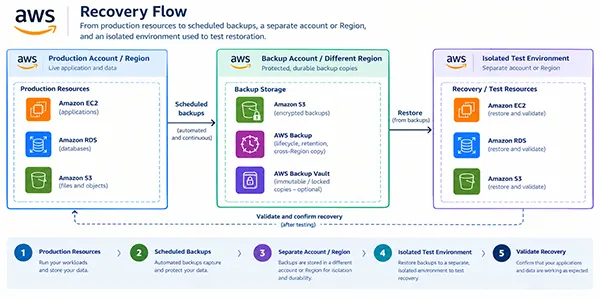
The backup health score tool can help you to backup steps that influence your system.
Replication Alone Does Not Solve Data Corruption
Replication makes several copies between datasets; it helps the server or location failure in visibility of your business online. This does not mean the recovery plan is the optimal point for recovery.
If you delete the file or an application from records, that change may affect other copies. This creates a situation where your business faces the same problem with different versions of files shared.
Wherever the old data requires a recovery plan, you should use stored replication with version history and kept backups. Also check your service’s settings and retention limits instead of assuming older versions will remain available.
Quick Insight:The last copy is not the right copy that you require. Sometimes the older versions after backup may be useful from a verified recovery plan.
Pick a Recovery Pattern That Fits the Deadline
You notice that recovery procedures are required for different failure options. If your document is deleted, then the response or failed database or whole environment is impacted accordingly.
| Methods followed | What’s present? | What gets in Exchange? |
| Backup and Restore | Saving copies so that you can recover it later securely. | Low cost and more time consumed to fix the issue. |
| Pilot Light | If an incident happens, the system covers the data under shutdown conditions | More time it takes to turn the system on in critical situations. |
| Warm Standby | When copy fails, then another line up the system. | Recovery is delivered quickly with cost unchanged. |
| Multi-Site Active/Active | More system control over the incident; if one goes down, another comes. | Features more than anything within seconds, but it’s the most expensive trade-off and difficult to handle. |
With repeated block-level replication, AWS Elastic Disaster Recovery helps to recover existing server workloads.
You should also understand that AWS documentation has recovery plans with time ranges of 5 to 20 minutes. It usually depends on operating system boot time, configuration, and application dependencies. This is not an optimal truth for every workload.
You can choose a plan that combines the RPO and RTO. If your business can tolerate a larger timeframe, then you do not need to pay for obtaining entire copies all along.
Restore the Right Thing, Not Everything
If your system fails to obtain a single file, then no need to require an entire system backup produces new issues.
AWS Backup has different restoration options for different resources, while Amazon S3 Versioning can help to recover old versions. Database recovery follows a different process, and it requires creating a new framework for recovery options.
Try this sequence that can help you:
- Recognize the affected portion: records, storage volumes, or services.
- Plan your recovery strategy with backup history, damage shown, or the timeframe in which recovery is complete.
- Select the restore items where possible instead of a full system restore, which requires more resources.
- Safe destination for teams to recognize the restored data securely before eliminating the production data.
- Check verified access before giving required permissions, data orders, and application activity.
If a suspicious incident affects the data, then secure the infected system so that no further losses occur. It can make the team’s efforts useless to restore the lost data or unauthorized access granted and the system compromised.
Give People a Way to Act
If you want healthy backups, then this cannot solve every problem. This can lead to the authority or an administration creating a barrier to access, emergency credentials may be unreachable, or network restrictions stop privileged teams from contacting the AWS account.
You should provide limited access to the team that approves a restore, performs the activity, and recovers it. Do not give administrative permission unless it is required.
Keep the account-recovery procedures and emergency instructions protected and limit their availability outside the environment where the restore team works.
Analyse the steps with a person who does not know the plan; if they fail to follow the instructions, then you need to change the runbook and perform again.
For example, a damaged network allowlist can block access even when the data remains intact. DataRecovee’s guide to fixing broken IP allowlists investigates this type of access problem.
Test the Restore Before There Is a Crisis
You notice that backup success status signifies that the job is done. This does not say that your business recovery data is usable.
This also results in files being incomplete, database permissions being wrong, or an application failing when it reconnects to a restored database. AWS Backup offers you restore-testing capabilities for the supported resources, helping your teams to assess recovery procedures and measure performance.
You should schedule tests at frequent gaps. Start with separate files or databases, then analyse the recovery of dependent applications. Record the time consumed for every step, during data processing, or when teams needed instructions.
Repeat the process when you find changes in infrastructure or application. Changed settings or a new database can impact your plan that was previously implemented.
Frequently Asked Questions
Does AWS Backup cover every AWS resource automatically?
Does cross-Region replication replace a backup?
No. Replication can copy unwanted changes to another location. Versioning and retained backups provide additional ways to recover earlier, clean data.
Can one AWS recovery plan cover files and databases?
Yes, one overall plan can cover both, but the restore procedures differ. Document the steps for S3 objects, RDS databases, storage volumes, servers, and dependent applications.
Related Posts
How Long Does Backing Up to iCloud Take? Causes and Fixes for Slow Backups
Is your iCloud backup taking ages? When your backup keeps spinning, it can be hard to tell whether it’s making…
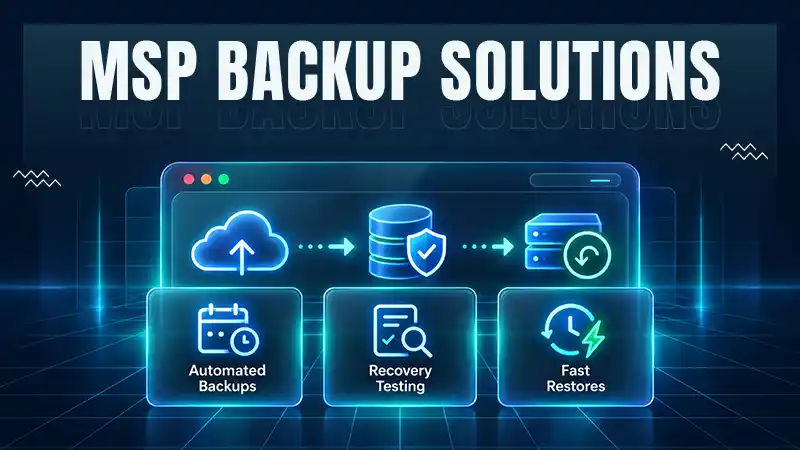
How MSPs Package Backup and Recovery as a Subscription That Actually Restores
An MSP technician checks nightly backup job results across several client accounts Some businesses often try to own a backup.…
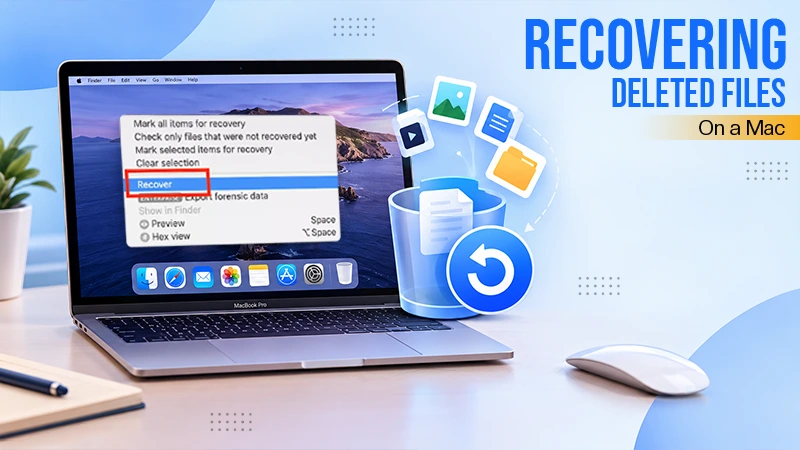
Best Tools for Recovering Deleted Files on a Mac
A wrong click can leave you sinking in grief and sorrow, just because that accidental click has deleted an important…

What to Back Up Before Migrating Your Business to New Software
Software migration hardly results in data loss during migration. It’s possible that you lose the data after a week or…

How Modern Enterprises Are Scaling Infrastructure with Custom AI
For many businesses, AI works as a collection of tiny experiments such as a chatbot, a coding assistant, or sometimes…

VMware vs. Sangfor aSV vs. Nutanix: Which Hypervisor Actually Saves You Money?
Selecting the right hypervisor isn’t simply an issue of technology; it could end up having a significant effect on your…

SD Card Corruption in IoT Devices: Why It Happens So Often and How to…
IoT devices can have good sensors, robust software, and an excellent housing, but all it takes is one small thing…

5 Best SaaS Platforms for Financial Services and Growing Businesses in 2026
In 2026, SaaS platforms have become essential for businesses that want to build smooth processes, automate routine tasks and clarify…

How Digital Records Support Workplace Injury Claims
An injury in the workplace does not necessarily mean that you have just a physical problem to overcome. It could…