
Most GPS trackers collect timestamps, speed, direction and may also sense things like temperature and battery level.
GPS Tracking Data: How Location Devices Capture, Store, and Protect It
 Written by Saipansab Nadaf

The moment we hear about GPS, we instantly imagine a dot moving on the map. We have accepted that it works that way only. However, in the background, a long and continuous process is underway to make that dot possible.
Whether it is a car tracking or monitoring a person, the system captures every location, stores it, transmits it and keeps it protected. Along the way, the data moves from networks to the system through a complex process.
To know how location devices capture, store and protect, read this post about GPS tracking data.
Key Takeaways
- A GPS tracker not just shows location but also keeps generating data related to speed, device ID and more.
- Local buffering is a smart process that helps to fix lags by storing records and updating them when connectivity is restored.
- Better security practices, such as encryption and access controls, hold the same value as fine tracking.
Where the Data Comes From
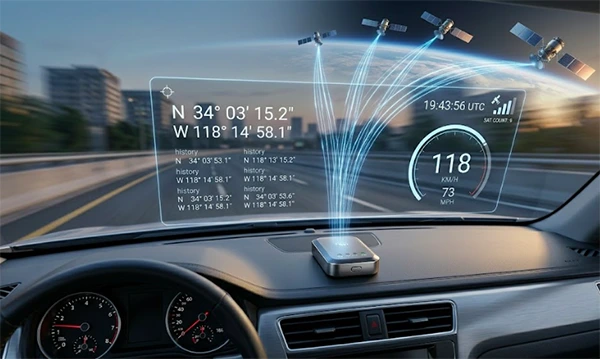
A GPS tracker computes its position by reading signals from multiple satellites and solving for latitude, longitude, and often altitude. But a single coordinate is seldom the whole record. A typical data point, sometimes called a “ping” or “breadcrumb,” packets together several fields:
- Latitude and longitude
- A precise timestamp
- Speed and heading
- Signal quality or number of satellites in view
- Device or asset ID
- Sometimes sensor data such as ignition status, temperature, or battery level
Every few seconds or minutes, the device sets up one of these records. Over a day, a single active tracker can build thousands of them. Across a fleet, that grows into millions of rows quickly.
How the Data Gets From Device to Dashboard
Once a record is prepared, it has to travel. Most cellular trackers transmit data over mobile networks using simple protocols designed for small, steady messages rather than heavy web traffic.
The journey usually looks like this:
- The device saves a location record.
- It routes the record over the cellular network to a backend server.
- The server parses the incoming message, confirms it, and writes it to a database.
- An application layer queries that database to render maps, reports, and alerts.
When connectivity drops, well-designed trackers do not simply dump data. They store records locally in onboard memory and send them in a batch once the connection returns. This buffering is why a vehicle can pass through a tunnel or a dead zone and still produce an unbroken route history afterward.
Where the Data Lives, and Why Storage Design Matters

GPS data is time-series data: a nonstop sequence of records ordered by timestamp. That has real consequences for how it should be stored.
Location databases tend to grow fast and stay write-heavy, since new points show up constantly. Teams managing this data typically think about:
- Retention policies: How long do you keep raw, second-by-second clues versus summarized trip data? Many systems keep high-resolution data for a short window and roll older records into brief summaries.
- Indexing: Queries are almost always “show me this device between these two times,” so indexing on device ID and timestamp keeps performance fair as tables grow.
- Backups: Because the data is always changing, regular, tested backups are essential. A crashed location database can mean losing route history, compliance records, or proof-of-service data that a business depends on.
When Location Data is Lost or Corrupted
This is where many teams learn the hard way that GPS data is just as risky as any other dataset. Common failure points include:
- A failing storage drive on the server holding the location database
- Database corruption after an unexpected break or power loss
- Accidental deletion of historical records during maintenance
- A device’s onboard memory failing before the buffered data could be uploaded
The risks are not trivial. Fleet operators may rely on historical GPS data for fuel reporting, driver security, insurance claims, or regulatory compliance. Losing months of route history can mean losing the information behind those records entirely.
This is why anyone storing major volumes of tracking data should treat it like the business-critical asset it is: spare storage, scheduled backups, and a clear recovery plan for when a drive fails or a database becomes distorted. The recovery strategy you would apply to any important database would be to validate backups, keeping copies in more than one place. And having tools ready to cure corruption applies just as much to a location data store as it does to email or financial records.
Protecting GPS Data from the Start
Beyond recovery, location data must undergo the same security discipline as any sensitive dataset. It shows where people and assets go, so the basics matter: encrypt data in transit and at rest, control who can query historical records, and apply memory limits so you are not holding more sensitive travel data than you actually need.
Also, explore how to share your location from an iPhone to android phone.
The Takeaway
At the end of the day, the value of a GPS tracker extends far beyond simply knowing the current location of something. The things to actually consider are the way it collects data every second and shares it with the right person with full protection.
Businesses that consider it not just as a location tracking feature, but as a crucial asset for them, are truly much better prepared to avoid loss of data. Above this, it helps to make better decisions while ensuring accuracy.
Frequently Asked Questions
What information does a GPS tracker collect?
When a GPS tracker loses network connectivity, what happens?
There might come a glitch because the information is automatically uploaded once the connectivity is back.
Is GPS tracking data important to secure?
Yes, the location data can show movements, share operational activity and locations of the assets.
Related Posts
How to Protect Business Data From Unwanted Scrapers
Scrapers are a well-known problem for businesses; protecting private records, discouraging unwanted bulk copying, and preserving access are topics one…
Your Email is Data Too: Testing AI Tools That Work Without an Account
People who read about data recovery are most likely to think hard about the place where the files can go.…

UX Design Firm or Full Product Partner: Who Owns the Outcome?
The ownership argument between both kinds of suppliers never ends. The sentence costs nothing to say, but blindly trusting that…

What is BitLocker and How Does It Work?
A stolen laptop can expose far more than the device itself. Your documents, work files, photos, and personal information may…

Beyond the Checkout: 5 Best High-Risk Merchant Account Providers for Online Businesses
Even with polished checkouts, online stores can still have trouble getting secure, suitable payments. The process is more complex than…

The 8 Best Automated Accessibility Testing Tools for Websites
Great copy and sharp design don’t prove that your website is accessible. It’s things like colour contrast, missing alt text,…

Cybersecurity Training for Beginners: 4 Practical Options Compared
Starting in cybersecurity is confusing because most beginner options look similar on the surface. Some are compact awareness courses, some…
The Ultimate Guide to Electronic Signatures for Businesses 2026
Electronic signatures are making modern workflows more convenient and time-saving. This guide to electronic signatures will let you know how…

How Email Authentication Fits Into a Layered Cybersecurity Strategy
One convincing email can be sufficient to pose major problems regarding security for a business. An email that appears to…