


A SATA drive is any storage device that uses the SATA interface to connect to a computer. This can include both traditional hard disk drives and solid-state drives.
What is a SATA Hard Drive? Meaning, Uses, and How it Works
If you have ever upgraded a PC, checked your laptop, or searched for a new hard drive, you have probably seen the term SATA. But what is the meaning of SATA?
Many people think SATA is a type of drive, but it is actually the connection that links storage devices to the motherboard. It is commonly used in both hard disk drives and SSDs.
SATA hard drives are still widely used because they offer large storage capacity at a lower price. This blog covers everything you need to know about SATA hard disks and their relevance today.
Key Takeaways
- SATA is the standard connection used for HDDs, SSDs, and other storage devices.
- SATA hard drives are affordable, widely compatible, and available in large capacities.
- A SATA HDD uses spinning platters, while a SATA SSD uses flash memory with no moving parts.
- Newer technology like NVMe is faster, but SATA drives still provide excellent value for everyday use.
What Does SATA Stand For?
SATA stands for Serial Advanced Technology Attachment, also known as Serial ATA. It is the connection standard used to link storage devices like hard drives, SSDs, and DVD drives to a computer’s motherboard.
SATA replaced the older Parallel ATA or PATA standard because it offered faster data transfer, smaller cables, and better airflow inside a PC case.
Unlike PATA, which transfers data in parallel, SATA uses serial communication. This makes it more efficient and reduces signal interference. That is why the SATA quickly became the standard storage connection for desktops and laptops.
What is a SATA Hard Drive?
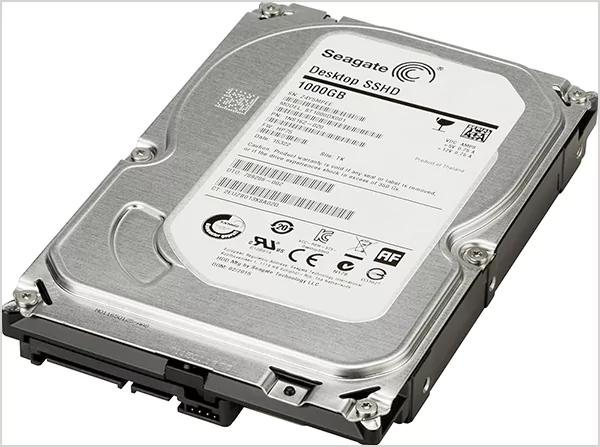
An HDD SATA drive is any storage drive that uses the SATA interface to connect to a computer. Most of the time, the term refers to a traditional hard disk drive (HDD) with spinning disks inside.
However, SSDs can also use SATA, which is why you may hear terms like SATA HDD and SATA SSD. SATA hard disk drives are widely used in desktops, laptops, gaming PCs, external drives, and office systems because they offer large storage capacities at a lower cost than newer technologies.
SATA drives are popular for compatibility because most motherboards have SATA ports, so upgrading or replacing a drive is usually simple.
How Does a SATA HDD Work?
A SATA HDD stores data on spinning magnetic platters inside the drive. When you save, open, or move a file, a read/write head moves across these platters to find the data.
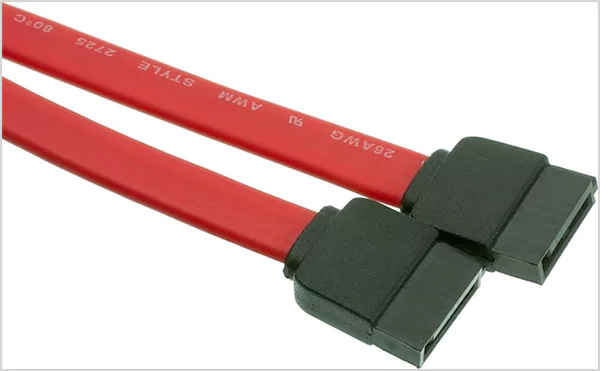
The SATA connection works like a bridge between the drive and the motherboard, transferring data through a cable. Most SATA hard drives use two cables. One to connect the drive to the motherboard and another to connect the drive to the power supply.
Compared to older PATA ribbon cables, SATA cables are much smaller and thinner. This improves airflow, keeps the inside of the PC cleaner, and makes cable management easier.
Over time, SATA has evolved into different versions. SATA I (up to 150 MB/s), SATA II (Up to 300 MB/s), and SATA III (up to 600 MB/s).
What are the Common Uses of SATA Hard Drives?
SATA hard drives are mainly used when large storage matters more than ultra-fast speed. You will commonly find them in desktop PCs, older laptops, office computers, CCTV systems, and external hard drives.
People use them for storing photos, videos, movies, games, documents, and backups. They are also often used as secondary drives. A common setup is to use an SSD for the operating system and apps, while a SATA HDD handles larger files and media.
This gives users faster everyday performance without giving up on storage space. Even though newer technologies like Non-Volatile Memory Express are much faster, HDDs still offer strong value for users who need affordable and reliable storage.
What is the Difference Between SATA HDD and SATA SSD?
A SATA HDD uses spinning platters and moving parts to store data. A SATA SSD uses flash memory and has no moving parts. That single difference changes everything.
SSDs are faster, quieter, more durable, and better for boot times and app loading. HDDs are cheaper and better for storing large amounts of data.
In real-world use, an SSD can be three to five times faster than an HDD, even though both use the same SATA connection. Durability is another big difference. Since HDDs have moving parts, they are more likely to get damaged by drops, vibrations, or wear over time.
Pros and Cons of SATA Drives
To help you make an informed decision, here’s a quick look at the advantages and limitations of SATA HDDs:
Pros
- More affordable than SSDs and NVMe drives
- Easy to install on most devices
- Good for backups, media storage, and large files
- Compatible with older and newer SATA versions
- Recovery is usually easier compared to SSD data recovery
Cons
- Slower than SSDs
- Can be noisy because of spinning parts
- More vulnerable to drops and physical damage
- Uses more power than SSDs
- Limited by SATA speed compared to NVMe drives
Final Thoughts
SATA HDDs are still relevant because they offer simple and affordable storage. SATA III can reach speeds of up to 6 Gbits/s, but newer storage options are much faster.
Still, if your priority is storage space instead of top-tier speed, SATA hard drives remain a practical choice. The right choice comes down to what matters most to you: speed, storage space, or budget.
Frequently Asked Questions
What is a SATA drive?
What is a SATA solid-state drive?
A SATA solid state drive is an SSD that uses the SATA connection standard. It uses flash memory instead of spinning disks, which makes it faster than a SATA HDD.
Is a SATA hard disk still worth buying?
Yes, a SATA hard disk is still worth buying if you need affordable, high-capacity storage for files, backups, media, or games.
What are SATA I, SATA II, and SATA III?
SATA I, SATA II, and SATA III are different generations of the SATA interface. They offer theoretical speeds of 1.5 Gbit/s, 3 Gbit/s, and 6 Gbit/s, respectively.
Is a SATA disk drive better than an SSD?
SSDs are much faster, quieter, and more durable. However, SATA disk drives are usually cheaper and offer more value for money.
Related Posts
Best Tools for Recovering Deleted Files on a Mac
A wrong click can leave you sinking in grief and sorrow, just because that accidental click has deleted an important…

What to Back Up Before Migrating Your Business to New Software
Software migration hardly results in data loss during migration. It’s possible that you lose the data after a week or…

How Modern Enterprises Are Scaling Infrastructure with Custom AI
For many businesses, AI works as a collection of tiny experiments such as a chatbot, a coding assistant, or sometimes…
VMware vs. Sangfor aSV vs. Nutanix: Which Hypervisor Actually Saves You Money?
Selecting the right hypervisor isn’t simply an issue of technology; it could end up having a significant effect on your…

SD Card Corruption in IoT Devices: Why It Happens So Often and How to…
IoT devices can have good sensors, robust software, and an excellent housing, but all it takes is one small thing…

5 Best SaaS Platforms for Financial Services and Growing Businesses in 2026
In 2026, SaaS platforms have become essential for businesses that want to build smooth processes, automate routine tasks and clarify…

How Digital Records Support Workplace Injury Claims
An injury in the workplace does not necessarily mean that you have just a physical problem to overcome. It could…

What Happens When Your Office Emergency Plan Is a Drawer?
An office emergency plan should not end with the first aid box sitting in the last drawer. All employees should…

How Data Recovery and Recordkeeping Failures Cost Businesses More Than They Realize
Most businesses file data recovery issues and recordkeeping gaps under different headings, treating one as an IT problem and the…