
It is a Windows system process that runs and manages essential background services needed for your PC.
What is svchost.exe? A Simple Guide to the Service Host in Windows
 Kartik Wadhwa
Updated on: Apr 21, 2026
Table of Contents
If you open Task Manager and notice multiple svchost.exe processes running, it may look confusing at first. But what is a svchost?
Many users assume it is a virus or a problem because it often appears to use memory and CPU in the background. In reality, svchost is a genuine Windows process that helps run important system services needed for your computer to work properly.
However, unusually high resource usage can sometimes signal an issue. Understanding “What is svchost.exe?” and how it works helps you know when it is normal and when it may need attention.
TL;DR
- svchost.exe is a core Windows process that runs crucial background system services.
- Multiple svchost processes are normal because Windows separates services for better stability and security.
- High CPU usage usually means one of the hosted services is malfunctioning, not svchost.exe itself.
- Common fixes include restarting your PC, scanning for viruses, updating Windows, and checking the Task Manager for problematic services.
What is svchost.exe?
svchost.exe, also known as Service Host, is an important Windows system process that helps run many background services your computer needs every day. These services handle tasks like Windows updates, internet connectivity, firewall protection, Bluetooth, and other core system functions.
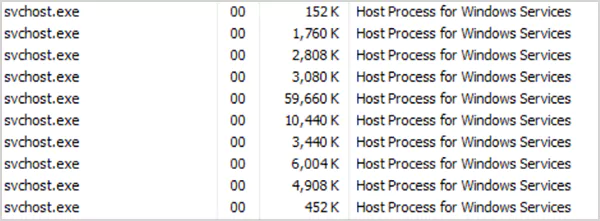
Since many Windows services cannot start on their own, Windows uses svchost.exe to launch and manage them properly in the background.
In simple terms, svchost exe svchost acts like a manager that keeps essential Windows services running smoothly. Without it, many built-in features would stop working properly, causing issues such as Windows Update errors.
Why are Multiple svchost.exe Processes Running?
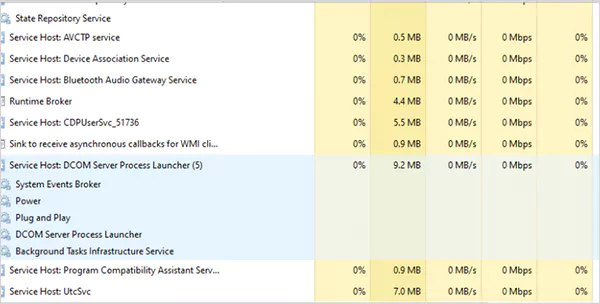
Seeing multiple svchost.exe processes in Task Manager is completely normal, especially on modern Windows systems.
Newer versions, such as Windows 10 and Windows 11, separate services into different Service Host processes rather than grouping everything. This helps improve system stability, security, and troubleshooting.
Having multiple svchost processes allows Windows to:
- Isolate services so one crash does not affect others.
- Improve security between background tasks.
- Make it easier to identify faulty services.
- Track CPU and memory usage more accurately.
Each svchost.exe process may handle one or more services such as network, tasks, updates, or printer support. However, if a specific process is using high CPU or memory, it may indicate a faulty service or a possible malware issue.
svchost.exe: What Does it do?
So, what is servicehost.exe? You know the basics now. The main job is to host and run services that operate from DLL files. But how does it work?
Unlike normal apps, DLL-based services cannot launch by themselves. So Windows uses svchost.exe to start them and keep them running. So, these processes act like a bridge between Windows and the background services.
It ensures those services start properly, stay active, and communicate with the operating system when needed.
Is svchost.exe Safe or Harmful?
The real svchost.exe is completely safe. It is a legitimate Windows process and an essential part of the operating system. However, some malware programs use the same name to trick users and hide from detection.
A genuine svchost file should usually be located inside “C:\Windows\System32”. If you find it running from any other random folder, it should be checked immediately.
In short, only the real svchost exe svchost in System32 is safe. So while it is harmless, fake copies can be dangerous.
How to Check if svchost.exe is a Virus?
If you think svchost may be infected or fake, the easiest way to verify it is by checking its file location. Here’s how:
- Open Task Manager.
- Find svchost.exe in the list.
- Right-click on it.
- Now just select Open file location.
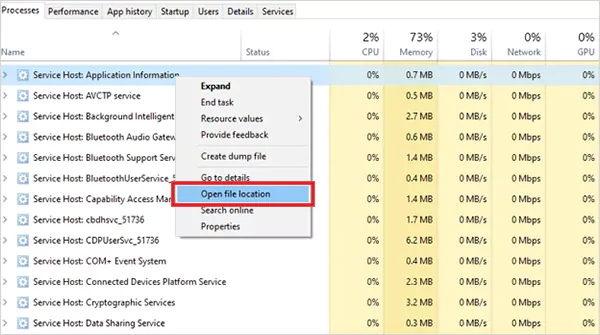
If the file is not located inside C:\Windows\System32, it may cause trouble. Other signs of a fake process include:
- Extremely high CPU or memory usage.
- Strange network activity.
- Frequent pop-ups or crashes.
- Antivirus is getting disabled automatically.
If anything seems unusual, run a full antivirus or malware scan immediately.
Why Does svchost.exe Use High CPU or Memory?
Normally, svchost uses very little CPU or memory. But if one of the services inside it starts having problems, resource usage can spike.
This usually happens because of the service running under svchost.exe. Not the process itself. Common reasons include:
- Windows update is running in the background.
- Corrupted system files.
- Broken Windows services.
- Malware infection.
- Too many startup or background programs.
In most cases, high usage means one hosted service is malfunctioning and needs troubleshooting.
How to Fix svchost.exe Performance Issues?
If svchost.exe is slowing down your PC, do not end the process immediately. Instead, find the service causing the issue first. Try the following fixes:
- Restart Your PC: A simple reboot of your computer can fix temporary bugs or stuck background services.
- Run a Virus Scan: Malware disguised as svchost exe svchost can cause abnormal memory usage. So, just run a scan to find and fix the issue.
- Update Windows: Broken or pending updates often create Service Host issues.
- Check Task Manager: Expand the svchost process to see which service is using resources.
- Disable Problematic Services: If one service keeps causing issues, you can stop or disable it after identifying it.
These steps usually solve most performance issues caused by the Service Host on Windows.
Conclusion
Svchost.exe is one of the most important Windows processes that manages many important background services your computer depends on. While seeing multiple processes is completely normal, unusually high CPU or memory usage may indicate an issue.
Understanding what is svchost.exe and how it works is important to troubleshoot problems faster and avoid unnecessary panic when you see it running in Task Manager.
Frequently Asked Questions
What is svchost.exe?
Is svchost.exe necessary for Windows?
Yes, it is an essential process that helps run many important background services required for the operating system to function properly.
Why is svchost slowing down my PC?
High resource usage usually happens because the hosted services are malfunctioning, Windows Update is active, or malware is involved.
How to know if svchost.exe is infected?
You can check if it is infected by verifying its file location, as the real file should be stored in the Windows System32 folder.
Is it safe to disable svchost?
It is not recommended unless you know exactly which service is causing the problem. Ending the wrong process may disrupt important Windows functions.
Related Posts

8 Best AI Presentation Makers for Business-Ready Slides
Making a presentation doesn’t just mean designing slides. It’s about defining a clear structure, using defined logic, useful visuals, and…

Queue Management Software Troubleshooting Guide: 8 Common Faults and Fixes
The long wait times and ineffective management of customer queues can have a significant impact on customer satisfaction and business…

How to Use Similarweb Website Traffic Data for Competitor Research
Competitor research without traffic data is guesswork. You can guess who your rivals are, guess how big they are, guess…

Choosing the Right Hosting Model for Scalable Digital Platforms
The performance of digital business is directly related to website speed, uptime, and scalability. Slow page performance has a negative…

How Data-Driven Performance Tools Are Transforming Employee Recognition in Tech Companies
“People work for money but go the extra mile for recognition, praise, and rewards.” — Dale Carnegie (Writer & Teacher)…

Why Businesses Struggle to Collect Reliable Data from the Web
Almost every company that depends on data runs into the same problem: although they can find the data they need,…

Why Financial Data Recovery Matters for Businesses
Financial data supports every part of a business, directly affecting cash flow, payroll, tax reports, audits, customer billing, and daily…

CMMC Compliance Is Coming for Manufacturers. Here Is What You Need to Do
“Cybersecurity is much more than a matter of IT.” — Stephane Nappo (Cybersecurity Professional) For manufacturers working within the defense…

How Data-Based Tools Influence Learning Performance
Learning has transformed in the modern age with the integration of new technologies to help students and professionals prosper in…